Fusion Unreal Intro
Overview
Photon Fusion Unreal is a scalable multiplayer networking SDK for Unreal Engine 5.4 and up. It provides room-based matchmaking, automatic property replication with late-join snapshots, custom RPCs with shared-authority targeting, interest management, and Forecast — our distributed physics prediction module that integrates directly with Unreal's Chaos Physics.
Fusion runs on the Photon Cloud, the same battle-tested infrastructure that powers thousands of live titles. You do not provision or maintain any servers. Photon handles hosting, scaling, and global region routing. Pricing is CCU-based with a free tier for development — see Pricing for plans and details.
Fusion is serverless in the sense that no Unreal Engine instance acts as the server, but it is not peer-to-peer either. Each play session lives in a Room — a stateful service on the Photon Cloud that holds the shared room-wide state and replicates property updates and RPCs to the relevant clients. Gameplay simulation runs on the clients themselves, under a shared-authority model described in the next section.
How Fusion Differs from Built-in Unreal Netcode
Built-in Unreal Netcode runs a client-server model under one of two topologies: a dedicated server (a headless Unreal build on third-party infrastructure) or a listen server (a regular client that also hosts the match). In both, a single instance holds ROLE_Authority for the entire world; every other client runs ROLE_AutonomousProxy for the pawn it controls or ROLE_SimulatedProxy for everything else. AGameMode exists only on the authority, and RPCs route through it via Server, Client, and NetMulticast markup.
Fusion Unreal replaces that single trust anchor with shared authority. Every replicated actor has an owner, and that owner — a regular game client — is the local authority for that actor. There is no single ROLE_Authority for the world. The Room on the Photon Cloud holds the shared state and replicates updates to the relevant clients, but it does not simulate gameplay.
One client per Room is elected as the Master Client. The Master Client is not a server — it has no extra simulation power — but it owns room-wide decisions like map changes and GameState updates. If the Master Client leaves the Room, Photon promotes another client automatically. See Game Classes for the practical implications.
Each option fits a different shape of game. Dedicated servers offer the strongest cheat resistance but carry premium per-match hosting and significant operational overhead — orchestration, monitoring, regional rollout — usually justified only for competitive titles. Listen servers save the hosting bill, but the host player's machine becomes the single point of failure: latency, uptime, and regional reach are whatever the host has, and a disconnect, crash, or app backgrounding ends the session for everyone. Shared authority pays neither cost — the Photon Cloud handles 21+ regions, DDoS protection, and uptime SLAs, while per-session running cost stays low enough to ship free-to-play. The trade is cheat tolerance: clients write their own state, so ranked competitive PvP still wants a dedicated server, while co-op, casual, party, sandbox, social, persistent worlds, mobile, web, and XR are where shared authority shines.
| Fusion | Host | Dedicated | |
|---|---|---|---|
| F2P, Mobile, XR, Web | Cross anything | PC/Console only | Cross anything |
| Cost | Low + scalable | "Free" Steam, EOS | Premium 10x–50x |
| Operations | Simple | Relay, mm?, SLA? | Advanced |
| Authority | Distributed, server-code | Uncontrollable client | Server sim |
| Host migration | Not necessary | Host loss ends session | Not necessary |
| Quality of Service (QoS) | 21+ regions, DDoS, SLA | Uncontrollable | Orchestration |
Engine-first Integration
Fusion Unreal ships as an Unreal Plugin. Drop it into a project's Plugins/ folder, regenerate project files, and start developing. No engine fork, no custom toolchain.
Existing Unreal replication semantics carry over for the common cases. A property marked Replicated or ReplicatedUsing=OnRep_X replicates through Fusion with the behavior you already know. The full list of UPROPERTY conditions and lifetime flags that Fusion honors is covered in the Manual.
C++
UPROPERTY(ReplicatedUsing = OnRep_Health)
int32 Health = 100;

UFUNCTION()
void OnRep_Health();
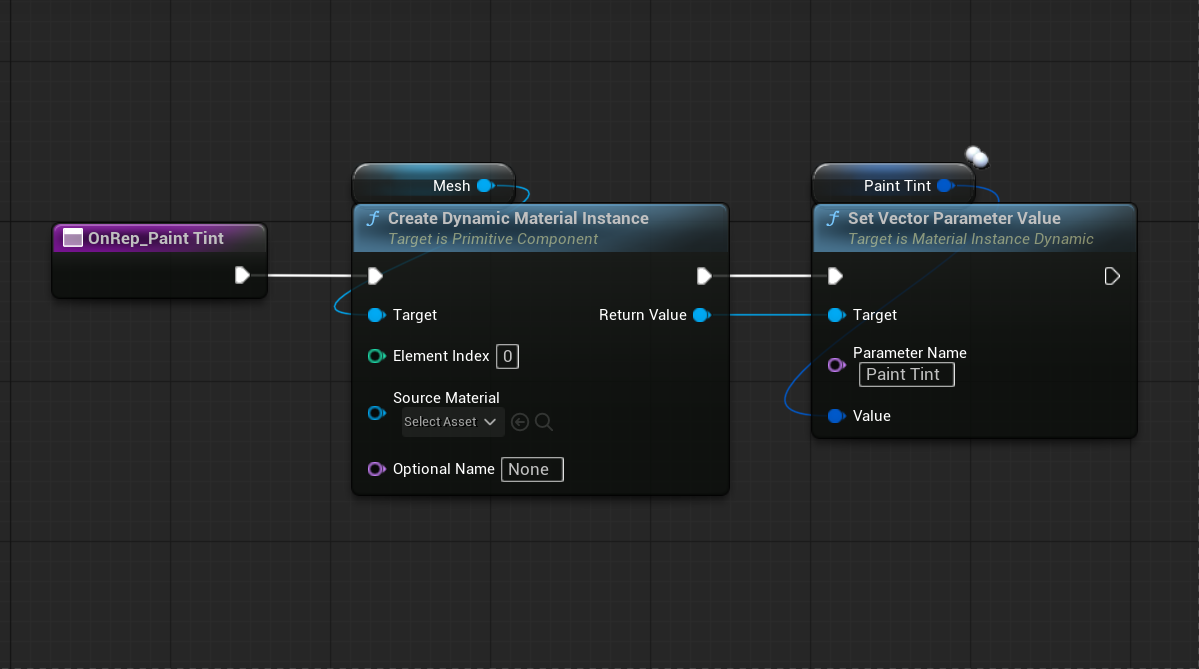
There are no special base classes. Replicated actors, components, and properties can be defined in C++ or in Blueprints. Gameplay code runs from the usual UE Tick() in both C++ and BP. The vast majority of Unreal Engine features work as-is.
The one place Fusion intentionally diverges is in RPC targeting. Because there is no canonical server, and because ownership is per-actor and can change at runtime, the built-in three (Server, Client, NetMulticast) do not map cleanly onto a shared-authority world. Fusion adds explicit target options — Owner, Master Client, All, and Everyone Else — exposed as custom Blueprint nodes and a SEND_FUSIONRPC macro in C++. The built-in RPC nodes still compile, with documented behavior described in RPC Basics.
Forecast: Physics Prediction
Fusion Unreal ships with Forecast, a distributed physics prediction module that integrates directly with Unreal's Chaos Physics. Replicated actors with Simulate Physics enabled are predicted locally on every client and gently corrected when the next authoritative update arrives. Motion stays smooth at render rate even when network updates come at 20–30 Hz.

Forecast engages automatically for replicated actors with Simulate Physics on. ACharacter-derived actors rely on Unreal's built-in character networking; other replicated properties update without interpolation. Per-actor Forecast tuning — spring, damping, error and extrapolation thresholds — sits under the Fusion|Forecast Physics category on the Fusion Actor Component, with defaults well suited to interactive props and vehicles.
Where to Go Next


Last updated on
Back to top