Spawning
In single-player, instantiating a scene creates a local node. In multiplayer, the same operation must create that node on every connected client and assign it a network identity so the replication system can track it. This is what networked spawning does - it turns a local scene instantiation into a coordinated event across all peers.
Despawning is the reverse: it removes the object from every client and frees its network identity. Late-joining clients automatically receive the current set of spawned objects when they enter the room.
Setup
FusionSpawner acts as a networked factory that creates and destroys objects across all clients. Add a FusionSpawner node to your scene and register spawnable scenes:
GDScript
const PlayerScene = preload("res://player.tscn")
const ProjectileScene = preload("res://projectile.tscn")

@onready var spawner = $FusionSpawner

func _ready():
    spawner.add_spawnable_scene(PlayerScene)
    spawner.add_spawnable_scene(ProjectileScene)
    spawner.spawned.connect(func(n): print("Spawned: ", n.name))
    spawner.despawned.connect(func(n): print("Despawned: ", n.name))
Set spawn_path to the parent node for spawned objects (default: spawner's parent).
All clients must register the same spawnable scenes in the same order.
Spawn and Despawn
Call spawn() to create a networked instance and despawn() to remove it from all clients.
GDScript
# Spawn first registered scene
var player = spawner.spawn()
player.position = Vector2(100, 200)

# Spawn a specific registered scene
var projectile = spawner.spawn(ProjectileScene)

# Despawn
spawner.despawn(player)
Set properties on the returned node after spawning. Replicated properties (configured in FusionReplicationConfig) will be included in the next network update.
Scene Structure
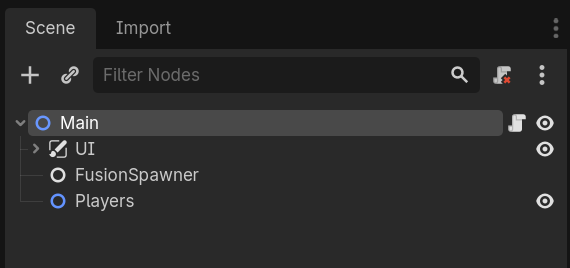
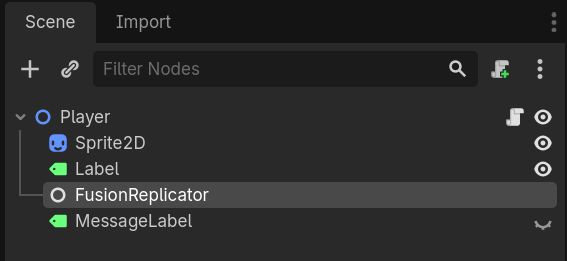
A typical game scene has a FusionSpawner alongside any game logic, while each spawnable scene has its own replicator (FusionSharedReplicator or FusionServerReplicator depending on topology) as a child of the root node.
Properties
These properties configure where spawned objects are placed in the tree and which scenes are available.
spawn_path(NodePath,"..") - parent for spawned objectsspawnable_scenes(Array[PackedScene]) - registered spawnable scenes
Signals
FusionSpawner emits signals when objects are created or destroyed, on all clients.
spawned(node: Node)- object spawned (local or remote)despawned(node: Node)- object despawned
Per-replicator spawned
The replicator also emits its own spawned() signal, complementing the spawner's. Connect on the replicator node itself when the handler needs to react as the replicator (for example, from a script attached to the replicated root) rather than from the spawner's parent.
- For dynamic spawns, it fires per-replicator immediately after the node enters the tree and
_readyhas run - on both the spawning peer and remote peers, and for sub-objects as well as roots. - For replicators loaded as part of a registered scene (via
register_current_scene()orload_scene()), emission is deferred until the scene is in the tree and every replicator belonging to that scene's map has finished binding. Sibling replicators are guaranteed to be reachable from the callback.
Sub-Objects
Sub-objects are dynamic children attached to a spawned root that get their own sync buffer. They share the root's authority - the same client owns both parent and sub-object.
To spawn sub-objects, add a FusionSpawner as a child of a spawned scene and switch it to sub-spawner mode. There are two ways:
- Inspector (recommended): tick Spawn As Sub Object on the FusionSpawner. On
_ready, the spawner walks up its ancestors, finds the nearest replicator sibling, and binds to it. - Code: call
bind_root_replicator(replicator)explicitly with the specific replicator you want to bind to.
Either way, the spawner's spawn() calls now create sub-objects instead of root objects. Placing a FusionSpawner under a node with a replicator does not auto-convert it - you must opt in.
GDScript
# In the spawned scene's script:
const TurretScene = preload("res://turret.tscn")

@onready var sub_spawner: FusionSpawner = $SubSpawner

func _ready():
    sub_spawner.add_spawnable_scene(TurretScene)
    sub_spawner.bind_root_replicator(get_node("FusionSharedReplicator"))  # or "FusionServerReplicator" in Client-Server

func spawn_turret():
    var turret = sub_spawner.spawn(TurretScene)
    turret.position = Vector2(0, -20)
Sub-objects must have their own replicator.
Sub-objects cannot have independent authority. Ownership always follows the root object.
Despawning on Player Leave
Because the simulation server owns every player-controlled object, you must handle cleanup when a player disconnects. The Fusion.player_left(player_id, is_inactive) signal fires on every peer when someone leaves the room — the master client (simulation server) uses this to despawn the departed player's character.
GDScript
func _ready():
    Fusion.player_left.connect(_on_player_left)

func _on_player_left(player_id: int, is_inactive: bool):
    if not Fusion.is_master_client():
        return
    if is_inactive:
        # Player may rejoin within the room's player_ttl_ms window. Keep their
        # character alive; they will reclaim input authority if they come back.
        return
    var character = _characters_by_player.get(player_id)
    if character:
        spawner.despawn(character)
        _characters_by_player.erase(player_id)
In Shared-Authority, object despawn is driven by ownership modes instead — Player Attached objects auto-despawn when their owner disconnects, so you typically do not need to listen to player_left for cleanup there.
Last updated on
Back to top