Video Settings
Video Streaming Settings
When using the Video SDK, several video streaming parameters can be configured. This is done in the VideoStreamSender components, e.g. a TextureVideoStreamSender.
Changing them can increase/decrease the bandwidth consumption and impact the video quality.
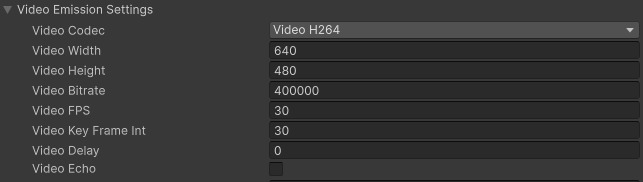
Video Codec: select the video codec used to encode/decode the video from the list (H264, VP8, etc.)
Video Width/Height: Streamed video resolution. The following video sizes are tested with PhotonVoice Video.
- 320x240
- 640x480
- 768x432
- 848x480
- 1024x576
- 1280x720
- 1920x1440
Please note that video is usually encoded by a hardware encoder. Each one imposes vendor-specific resolution constraints. A resolution that streams fine from one device can look garbled on the receiver when sent from another.
So always test the desired resolution on your target hardware.
Example measured on a Samsung Z Fold 8 (Qualcomm): the width must be a multiple of 64 but not of 512, and the height a multiple of 16. So 832x480 and 960x576 are clean, while 848x480 and 1024x576 are garbled. The very same resolutions all work on a Samsung A16 (Exynos).
- Video Bitrate: Stream bitrate. By default, Photon Cloud servers bandwidth limitation per stream depends on the infrastructure you are using:
- Gaming: 1 Mbit/s
- Industries: 2 Mbit/s
If you need more, please contact us at hello@photonengine.com.
Video FPS: Streamed video frames per second.
Video Key Frame Int: Keyframes interval in frames.
Video Delay: The delay in frames between
frameQueuewriter and reader. Originally designed for simple stream synchronization. InDeliveryMode.UnreliableUnsequencedPhoton transport mode, it helps to save late events. For FEC, it should be >= the FEC injection interval to fully utilize a FEC event belonging to different frames. A fragmented frame may have FEC events belonging to this frame only. As soon as the receiver finds a fragmented frame in the stream, it sets the actual delay to be at least 1 to ensure that all fragments have time to arrive.Video Echo: enable this option to receive the video stream sent by the local client.
Other Streaming Settings
Here are additional streaming options (VoiceCreateOptions and LocalVoice properties):
- Fragment: Set it to true to split large video frames into small packets sent independently by Photon transports. In unreliable mode, if some small packets are lost, the frame buffer is still passed to the decoder with 0s instead of lost data.
- Reliable: All packets are guaranteed to be delivered. May be used in combination with Fragment.
- FEC: if > 0, after the specified number of frames, a forward error correction packet is sent. Do not use with Reliable. Mostly useful in Fragment mode because it reduces losses of large packet fragments.
Multiple streams from the same camera
- Supported on Windows, Mac and WebGL.
- Create a 2nd video stream and specify the same camera name, but different bitrate.
- On Windows and Mac, different resolutions are also supported. The high-res video stream must be created before the low-res one to avoid camera initialization with a lower resolution.