What's New
Quantum SDK 3.1 complements the Quantum 3 generation with more stable physics, performance and scalability improvements.
New Physics Solver
Quantum Physics is becoming stateful and now comes with a Projected Gauss-Seidel solver with warm-start (you can still select the legacy solvers if you want to keep the old behavior).
This new solver makes use of time coherence to improve on two main aspects relative to solvers used in previous versions:
- Better stacking: able to handle more complex systems of constraints like stacks of objects and compound joints (e.g. ragdolls) by converging towards a suitable solution across multiple frames.
- Less overshooting: iterations are no longer agnostic to each other and can correct intermediary overshooting, leading to more correct solutions.
Stacks of objects in the new PGS Solver:
Previous version solver (HGS) in the same scenario:
3D Ragdolls and Character Joint
Quantum 3.1 adds a new CharacterJoint3D type, useful for creating ragdolls and ball-and-socket constraints. It attaches a physics body to an anchor around which it can rotate, optionally limited by twist and swing angles. It can be configured via the PhysicsJoint3D component prototype.
Building on top of it, the new QuantumRagdoll Unity component is a wizard-like tool that helps creating ragdolls and updates their view elements based on the simulation state:
- Automatic baking: bakes the limbs, head, chest and hips from an
Animatorcomponent reference. - Gizmo handles: edit the ragdoll setup directly in the scene view.
- Asymmetric ragdolls: override the baked properties of individual limbs, head, chest and hips.
- Physics material: assign a
PhysicsMaterialto all limb colliders at once.
A template ragdoll can be created by right-clicking in the Hierarchy > Quantum > 3D > Ragdoll Entity.
Together with the new PGS solver and the improved 2D and 3D joint position solvers, complex joint systems like ragdolls are now much more stable.

LUT-less Math
The fixed-point math no longer uses lookup tables. Sqrt, trig, exp, log, asin and acos are calculated directly, so there are no LUT assets to load in Unity, the console runner, the spectator or on the server. Results are more accurate (most trig, exp and log functions are now within one or two raw units) and the math compiles with Burst. Vector, quaternion and matrix math was also tuned so IL2CPP inlines it.
Breaking: FPLut and QuantumLookupTables are obsolete. After upgrading, delete Photon/Quantum/Runtime/RuntimeAssets/LUT, QuantumLookupTables.cs and QuantumUser/Resources/QuantumLookupTables.asset. The LutProvider parameter, the LutFolder setting and the dotnet runner's LUT path argument are gone.
Exponential Decay interpolation mode for Entity Views
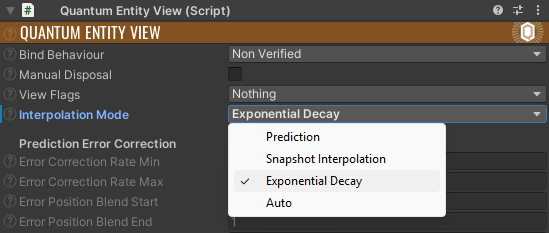
QuantumEntityView now supports a third interpolation mode, ExponentialDecay, which is the new default of the InterpolationMode dropdown. Prediction and SnapshotInterpolation are still available.
It's a lightweight, frame-rate-independent smoothing that exponentially eases the GameObject's Unity transform toward its target position and rotation each frame, rather than interpolating between fixed simulation snapshots. This makes it very cheap and visually smooth, while remaining well-behaved when transforms are written externally.
Entity View Transform History
View interpolation no longer requires two extra full frame copies each update. Instead, the QuantumEntityViewTransformHistory records only the transforms of the entity views that need them in a small per-tick buffer. It is accessible via QuantumEntityViewUpdater.TransformHistory and works with all interpolation modes.
As a result, QuantumGame.Frames.PredictedPrevious and PreviousUpdatePredicted are no longer separate frame copies by default and point to the Verified frame instead. Projects that read these frames directly can restore the old copies by setting QuantumGameFlags.IsLegacyFrameCopiesEnabled (or SessionRunner.Arguments.IsLegacyFrameCopiesEnabled).
DisableInterpolatableStates is obsolete and was replaced by IsLegacyFrameCopiesEnabled, which has the inverted meaning and is off by default.
Table Components
Until now, Quantum's ECS exclusively used sparse sets to store component values. Every component type had an associated sparse set (a kind of dictionary) linking entities to their component values.
Sparse set components can be added and removed quickly, but iterating several at once slows down when they store different entities in different orders. Typically, a filter can only sequentially access the first component's values; the rest require random lookups.
Quantum 3.1 adds another kind of component storage called tables. A table stores component arrays for all entities that have a specific combination of table components, and each entity in the table occupies the same "row" (index) in every "column" (array). Changing which table components an entity has requires moving it to a different table.
Table components flip the benefits around. They're faster to iterate, but slower to add and remove.
Components will continue to use sparse set storage by default. To use table storage, simply add the table keyword to a component's declaration in the DSL.
table component Health {
    FP Value;
}
You can mix and match both table and sparse set components in the same entities, so you can make the best of both worlds. That's it, API semantics work the same way as before, so no need to modify any code. Adding or removing table components while a filter is iterating the same entities is also safe and does not need to be deferred.
The built-in components (Transforms, Colliders, Bodies, etc) continue to use sparse set storage by default. The storage mode of any component, including the built-in ones, can be overridden without changing the DSL by adding an entry to SimulationConfig.Entities.ComponentTypeConfiguration and setting its Storage field to SparseSet or Table.
Optional Filter Components
Filters can now designate some of their components as optional. Entities missing an optional component are not skipped, instead NextUnsafe (or the filter struct) outputs null for that component pointer.
C#
var filter = frame.Filter<Transform3D, PhysicsBody3D>(optional: ComponentSet.Create<PhysicsBody3D>());
while (filter.NextUnsafe(out var entity, out var transform, out var body)) {
  if (body != null) { }
}
Compound Entity Prototypes
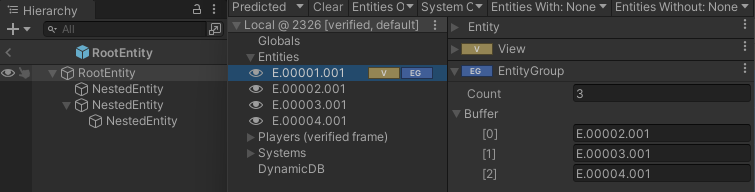
Compound Prototypes allow defining a composition of entity prototypes with a shared lifecycle. This is achieved by nesting entity prototypes within a root prototype. All nested entities depend on the root and share its lifetime: when the root is created or destroyed, all nested entities are created or destroyed accordingly.
This approach is particularly useful for organizing tightly coupled entities into a structured hierarchy.
Find more about it here.
Integrated Compound Commands
The API for sending and processing commands has changed so that multiple commands per frame can be sent without requiring extra management using a CompoundCommand.
Sending a command:
C#
// old
QuantumRunner.Default.Game.SendCommand(new MyCommand());
QuantumRunner.Default.Game.SendCommand(playerSlot: 0, command: new MyCommand());

// new
QuantumRunner.Default.Game.AddCommand(new MyCommand());
QuantumRunner.Default.Game.AddCommand(playerSlot: 0, command: new MyCommand());
Processing commands:
C#
public override void Update(Frame frame) {
  for (int player = 0; player < frame.MaxPlayerCount; player++) {

    // old, processes one command per frame
    {
      var commandA = frame.GetPlayerCommand(player) as MyCommand;
      if (commandA != null) { }
      // or
      var commandB = frame.GetPlayerCommand<MyCommand>(player);
      // or
      if (frame.TryGetPlayerCommand<MyCommand>(player, out var commandC)) { }
    }

    // new, processes multiple commands per frame
    {
      // using a new iterator
      foreach (var command in frame.GetPlayerCommands<MyCommand>(player)) { }

      // or process commands using a for-loop
      for (int i = 0; i < frame.GetPlayerCommandCount(player); i++) {
        var commandA = frame.GetPlayerCommand(player, i) as MyCommand;
        if (commandA != null) { }
        // or
        if (frame.TryGetPlayerCommand<MyCommand>(player, i, out var commandB)) { }
      }
    }
  }
}
Optionally dispatch all queued commands immediately by calling QuantumGame.SendBufferedCommands().
The Quantum Server SDK also changed the command processing. The API was adapted and simplified reducing the required boilerplate code to serialize commands.
A new callback is introduced that already contains the deserialized command. While OnDeterministicCommand(DeterministicPluginClient client, Command commandMessage) will work as before we suggest to switch to the new callback.
Using the return enum OnDeterministicCommandResult intercepted commands can be marked as Accept, Discard or Modified which will re-serialized changed commands.
C#
public override OnDeterministicCommandResult OnDeterministicCommand(DeterministicPluginClient client, DeterministicCommand command) {
  if (command is MyCommand myCmd) {
    myCmd.Foo = 42;
  }
  return OnDeterministicCommandResult.Modified;
}
SendDeterministicCommand() also has a new overload to send a concrete DeterministicCommand object now.
Heap and Memory Storage Improvements
Quantum 3.1 brings several improvements to the frame heap:
- Large blocks: Blocks are no longer limited to the page size. It's even possible to allocate an entire chunk of backing memory (called a "segment") as a single block.
- Lazy expansion: When the frame heap exhausts its existing memory segments, it will allocate another.
This release also introduces a new frame heap variant that holds individual variable-size blocks instead of pages of same-size blocks, potentially lowering heap fragmentation. Select "block-based" heap management in the SimulationConfig to use this variant.
Sparse set component blocks were also re-implemented with a lazy allocated sparse-buffer chunks, which greatly reduces the time spent in frame CopyFrom calls, specially on cases with large number of component types and large number of entities.
Simulator Callbacks
New callbacks now expose some of the simulator internals through the SimulatorContext, informing about and giving control over the simulation flow.
Such controls can be useful in projects that require tight control over the simulation budget and include:
- Simulator Stats: how many Verified/Predicted frames were or still will be simulated, target ticks, current stage, Stalling status, if a rollback will happen or has happened (
WillRollbackPrediction,HasRolledBackPrediction), etc. - Skip Prediction Rollback: set
SkipPredictionRollbackIfPossibleto selectively skip the prediction rollback in order to exchange prediction accuracy for performance. The Prediction stage still runs, continuing from the previous predicted state. This allows you to alternate between a) advancing multiple verified frames without rollback and full resimulations and b) rolling back and fixing mispredictions with full resim when there are not many verified frames to move forward. - Skip Prediction: set
SkipPredictionto skip both the rollback and the Prediction stage in a Session Update, leaving the predicted state where the previous update left it. - Limit Verified Simulations: limit the amount of Verified ticks simulated in each Update by setting
TicksToVerifyon the context orDeterministicSession.MaxVerifiedTicksPerUpdate. This is the feature to be used in combination with the above to achieve the smoothest performance possible in these advanced cases.
Skipping is a request, not a guarantee. Rollbacks still eventually need to be executed: when verification has advanced past the previously predicted tick (IsRollbackRequired), the rollback is always performed. Both skip flags must be set no later than the BeforePrediction stage.
The new callbacks are raised before and after the verification and prediction stages of the simulation.
Additionally, existing callbacks like SimulationFinished now also carry the simulator context.
| Callback | Description |
|---|---|
| CallbackBeforeSimulationStage | Is called once before the start of each simulation stage (verification and prediction). |
| CallbackSimulationStageFinished | Is called once at the end of each simulation stage (verification and prediction). |
| CallbackSimulateFinished | Is called when a frame simulation (Verified or Predicted) has completed. |
The SDK comes with a default simulation/rollback pacing ruleset implemented by the Quantum Unity script QuantumRunnerRollbackPolicy. It is already included in the StartUI prefab, otherwise add this script to the Unity scene.
Game Time Scale and Game Timer
The frame now tracks a game time that can be paused or slowed down. Frame.GameTick advances by Frame.GameTimeScale at the start of each frame (default 1, 0 pauses), and the new GameTimer struct counts game ticks instead of frames, so it pauses and slows down with the game.
C#
frame.GameTimeScale = FP._0_50; // slow motion, applied from the next frame on
var cooldown = GameTimer.FromSeconds(frame, 2); // lasts 4 seconds at half speed
Frame.DeltaTimefollows the time scale (GameTimeScale / UpdateRate),Frame.UnscaledDeltaTimeignores it.- Physics supports a time scale of 0: collision detection and callbacks still run, but bodies, joints and character controllers don't move.
- Above 1 physics runs proportionally more substeps, so the solver, joints and springs behave as at a time scale of 1 (
SimulationConfig.Physics.ScaleSubstepsWithGameTimeScale, capped byMaxScaledSubsteps).
See Frame Timer for when to use GameTimer or FrameTimer.
Breaking: Frame.DeltaTime is now derived from Frame.GameTimeScale at the start of each frame. Setting DeltaTime sets GameTimeScale instead and takes effect from the next frame on. Disable SimulationConfig.GameTimeScaleAffectsDeltaTime to keep the legacy behavior, where DeltaTime keeps the value it is set to and only the game tick is scaled. Rerun the Quantum CodeGen after upgrading, the layout of the built-in globals changed.
CodeGen Improvements
The Quantum DSL code generation received several improvements to better support large projects and reusable libraries.
Modules: adding #pragma module <name> to a .qtn file emits its output (components, prototypes, events, etc) into a separate set of module-specific .cs files instead of the shared core files. This can be used to break apart the generated code once it becomes too unwieldy.
#pragma module Asteroids

component AsteroidsShip {
    FP Score;
}
Access modifiers: types and fields declared in the DSL can now have access modifiers. public is still the default, types also accept internal while fields accept internal and private.
internal component Health {
    FP Value;
    private FP RegenTimer;
}
Per-file settings: enabling UseCustomSettings on the importer of a .qtn file generates that file separately with its own GeneratorOptions and output folders. This can be used to isolate parts of the DSL into self-contained libraries or addons. See the QuantumQtnAssetImporter documentation for details and limitations.
Non-const event IDs: generated event IDs are now static properties instead of const values. Adding or removing an event no longer causes cascading code changes. To revert to the old behavior, add ConstEventIds to LegacyCodeGenOptions in Project Settings > Photon Quantum > Code Gen.
Imported components: imported components no longer require their size to be specified as long as they are not used as fields in other components or structs, so import component Foo; is now valid.
Signal struct: declaring a signal with signal struct packs its parameters into a generated {SignalName}Args struct that is passed to the systems, so parameters can be added later without changing the signatures of all systems implementing the signal. The signal is still raised with the parameter list, e.g. f.Signals.OnHit(damage, target). See Signals for details.
signal struct OnHit(FP damage, entity_ref target);
C#
public void OnHit(Frame frame, in OnHitArgs args) {
  Log.Info($"{args.target} took {args.damage} damage");
}
Agent-Friendly Documentation
The SDK now ships an offline version of the Quantum documentation optimized for AI coding agents. Both steps are available in the Quantum Hub:
- Install Quantum Agent-Friendly Local Documentation: extracts
QuantumDocumentation.zipintoAssets/Photon/Quantum/Documentation~so agents can read the manual offline viallms.txt. Unity ignores the~folder, so nothing is imported. Re-run it after an SDK upgrade to refresh the pages. - Copy AGENTS.md Snippet: select the repository root where your
AGENTS.mdorCLAUDE.mdlives. A snippet linking to the Quantum agent guide (Assets/Photon/Quantum/AGENTS.md) is copied to the clipboard, ready to be pasted into your agent file.
Last updated on
Back to top- New Physics Solver
- 3D Ragdolls and Character Joint
- LUT-less Math
- Exponential Decay interpolation mode for Entity Views
- Entity View Transform History
- Table Components
- Optional Filter Components
- Compound Entity Prototypes
- Integrated Compound Commands
- Heap and Memory Storage Improvements
- Simulator Callbacks
- Game Time Scale and Game Timer
- CodeGen Improvements
- Agent-Friendly Documentation