Manual
動畫視圖更新器
QuantumEntityViewUpdater指令碼負責觸發帶有AnimatorComponent的每個實體的Animate回調。該實體必須有一個實現IAnimatorEntityViewComponent介面的QuantumEntityViewComponent。動畫器附加元件包含AnimatorMecanim和AnimatorPlayables,可以直接使用或擴展以實現更加自定義的工作流程。
動畫器 Mecanim
提供 Quantum 動畫器與 Unity 的 Mecanim 系統之間的整合,實現平滑的過渡和動畫的幀同步。它提供幀率控制,並支援使用動畫圖層,這是AnimatorPlayables不支援的功能。
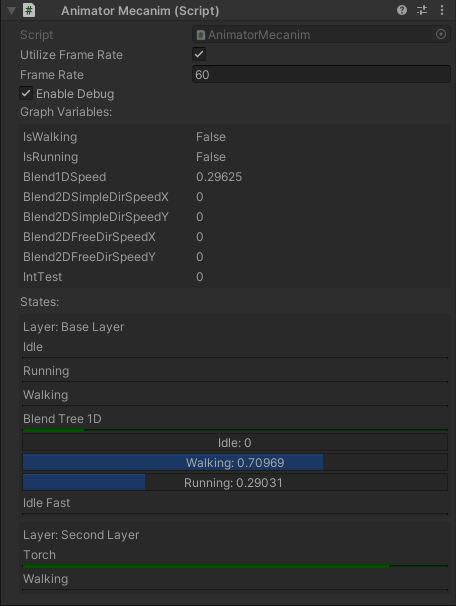
為防止 Unity 中自動觸發過渡,請確保在Animator Graph設定中勾選Mute Graph Transitions On Export。
動畫器 Playables
它使用 Playable Graphs 來處理動畫,而非 Mecanim,提供更加自定義的動畫更新方式。然而,並非所有 Mecanim 功能都支援此設定,例如動畫圖層。
動畫器事件
Quantum 動畫器支援Instant事件和Time-Window事件。事件回調會在指定的剪輯播放時觸發,並在事件創建時配置的時刻執行。這意味著兩個使用相同剪輯的狀態將共享事件。
即時事件
C#
public abstract class AnimatorInstantEventAsset : AnimatorEventAsset, IAnimatorEventAsset
  {
    /// <inheritdoc cref="AnimatorEventAsset.OnBake"/>
    public new AnimatorEvent OnBake(AnimationClip unityAnimationClip, AnimationEvent unityAnimationEvent)
    {
      var quantumAnimatorEvent = new AnimatorInstantEvent();
      quantumAnimatorEvent.AssetRef = Guid;
      quantumAnimatorEvent.Time = FP.FromFloat_UNSAFE(unityAnimationEvent.time);
      return quantumAnimatorEvent;
    }
  }
即時事件只會在動畫器播放包含該事件的剪輯時觸發一次Execute()函數。一個好的模式是繼承基礎AnimatorInstantEventAsset並以不同程序覆寫基礎類別的方法,例如自定義Frame.Siganls。
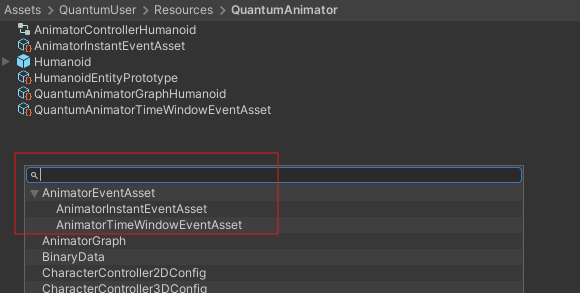
可以使用Create->Quantum->Assets...創建事件資產
時間窗口事件
過程與即時事件創建類似,但在這種情況下,必須在 Unity 剪輯中創建第二個相同類型的事件來標記事件執行的結束。對於此事件類型,會在 Unity 剪輯中定義的開始和結束幀之間的每一幀觸發 Execute 回調。
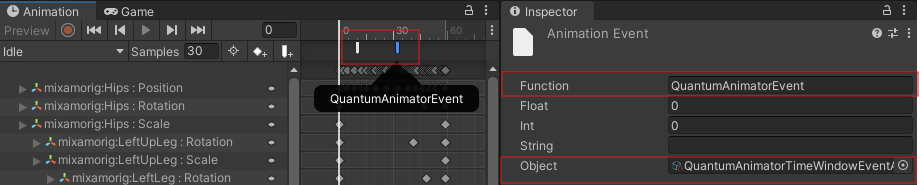
如果想創建具有類似行為的新事件,例如有OnEnter()、Execute()及OnExit()方法,透過繼承AnimatorTimeWindowEventAsset類別:
C#
  /// <summary>
  /// This is a sample of how to use SampleTimeWindowEvent events. Use it as a base to create a new class inheriting from AnimatorInstantEventAsset and
  /// implement a custom logic on Execute method
  /// </summary>
  [Serializable]
  public class ExampleTimeWindowEventAsset : AnimatorTimeWindowEventAsset
  {
    public override unsafe void OnEnter(Frame f, AnimatorComponent* animatorComponent, LayerData* layerData)
    {
      Debug.Log($"[Quantum Animator ({f.Number})] OnEnter animator time window event.");
    }

    public override unsafe void Execute(Frame f, AnimatorComponent* animatorComponent, LayerData* layerData)
    {
      Debug.Log($"[Quantum Animator ({f.Number})] Execute animator time window event.");
    }

    public override unsafe void OnExit(Frame f, AnimatorComponent* animatorComponent, LayerData* layerData)
    {
      Debug.Log($"[Quantum Animator ({f.Number})] OnExit animator time window event.");
    }
  }
事件設置
按照以下步驟在動畫剪輯上定義事件:
- 在
QuantumEntityPrototype中包含Animator元件的 GameObject 上新增AnimationEventData元件:

- 在動畫窗口中選擇剪輯並新增一個新的
Unity AnimationEvent:
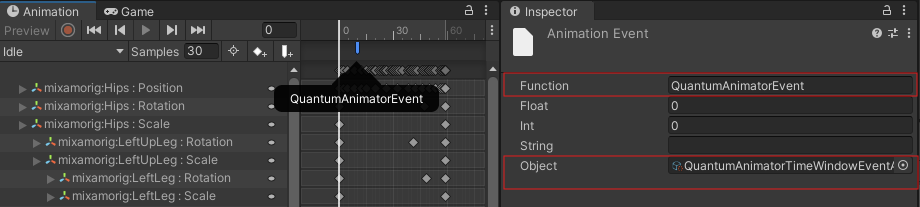
- 選擇創建的事件,並按照下圖指定
Function及Object:
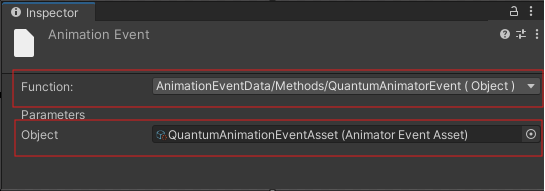
動畫器狀態信號
動畫器狀態信號現在會在透過過渡或FadeTo的更改狀態時被調用。這些信號由AnimatorBehaviourSystem實現,也可以由其他系統實現。
C#
// Called in the first update when the Animator begins entering a state.
void OnAnimatorStateEnter(Frame f, EntityRef entity, AnimatorComponent* animator, AnimatorGraph graph, LayerData* layerData, AnimatorState state, FP time);

// Called every frame while the Animator is updating a state.
void OnAnimatorStateUpdate(Frame f, EntityRef entity, AnimatorComponent* animator, AnimatorGraph graph, LayerData* layerData, AnimatorState state, FP time, AnimatorStateType stateType);

// Called when the Animator updates for the last time, before fading to another state.
void OnAnimatorStateExit(Frame f, EntityRef entity, AnimatorComponent* animator, AnimatorGraph graph, LayerData* layerData, AnimatorState state, FP time);
這些信號提供以下內容:
Frame: 調用信號時的當前FrameEntityRef: 與提供給信號的AnimatorComponent相關聯的EntityRef- 指向
AnimatorComponent的指標 - 當前
AnimatorGraph和AnimatorState的參考 - 指向
LayerData的指標 - 調用信號時
LayerData的當前對應時間
OnAnimatorStateUpdate還提供AnimatorStateType,這是一個包含以下內容的enum:
NoneFromStateCurrentStateToState
在過渡期間,ToState和FromState都會發送OnAnimatorStateUpdate信號,因此提供AnimatorStateType以幫助區分正在更新的是哪一個。例如,這可以用於防止AnimatorStateBehaviours在被過渡出去時執行其更新。
動畫器狀態行為
與動畫器事件不同,Animator State Behaviour可以在使用相同剪輯的狀態之間獨立,並支援OnStateEnter、OnStateUpdate及OnStateExit。
設置
1- 在 Unity 動畫器窗口中,選擇要新增行為的狀態,然後將AnimatorStateBehaviourHolder指令碼附加到該狀態。
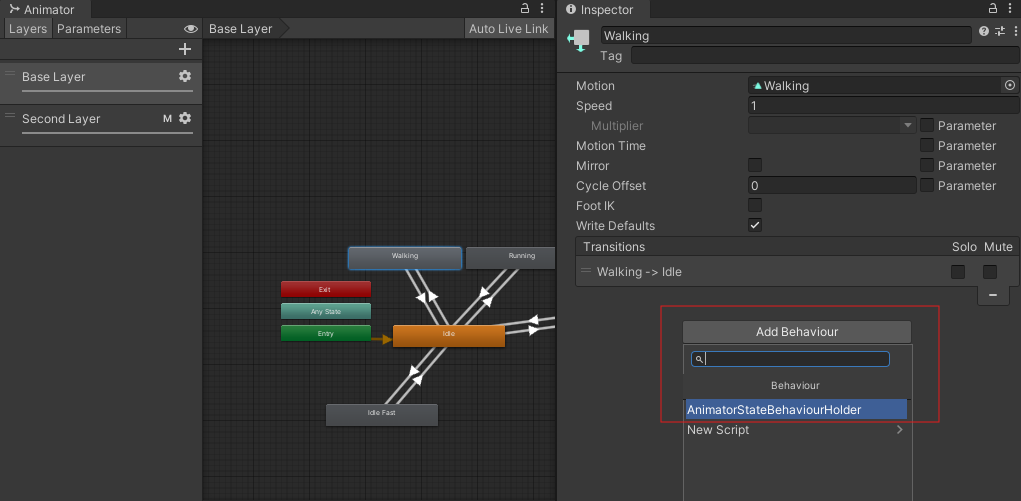
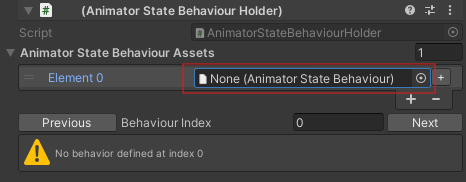
2- 使用動畫器套件中包含的DebugBehavior範例,向AnimatorStateBehaviourAssets列表新增新元素。
3- 使用選單選項內嵌圖形資產:Tool->Quantum Animator->Bake All Graph Assets。
4- 將AnimatorBehaviourSystem新增到Default Config Systems資產。
5- 每次播放狀態時,應該會記錄調試訊息。
AnimatorStateBehaviour是抽象的,因此繼承它的類別必須實現以下方法:
C#
bool OnStateEnter(Frame f, EntityRef entity, AnimatorComponent* animator, AnimatorGraph graph, LayerData* layerData, AnimatorState state, FP time);
bool OnStateUpdate(Frame f, EntityRef entity, AnimatorComponent* animator, AnimatorGraph graph, LayerData* layerData, AnimatorState state, FP time, AnimatorStateType stateType);
bool OnStateExit(Frame f, EntityRef entity, AnimatorComponent* animator, AnimatorGraph graph, LayerData* layerData, AnimatorState state, FP time);
這些與之前提到的動畫器狀態信號幾乎相同;然而,它們返回一個bool。如果使用提供的AnimatorBehaviourSystem,返回true將阻止系統檢查可能屬於AnimatorState的剩餘AnimatorStateBehaviours。例如,如果一個AnimatorStateBehaviour使用FadeTo過渡到新狀態,返回true將阻止剩餘的AnimatorStateBehaviours執行它們的OnAnimatorStateUpdate調用。
FadeTo
FadeTo可以用於過渡到獨立於條件的另一個狀態。啟用AllowFadeToTransitions以啟用此功能。
C#
  // public void FadeTo(Frame frame, AnimatorComponent* animatorComponent, string stateName, bool setIgnoreTransitions, FP deltaTime)
  //usage example
  if (input->Run.WasPressed)
  {
    graph.FadeTo(frame, filter.AnimatorComponent, "Running", true, 0);
  }
根運動
Quantum 動畫器使用 Unity 的AnimationClip資訊將運動曲線資料內嵌到AnimatorGraph資產中。內嵌的資訊稍後可以在模擬中用於根據當前播放的剪輯修改實體的位置和旋轉。
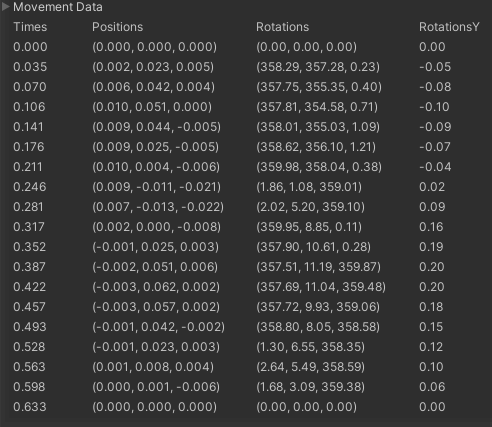
使用方法
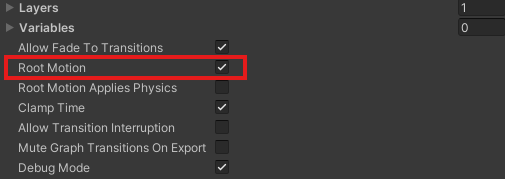
需要啟用Root Motion選項以允許處理運動資料。還需要正確設置源模型的Animation分頁中的根運動配置,更多資訊請參考Unity的根運動文檔。
禁用狀態根運動
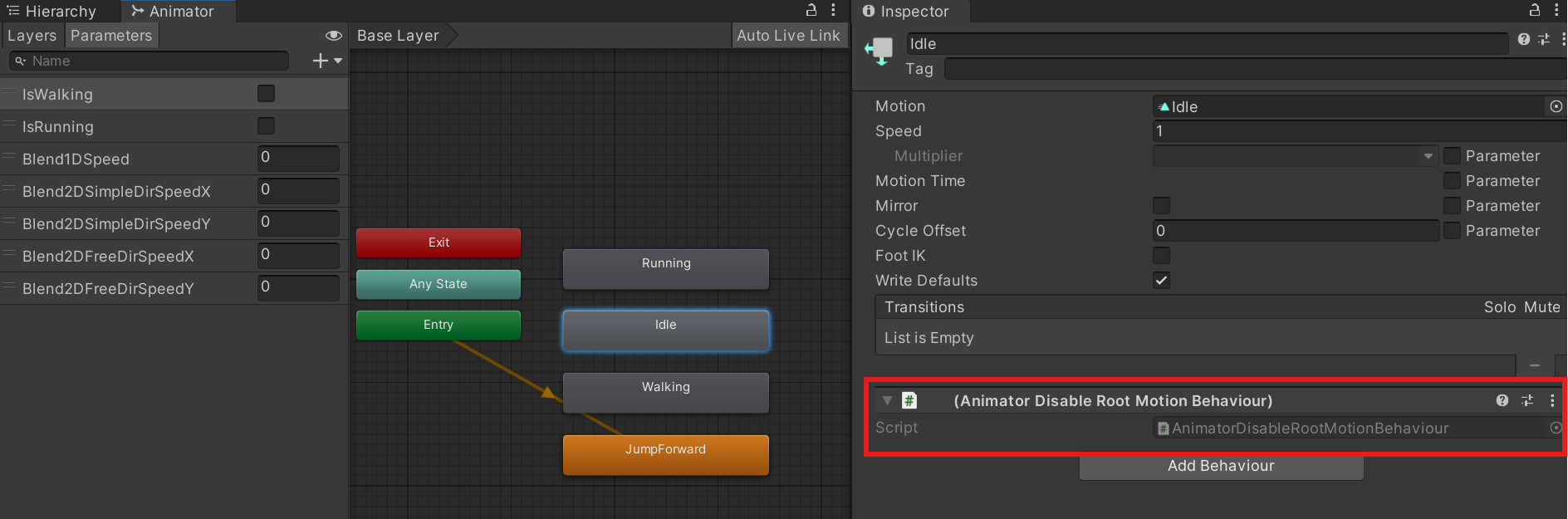
預設下,只要啟用了Root Motion選項,AnimatorGraph中所有狀態的運動資料都會啟用。將Animator Disable Root Motion Behaviour新增到 Mecanim 狀態可以確保該狀態被排除在根運動計算之外。
使用範例
QuantumAnimation 僅負責計算每個 Quantum 幀的當前運動增量,允許用戶使用生成的資料來更新實體的變換。以下程式碼展示如何應用OnAnimatorRootMotion3D和OnAnimatorRootMotion2D的範例。
C#
  // Handles 3D root motion
  public void OnAnimatorRootMotion3D(Frame f, EntityRef entity, AnimatorFrame deltaFrame, AnimatorFrame currentFrame)
    {
      //Return in case there is no motion delta
      if (deltaFrame.Position == FPVector3.Zero && deltaFrame.RotationY == FP._0) return;

      if (f.Unsafe.TryGetPointer<Transform3D>(entity, out var transform))
      {
        // Create a quaternion representing the inverse of the current frame's Y-axis rotation
        var currentFrameRotation = FPQuaternion.CreateFromYawPitchRoll(currentFrame.RotationY, 0, 0);
        currentFrameRotation = FPQuaternion.Inverse(currentFrameRotation);

        // Rotate the delta position by the inverse current rotation to align movement
        var newPosition = currentFrameRotation * deltaFrame.Position;

        // Apply the transform's rotation to the new position to get the world displacement
        var displacement = transform->Rotation * newPosition;

        var kccSettings = f.FindAsset<KCCSettings>(f.Unsafe.GetPointer<KCC>(entity)->Settings);

        // Compute an adjusted target hit position for raycasting
        var targetHitPosition =(displacement.XOZ.Normalized * FP._0_33 * 2 ) + displacement;

        // Perform a raycast in the direction of the intended motion to detect potential collisions with statics
        var hits = f.Physics3D.RaycastAll(transform->Position, targetHitPosition.XOZ, targetHitPosition.Magnitude, -1,
          QueryOptions.HitStatics);

        if (hits.Count <= 0)
        {
          // If no collision, disable the character controller temporarily
          if (f.Unsafe.TryGetPointer<KCC>(entity, out var kcc))
          {
            kcc->SetActive(false);
          }

          // Apply the motion and rotation to the transform
          transform->Position += displacement;
          transform->Rotate(FPVector3.Up, deltaFrame.RotationY * FP.Rad2Deg);
        }
        else
        {
          // If there is collision, enable the character controller
          if (f.Unsafe.TryGetPointer<KCC>(entity, out var kcc))
          {
            kcc->SetActive(true);
          }
        }
      }
    }

    public void OnAnimatorRootMotion2D(Frame f, EntityRef entity, AnimatorFrame deltaFrame, AnimatorFrame currentFrame)
    {
      //Return in case there is no motion delta
      if (deltaFrame.Position == FPVector3.Zero && deltaFrame.RotationY == FP._0) return;

      if (f.Unsafe.TryGetPointer<Transform2D>(entity, out var transform))
      {
        // Calculate new rotation by applying delta
        FP newRotation = transform->Rotation + deltaFrame.RotationY;

        // Normalize rotation to keep it within [-π, π]
        while (newRotation < -FP.Pi) newRotation += FP.PiTimes2;
        while (newRotation > FP.Pi) newRotation += -FP.PiTimes2;

        // Rotate delta movement vector based on new orientation
        var deltaMovement = FPVector2.Rotate(deltaFrame.Position.XZ, newRotation);

         // Apply movement and rotation to the transform
        transform->Position += deltaMovement;
        transform->Rotation = newRotation;
      }
    }
Last updated on
Back to top