Example using pre-built UI
這是一個簡單的教學指引,以展示如何執行核心錦標賽迴圈到您的遊戲之內。 它使用預先組建的UI畫面,其在錦標賽-SDK Unity外掛程式中可用。
匯入示範場景
從Unity外掛程式套件來匯入TournamentSDK_Demo資料夾。
這個資料夾含有相關的UI指令碼、預製件及場景,其將協助您來視覺化錦標賽中繼資料。
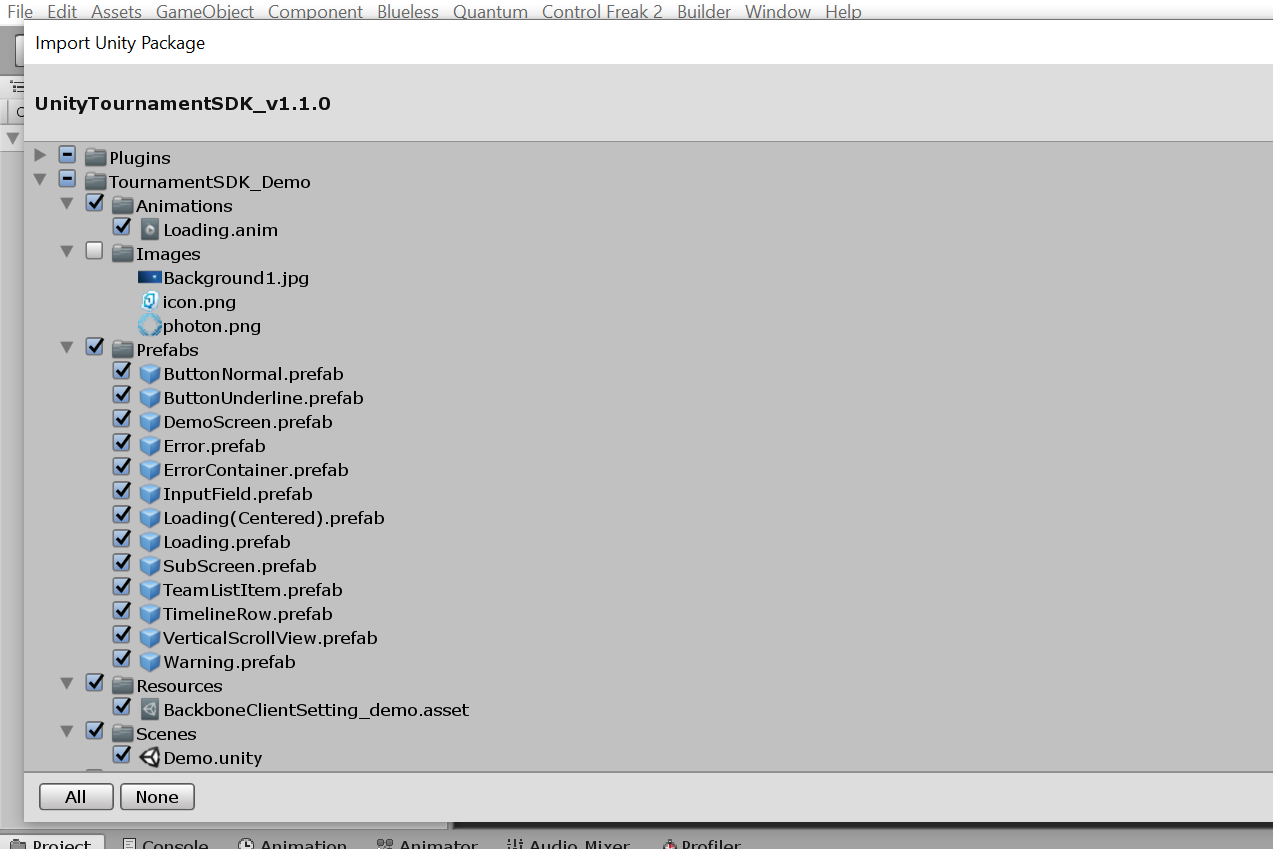
在成功匯入後,開啟位於TournamentSDK_Demo/Scenes/Demo.unity的Demo場景。
您可以運行場景。
填入您的遊戲 客戶端ID 並且初始化錦標賽-SDK客戶端。
填入您的 暱稱 並且使用 匿名提供者 來登入(請確保在您的儀表板中 啟用 匿名登入提供者)。
在這個時間點,您應該能夠瀏覽最近的錦標賽並且與它們互動。
手動客戶端初始化
在這個示例中,我們希望在使用者選擇暱稱,並且Photon已經成功連接到伺服器之後,才初始化錦標賽-SDK。
新增BackboneManager指令碼到您的場景物件之中。
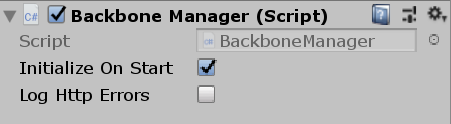
取消勾選 敘述 在開始時初始化 的勾選框。
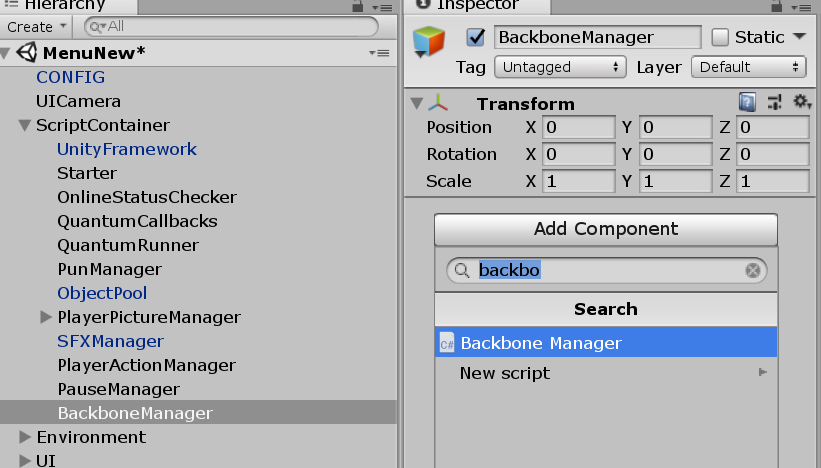
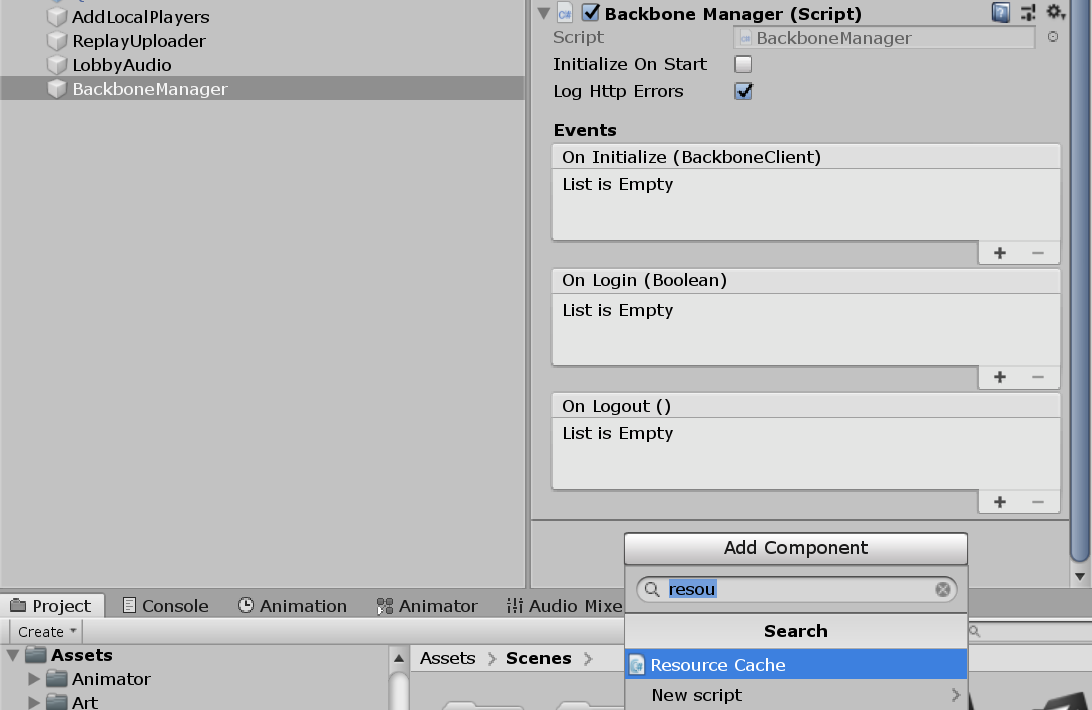
同時新增ResourceCache指令碼到相同的場景物件。
建立新的指令碼名為BackboneIntegration。
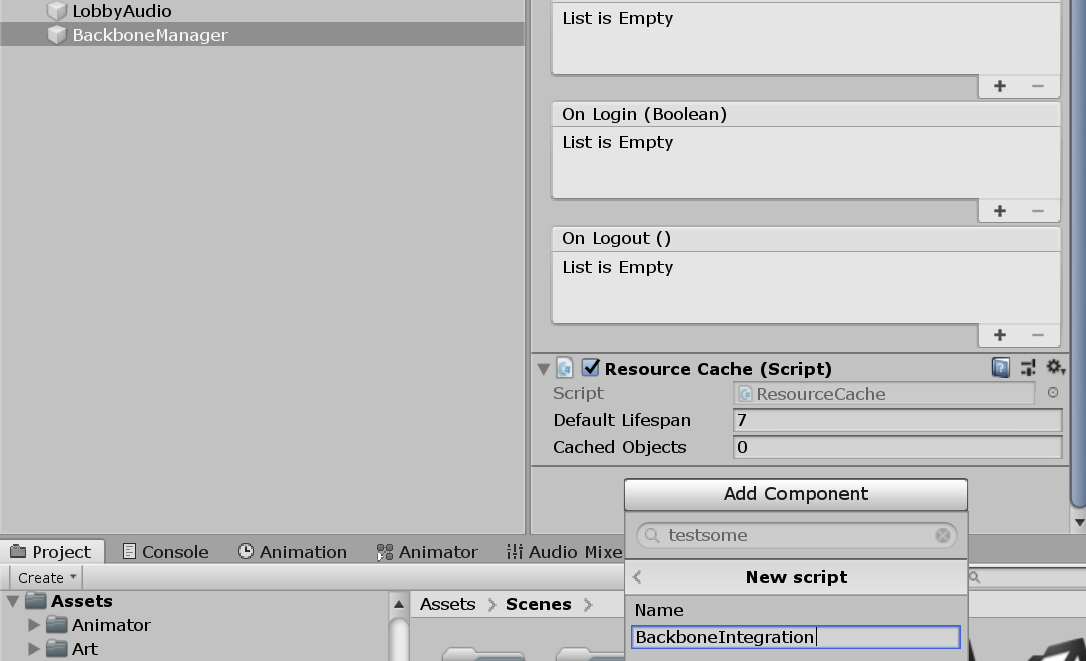
開啟這個指令碼,並且執行客戶端初始化流程。
C#
using Gimmebreak.Backbone.User;
using System.Collections;
using UnityEngine;

public class BackboneIntegration : MonoBehaviour {

    private WaitForSeconds waitOneSecond = new WaitForSeconds(1);

    private IEnumerator Start()
    {
        // wait until player nick was set (this happens on initial screen)
        while (string.IsNullOrEmpty(PhotonNetwork.player.NickName))
        {
            yield return this.waitOneSecond;
        }
        // keep trying to initialize client
        while (!BackboneManager.IsInitialized)
        {
            yield return BackboneManager.Initialize();
            yield return this.waitOneSecond;
        }
        // create arbitrary user id (minimum 64 chars) based on nickname
        string arbitraryId = "1000000000000000000000000000000000000000000000000000000000000001" + PhotonNetwork.player.NickName;
        // log out user if ids do not match
        if (BackboneManager.IsUserLoggedIn &&
            BackboneManager.Client.User.GetLoginId(LoginProvider.Platform.Anonym) != arbitraryId)
        {
            Debug.LogFormat("Backbone user({0}) logged out.", BackboneManager.Client.User.UserId);
            yield return BackboneManager.Client.Logout();
        }
        // log in user
        if (!BackboneManager.IsUserLoggedIn)
        {
            yield return BackboneManager.Client.Login(LoginProvider.Anonym(true, PhotonNetwork.player.NickName, arbitraryId));
            if (BackboneManager.IsUserLoggedIn)
            {
                Debug.LogFormat("Backbone user({0}) logged in.", BackboneManager.Client.User.UserId);
            }
            else
            {
                Debug.LogFormat("Backbone user failed to log in.");
            }
        }
    }
}
顯示即將到來的錦標賽
當使用者成功登入之後,您可以重新整理錦標賽清單。
C#
// refresh tournament list
BackboneManager.Client.LoadTournamentList()
    // add finish callback
    .FinishCallback(() => { /* List is loaded */ })
    // run on 'this' MonoBehaviour
    .Run(this);
您可以使用BackboneManager.Client.Tournaments.UpcomingTournament屬性,為了使用者來取得下一個錦標賽。
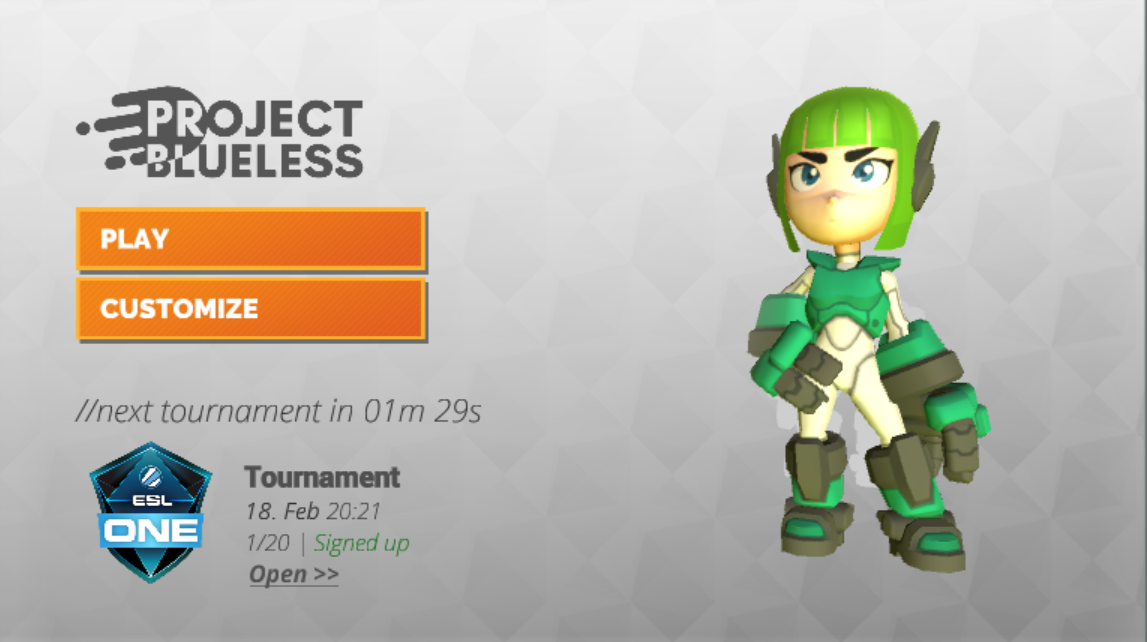
C#
var tournament = BackboneManager.Client.Tournaments.UpcomingTournament;
this.tournamentName.text = tournament.TournamentName;
this.tournamentDate.text = tournament.Time.ToLocalTime().ToString("'<b>'dd. MMM'</b>' HH:mm");
this.tournamentTicket.text = string.Format("{0}/{1} | {2}",
                                           tournament.CurrentInvites,
                                           tournament.MaxInvites,
                                           GetSignupStatus());
複製錦標賽中樞畫面
在這個示例中,我們希望使用某些錦標賽-SDK中提供的 預設UI畫面。
執行的最基礎的畫面是TournamentListScreen及TournamentHubScreen。
複製TournamentHubScreen到您的UI階層。
這個畫面向使用者顯示了所有錦標賽細節,並且作為一個錦標賽遊玩中樞。
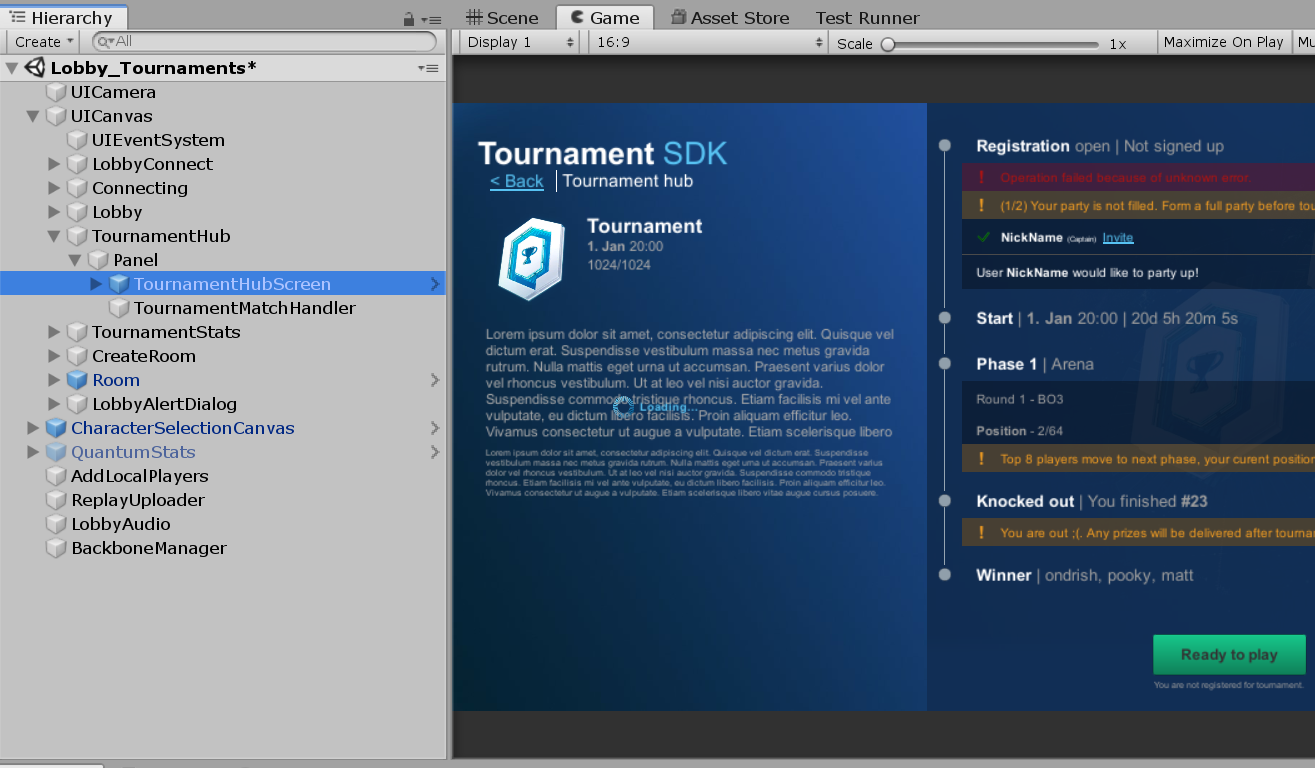
為了初始化TournamentHubScreen,必須在啟用UI物件之前設定一個正確的 **錦標賽ID。
建立一個可在TournamentHubScreen物件上找到的參照到GUITournamentHubScreen,並且調用 Initialize(long tournamentId)。
C#
// This is inside UI container script that controls and shows UI panel (not part of tournament-sdk)

// Reference to imported tournament hub screen script
[SerializeField]
private GUITournamentHubScreen tournamentHubScreen;
//...
// Show tournament hub for specific tournament id
public static void ShowScreen(long tournamentId)
{
    // Check if tournament is present
    var tournament = BackboneManager.Client.Tournaments.GetTournamentById(tournamentId);
    if (tournament != null)
    {
        initializedTournamentId = tournamentId;
        // Initialize tournament hub screen for correct tournament id
        Instance.tournamentHubScreen.Initialize(tournamentId);
        // Enable UI object
        ShowScreen();
    }
}
這個方法現在可以從我們在之前的步驟中建立的即將進行的錦標賽小工具中被調用。
C#
// This is inside UI container script that controls and shows UI panel (not part of tournament-sdk)

// Open tournament hub for upcoming tournament
public void OpenTournamentHub()
{
    if (BackboneManager.IsUserLoggedIn)
    {
        // Check if upcomning tournament is present
        var upcomingTournament = BackboneManager.Client.Tournaments.UpcomingTournament;
        if (upcomingTournament != null)
        {
            // Hide main screen
            LobbyMain.HideScreen();
            // Show tournament hub
            // Note: UITournamentHub is not part of tournament-sdk, it is a wrapper
            // around TournamentHubScreen
            UITournamentHub.ShowScreen(upcomingTournament.Id);
            LobbyAudio.Instance.OnClick();
        }
    }
}
注意事項:這個示例將不會使用TournamentListScreen,為了簡化,它只顯示即將進行的錦標賽。
執行錦標賽對戰處理常式
現在必須在錦標賽中樞及遊戲大廳/房間建立API之間建立一個介面。
建立名為TournamentMatchHandler的新的指令碼。
開啟這個指令碼並且將它衍生自TournamentMatchCallbackHandler。
它提供一個簡單的方法集,以交流您的大廳/房間狀態到錦標賽中樞。
C#
public bool IsConnectedToGameServerNetwork()
{
    //Check if client is successfully connected to your networking backend.
    //Return true if user is connected and ready to join given match.
}

public bool IsUserConnectedToMatch(long userId)
{
    //Check if specific user is already connected to lobby/room.
    //Return true if user is connected.
}

public void OnJoinTournamentMatch(Tournament tournament, TournamentMatch match, ITournamentMatchController controller)
{
    //Callback from tournament hub passing tournament, match and controller object.
    //Use match data to join correct lobby/room.
    //Use controller to inform tournament hub about changes in your lobby/room.
}

public bool IsUserReadyForMatch(long userId)
{
    //Check if specific user is ready (e.g. moved to correct slot)
    //Return true if user is ready to start.
}

public bool IsGameSessionInProgress()
{
    //Check if game session is already in progress for given tournament match.
    //Return true if game session is in progress.
}

public void OnLeaveTournamentMatch()
{
    //Callback from tournament hub informing user should leave joined lobby/room.
}

public void StartGameSession(IEnumerable<TournamentMatch.User> checkedInUsers)
{
    //Callback from tournament hub requesting game session to start immediately. Also
    //passing users that successfully checked in for current match.
    //Create tournament game session, and start your game.
    //This might be called multiple times until IsGameSessionInProgress returns true.
}
上述的方法按照下列順序來執行:
- 加入錦標賽對戰時()
- 已連接到遊戲伺服器網路()
- 使用者已連接到對戰()
- 遊戲階段已進行中()
- 使用者已準備好對戰()
- 開始遊戲階段()
加入錦標賽對戰時
來自錦標賽中樞的回調傳送錦標賽、對戰及控制器物件。 使用對戰資料來加入正確的大廳/房間。 使用控制器來告知錦標賽中樞關於在您的大廳/房間之中的更改。
C#
public override void OnJoinTournamentMatch(Tournament tournament, TournamentMatch match, ITournamentMatchController controller)
{
    // User is requesting to join a tournament match, create or join appropriate room.
    // You can use match.Secret as room id.
    this.tournament = tournament;
    this.tournamentMatch = match;
    this.tournamentMatchController = controller;
    this.sessionStarted = false;
    this.creatingSession = false;
    // Forward UserId & TeamId to Quantum player
    PlayerData.Instance.BackboneUserId = BackboneManager.Client.User.UserId;
    PlayerData.Instance.BackboneTeamId = match.GetMatchUserById(BackboneManager.Client.User.UserId).TeamId;
    // Join Photon room
    StartCoroutine(JoinRoomRoutine());
}

private IEnumerator JoinRoomRoutine()
{
    while (this.tournamentMatch != null)
    {
        // If you require specific region for tournament, you can use
        // tournament custom properties providing the info about required region.
        // string cloudRegion = this.tournament.CustomProperties.Properties["cloud-region"];
        // ...
        // PhotonNetwork.ConnectToRegion(region, gameVersion);
        // ...
        // wait until connected to proper region
        // ...
        // continue connecting to room

        // If tournament match is finished then leave.
        if (this.tournamentMatch.Status == TournamentMatchStatus.MatchFinished ||
            this.tournamentMatch.Status == TournamentMatchStatus.Closed)
        {
            // Check if connected room is for finished match
            if (PhotonNetwork.inRoom &&
                PhotonNetwork.room.Name == this.tournamentMatch.Secret)
            {
                PhotonNetwork.LeaveRoom(false);
            }
        }
        // Try to connect to tournament match room
        else if (PhotonNetwork.connectedAndReady &&
                 !PhotonNetwork.inRoom &&
                 !this.connectingToRoom)
        {
            this.connectingToRoom = true;
            // Set player propery with UserId so we can identify users in room
            SetPlayerProperty("BBUID", BackboneManager.Client.User.UserId);
            RoomOptions roomOptions = new RoomOptions();
            roomOptions.IsVisible = false;
            // Set max players for room based on tournament phase setting
            roomOptions.MaxPlayers = (byte)(this.tournament.GetTournamentPhaseById(this.tournamentMatch.PhaseId).MaxTeamsPerMatch * this.tournament.PartySize);
            // Join or create Photon room with tournamemnt match secret as room id
            PhotonNetwork.JoinOrCreateRoom(this.tournamentMatch.Secret, roomOptions, TypedLobby.Default);
        }
        // If we are in wrong room then leave
        else if (PhotonNetwork.inRoom &&
                 PhotonNetwork.room.Name != this.tournamentMatch.Secret)
        {
            PhotonNetwork.LeaveRoom(false);
        }

        yield return this.waitOneSec;
    }
}
這個方法應該初始化您的TournamentMatchHandler並且開始連接到適當的大廳/房間。
這只在使用者確認他準備好下一場對戰後調用一次。
已連接到遊戲伺服器網路
來自錦標賽中樞的回調,以檢查客戶端是否已經成功連接到您的網路後端。 如果使用者已連接並且準備好加入給定的對戰,則傳回真。
C#
public override bool IsConnectedToGameServerNetwork()
{
    // Check if user is connected to photon and ready to join a room.
     return PhotonNetwork.connectedAndReady;
}
使用者已連接到對戰
來自錦標賽中樞的回調,以檢查特定使用者是否已經連接到大廳/房間。 如果使用者已連接,則傳回真。 請注意,在加入Photon房間之前,玩家屬性以 使用者ID 被設定。 這個玩家屬性用於識別已連接的Photon玩家。
C#
public override bool IsUserConnectedToMatch(long userId)
{
    // Check if tournament match user is connected to room.
    // Before user joined room, photon player property BBUID was set with users id.
    var photonPlayer = GetPhotonPlayerByBackboneUserId(userId);
    return photonPlayer != null;
}

private PhotonPlayer GetPhotonPlayerByBackboneUserId(long userId)
{
    if (PhotonNetwork.inRoom)
    {
        for (int i = 0; i < PhotonNetwork.playerList.Length; i++)
        {
            long playerUserId;
            if (TryGetPlayerProperty(PhotonNetwork.playerList[i], "BBUID", out playerUserId) &&
                userId == playerUserId)
            {
                return PhotonNetwork.playerList[i];
            }
        }
    }
    return null;
}
將為每位預計將參加已連接錦標賽對戰的使用者來調用這個方法。
遊戲階段已進行中
來自錦標賽中樞的回調,以檢查在給定的錦標賽對戰中遊戲階段是否已進行中。 如果遊戲階段已進行中,則傳回真。
C#
public override bool IsGameSessionInProgress()
{
    // Determine if tournament match session has started.
    return sessionStarted;
}
在這個示例中,在成功調用到 BackboneManager.Client.CreateGameSession()之後,我們設定sessionStarted為真。
使用者已準備好對戰
來自錦標賽中樞的回調,以檢查特定使用者是否已準備好(比如,移動到正確的槽位)。 如果使用者已準備好開始,則傳回真。 還沒有針對對戰來報到的本機使用者,將只在傳回真之後才完成報到。
C#
public override bool IsUserReadyForMatch(long userId)
{
    // Return true when user loaded/set everything neccsary for
    // match to start (if user input is required this should be time limited).
    return true;
}
在這個示例中,當使用者連接到房間之後,我們不需要為了使用者來設定任何東西,所以我們預設傳回真。
開始遊戲階段
來自錦標賽中樞的回調請求遊戲階段立即開始。
同時傳送在目前的對戰中成功報到的使用者。
建立錦標賽遊戲階段,並且開始您的遊戲。
這可能會被調用多次,直到IsGameSessionInProgress傳回真。
C#
public override void StartGameSession(IEnumerable<TournamentMatch.User> checkedInUsers)
{
    // Start tournament game session with users that checked in.
    // Be aware that this callback can be called multiple times until
    // IsGameSessionInProgress returns true.

    // Check if session has started
    if (sessionStarted)
    {
        return;
    }

    // Check if Photon is still connected to room and ready
    if (!PhotonNetwork.connectedAndReady ||
        !PhotonNetwork.inRoom)
    {
        return;
    }

    // Check if session is not being requested
    if (!this.creatingSession)
    {
        this.creatingSession = true;
        // Create tournament game session
        BackboneManager.Client.CreateGameSession(
            checkedInUsers,
            this.tournamentMatch.Id,
            0)
            .ResultCallback((gameSession) =>
                {
                    this.creatingSession = false;
                    // Check if game session was created
                    if (gameSession != null)
                    {
                        // Indicate that session has started
                        this.sessionStarted = true;
                        // Set room properties
                        var ht = new ExitGames.Client.Photon.Hashtable();
                        ht.Add("SESSIONID", gameSession.Id);
                        ht.Add("TOURNAMENTID", this.tournament.Id);
                        ht.Add("TOURNAMENTMATCHID", this.tournamentMatch.Id);
                        PhotonNetwork.room.SetCustomProperties(ht);
                        // At this point you can also initiate scene loading
                        // and game session start
                    }
                })
            .Run(this);
    }
}
附加錦標賽對戰處理常式
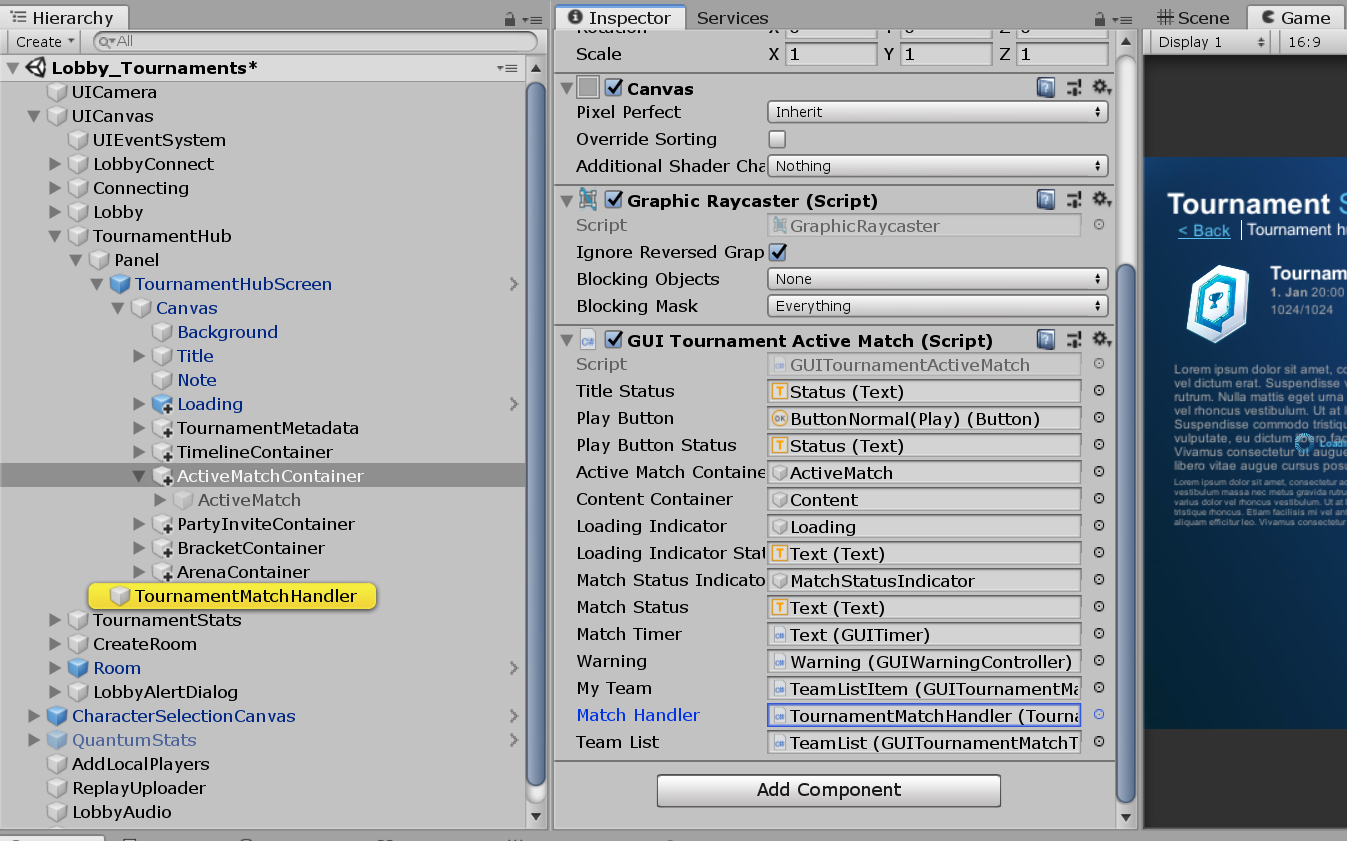
新增已建立的TournamentMatchHandler到場景物件。(比如,在TournamentHubScreen旁邊)
然後新增TournamentMatchHandler的物件參照到GUITournamentActiveMatch指令碼的 對戰處理常式 欄位。
這個指令碼可以在TournamentHubScreen/Canvas/ActiveMatchContainer物件上找到。
執行結果提交
當完成一個遊戲階段時,必須設定最終位置。
在遊戲階段開始之前,建立一個新的遊戲階段物件或使用透過BackboneManager.Client.CreateGameSession()獲得的遊戲階段物件。
您也可以來提交一個附有遊戲階段結果的自訂統計資料。
C#
List<GameSession.User> users = new List<GameSession.User>();
Dictionary<long, int> kills = new Dictionary<long, int>();
Dictionary<long, int> deaths = new Dictionary<long, int>();
// Iterate through game players(robots) and gather placements and stats
for (int i = 0; i < sortedRobots.Count; i++)
{
    // Get quantum runtime player
    var runtimePlayer = QuantumGame.Instance.Frames.Current.GetPlayerData(((Robot*)sortedRobots[i])->Player);
    if (runtimePlayer != null)
    {
        // Get players BackboneUserId & match TeamId
        long userId = (long)runtimePlayer.BackboneUserId;
        byte teamId = runtimePlayer.BackboneTeamId;
        // Create a new game session user and assign a final placement
        // (1-X, one being the best)
        users.Add(new Gimmebreak.Backbone.GameSessions.GameSession.User(userId, teamId) { Place = (i + 1) });
        // Get players kills stat
        kills.Add(userId, ((Robot*)sortedRobots[i])->Score.Kills);
        // Get players death stat
        deaths.Add(userId, ((Robot*)sortedRobots[i])->Score.Deaths);
    }
}
// Create a game session object to be submitted
Gimmebreak.Backbone.GameSessions.GameSession gameSession = new Gimmebreak.Backbone.GameSessions.GameSession(gameSessionId, 0, users, tournamentMatchId);
// Set a play date & session time
gameSession.PlayDate = ServerTime.UtcNow;
gameSession.PlayTime = gameTime;
// Add game session stats
gameSession.Users.ForEach(user =>
                          {
                              gameSession.AddStat(1, user.UserId, kills[user.UserId]);
                              gameSession.AddStat(2, user.UserId, deaths[user.UserId]);
                          });
當填入遊戲階段物件後,您可以透過BackboneManager.Client.SubmitGameSession(gameSession);來提交它
C#
 private IEnumerator ProcessResult(long tournamentId, GameSession finishedGameSession)
 {
     var tournament = BackboneManager.Client.Tournaments.GetTournamentById(tournamentId);
     var tournamentMatch = tournament.UserActiveMatch;
     //report game session
     yield return BackboneManager.Client.SubmitGameSession(finishedGameSession);
     //refresh tournament data
     yield return BackboneManager.Client.LoadTournament(tournamentId);
     //check if tournament match was not finished (if not another game should be played)
     bool initializeNextGame = tournamentMatch != null &&
         tournamentMatch.Status != TournamentMatchStatus.MatchFinished &&
         tournamentMatch.Status != TournamentMatchStatus.Closed;
 }
在結果提交之後,您可以重新載入錦標賽資料,來查看UserActiveMatch是否已關閉或已完成。
如果使用者啟用中的對戰還沒有完成,它意味著另一個遊戲階段應該跟隨。(比如,前三名對戰)
透過BackboneManager.Client.CreateGameSession()來建立一個新的遊戲階段並且重複循環。
完成錦標賽核心迴圈
在最後結果提交之後,完成或關閉UserActiveMatch時,它意味著使用者應該回到TournamentHubScreen。
在那裡他可以看見已完成對戰後的目前的統計資料及進度更改。
在沒有明確的確認動作「準備好下一場對戰」之前,使用者將不會立刻被移到另一個對戰。
當使用者確認他已經準備好下一場對戰,系統指派另一個UserActiveMatch,並且循環重複,直到完成錦標賽。
Last updated on
Back to top