Voice Moderation with Photon Voice
Voice moderation requires a Photon Premium Cloud plan.
Introduction
Photon Cloud forwards the voice streams of your app server-to-server to a moderation provider. Photon does not moderate voice itself; it integrates with these providers:
Compared to a client-side integration, the server-to-server forwarding has two advantages:
- Security: clients cannot manipulate the moderation.
- Bandwidth: there are no extra client-to-provider streams, and muted streams are not sent from the server to the clients.
Keep in mind:
- You need an account with the moderation provider.
- The bandwidth usage of your app on Photon Cloud increases, depending on your voice quality settings.
- All streams go to the provider over HTTPS. Photon does not log or store audio data.
Setup
ToxMod, GGWP and VoicePatrol are voice filter add-ons of the Premium Cloud plan. You subscribe to one of them in the dashboard and then configure its plugin on your Voice app. PlaySafe is enabled on request, see PlaySafe.
Subscribe to a Voice Filter
- Create an account with the provider and keep its API credentials at hand.
- Open the Public Cloud page and click -/+ CCU on the card of your Voice app.
- Select the Premium Cloud tab.
- Accept the Voice Filter License Terms. The link below the voice filters opens the terms page and brings you back once you accepted them. The terms cover all voice filters and are accepted once per account.
- Check the voice filter you want, click Subscribe and confirm the order. The dashboard shows the subscriptions overview until the add-on is active.
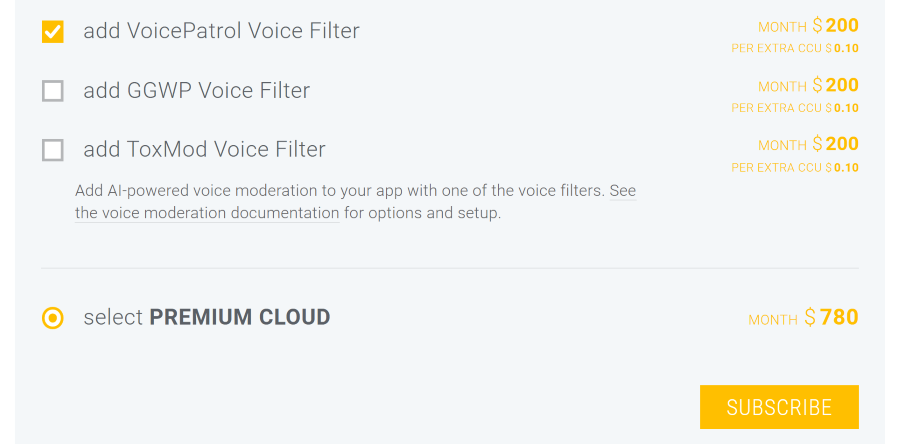
Only one voice filter runs on an app at a time. To switch to another voice filter, close the running one first.
Configure the Plugin
Once the add-on is active, the Plugins section of the app's Manage page offers the plugin of the subscribed voice filter.
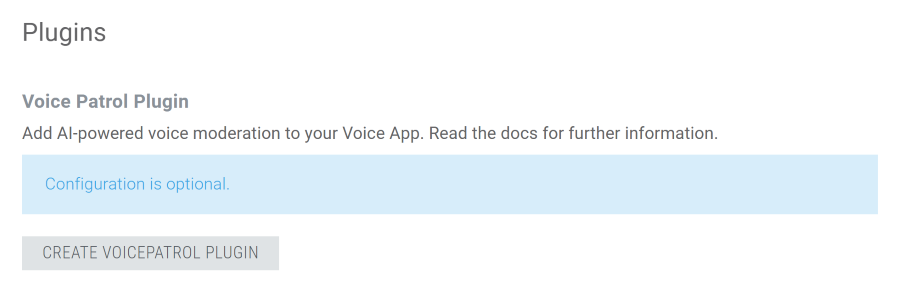
- Click Create [...] Plugin.
- Enter the settings of your provider, see the tables below.
- Click Save.
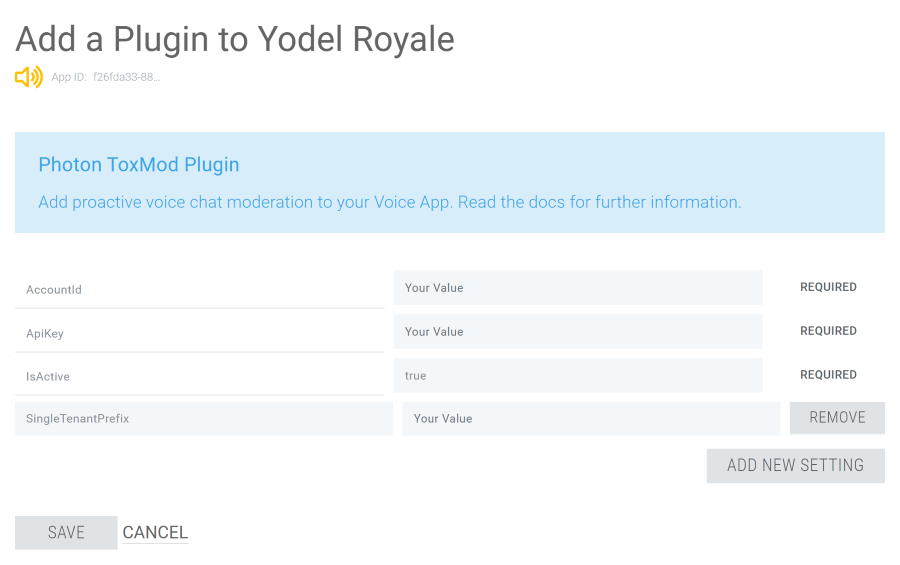
The Plugins section lets you edit or delete the configuration later.
ToxMod
| Key | Required | Description |
|---|---|---|
ApiKey |
yes | The API key used to authenticate with the ToxMod API. |
AccountId |
yes | The name of the account used to authenticate with the ToxMod API. |
IsActive |
yes | false disables the forwarding without removing the plugin setup. |
SingleTenantPrefix |
no | A value provided by Modulate for their API. Usually empty. |
GGWP
| Key | Required | Description |
|---|---|---|
ApiKey |
yes | The API key used to authenticate with the GGWP API. |
IsActive |
yes | false disables the forwarding without removing the plugin setup. |
VoicePatrol
| Key | Required | Description |
|---|---|---|
ApiKey |
yes | The API key used to authenticate with the VoicePatrol API. |
IsActive |
yes | false disables the forwarding without removing the plugin setup. |
PlaySafe
PlaySafe is available on request. Create a ticket to have the PlaySafe plugin unlocked for your Voice app.
The plugin uploads short clips of each player's voice to PlaySafe, tells it when players mute or unmute each other, and sends a regular "still playing" signal per player. PlaySafe tells the plugin how much of the audio it wants to receive. PlaySafe sends its verdicts, for example a temporary voice ban, to your own backend through webhooks. To keep a banned player from being heard, return their id from your MutePollUrl. The plugin always reports the audio as 48 kHz mono, so set your Photon Voice recorders to 48 kHz.
| Key | Required | Description |
|---|---|---|
ApiKey |
yes | The API key of your product in the PlaySafe dashboard. |
RemoteSampling |
no | Default true. Sends only the share of the audio that PlaySafe asks for. false uploads everything that ForwardPercentage lets through. |
SessionPulseInterval |
no | Default 60. Seconds between the "still playing" signals of a player. 0 switches them off. |
ClipLength |
no | Default 15000. Maximum length of one uploaded clip in milliseconds. |
Common Options
These options work with all providers.
| Key | Description |
|---|---|
ForwardPercentage |
Percentage of rooms that are forwarded to the moderation provider. GGWP accepts lower values for testing. ToxMod expects 100. |
UseAnonIDs |
Forwards anonymized user ids and session ids. Applies to GGWP only. ToxMod requires UUIDs, so its ids are always anonymized with a method designed by Modulate. |
ForwardPrivateRooms |
Default true. A private room has IsVisible set to false, which is the default of the Photon Voice SDK. false forwards only public rooms, so you can moderate public rooms and leave private rooms alone. |
PrivateRoomSuffix |
If set, a room whose name ends with this suffix is created private (IsVisible = false). The suffix also marks private rooms in the moderation provider when ForwardPrivateRooms is true. |
MutePollInterval |
Default 5000. Interval in milliseconds between the requests for the list of muted users. |
MutePollUrl |
URL of an HTTP service on your backend that returns the list of globally muted users. The format is described below. |
The plugin polls MutePollUrl with a POST request whose application/json body lists the user ids of the active users:
JSON
{"users": ["user1", "user2", "user3"]}
The response is an application/json array with the user ids that are muted:
JSON
["user1", "user2"]
Additional Options for Enterprise Customers
The voice moderation integration is based on the Photon Server plugin architecture. Enterprise customers can run their own plugin in their Private Cloud, which adds the client features below. If you are interested in operating your own plugin, create a ticket.

Enterprise Client Features
Clients provide muting and proximity data to the plugin with a RaiseEvent operation using the system command event code 222. The event data is an object array with three fields:
- The first field is a byte with the subcode of the operation:
2for UpdateMute,3for UpdateProximity. - The second field is an integer or string array with the players (ActorNrs or UserIds).
- The third field is optional and sets the operation type:
0or unset is Set (the list replaces the muted players or the players in proximity),1is Remove (the players are removed from the list),2is Add (the players are added to the list).
Helper methods for PhotonTransport.cs of the Photon Voice SDK that send the mute and proximity commands:
C#
#if USE_VOICE_PLUGIN
    public void AddToProximity(IEnumerable<int> playersInProximity)
    {
        this.UpdateProximity(playersInProximity, CommandEventMethod.Add);
    }

    public void RemoveFromProximity(IEnumerable<int> playersInProximity)
    {
        this.UpdateProximity(playersInProximity, CommandEventMethod.Remove);
    }

    public void SetProximity(IEnumerable<int> playersInProximity)
    {
        this.UpdateProximity(playersInProximity, CommandEventMethod.Set);
    }

    private void UpdateProximity(IEnumerable<int> playersInProximity, CommandEventMethod method)
    {
        PluginCommand(CommandEventSubcode.UpdateProximity, playersInProximity, method);
    }

    public void AddMuted(IEnumerable<int> playersMuted)
    {
        this.UpdateMuted(playersMuted, CommandEventMethod.Add);
    }

    public void RemoveMuted(IEnumerable<int> playersMuted)
    {
        this.UpdateMuted(playersMuted, CommandEventMethod.Remove);
    }

    public void SetMuted(IEnumerable<int> playersMuted)
    {
        this.UpdateMuted(playersMuted, CommandEventMethod.Set);
    }

    private void UpdateMuted(IEnumerable<int> playersMuted, CommandEventMethod method)
    {
        PluginCommand(CommandEventSubcode.UpdateMute, playersMuted, method);
    }

    private void PluginCommand(CommandEventSubcode subCode, IEnumerable<int> players, CommandEventMethod method)
    {
        var data = new object[3];
        data[0] = (byte)subCode;
        data[1] = players.ToArray();
        data[2] = (byte)method;

        this.OpRaiseEvent(222, data, RaiseEventOptions.Default, SendOptions.SendReliable);
    }
#endif
Last updated on
Back to top