Fusion Godot Intro
Overview
Photon Fusion Godot brings scalable multiplayer networking to Godot Engine 4.6 as a drop-in GDExtension addon. You get room-based matchmaking, efficient state replication with late join support, forecast physics prediction and flexible RPCs. And better, everything is designed from the ground up to feel native to Godot's node-based workflow.
Fusion runs on the same battle-tested Photon Cloud infrastructure that powers thousands of live titles across every major platform. You do not need to provision or maintain any servers - Photon handles hosting, scaling and global region routing. Pricing is CCU-based with a free tier for development. See Pricing for plans and details.
Simple Connection and Matchmaking
Getting players into the same session is the first challenge when creating a multiplayer game. Fusion handles this end to end: game clients connect to Photon Cloud's global network of region clusters, and get matched into a room (a shared game session where players sync state and exchange RPCs), all done directly in GDScript (or C# with Godot .Net). Rooms are configurable with max player counts, custom properties and lobby filtering, so you can build anything from a quick-match to a private lobby system.
You do not need to provision or maintain any servers. Photon manages hosting, scaling and region routing worldwide.
See Connection & Matchmaking for the full API.
GDScript
Fusion.connect_to_photon("player_42", "us")  # "us" = Photon Cloud region
Fusion.connected_to_photon.connect(func():
    var room_options := FusionRoomOptions.new()
    room_options.max_players = 8
    Fusion.join_or_create_room("arena", room_options)
)
One SDK, Two Network Modes
Different multiplayer games have different authority needs. A co-op sandbox and a competitive shooter require fundamentally different trust models. Fusion supports both through the same SDK: Shared-Authority and Client-Server.
In Shared-Authority, every client owns and simulates its own objects locally, while the Photon server maintains a stateful cache of the world. Replication works at the property level - only changed values are distributed, keeping bandwidth low. When a new player joins mid-match, they receive the full state snapshot automatically.
In Client-Server, a simulation server (the host or a dedicated server) runs game logic and validates all state changes. Clients send their input to the simulation server, which executes and writes the results. The Photon Cloud still handles state distribution, Area of Interest filtering and late join snapshots - splitting the load so the simulation server focuses on gameplay. Clients predict locally for responsive feel, and corrections are applied when the authoritative state arrives.
Both topologies use the same core workflow: connect via Fusion, spawn objects with FusionSpawner, send RPCs through Fusion.rpc() and configure replication in the inspector. The replicator node differs by topology: FusionSharedReplicator for Shared-Authority, FusionServerReplicator for Client-Server. Both share the same core replication features (custom properties, smoothing, AOI); FusionServerReplicator additionally supports input queuing and prediction.
See Choose a Topology to decide which fits your game.
Engine-First Integration
Fusion was designed with Godot's idioms in mind. The replicator (FusionSharedReplicator or FusionServerReplicator depending on topology) is a regular child node, add it to any spawnable scene and it handles networking for that object tree. There are no special base classes to inherit from, no complicated custom node types to learn and also no engine rebuild (Fusion is a GDExtension you can use with the stock engine, including the version from Steam).
You write gameplay code in GDScript, use the scene tree, connect signals and configure properties in the inspector exactly as you would in a single-player project.
Spawning networked objects follows the same pattern: register a packed scene with FusionSpawner, call spawn() and it will be created on every client in the same room.
The Quick Start Guide walks through a full example in under 10 minutes.
GDScript
var player_scene = preload("res://player.tscn")
spawner.add_spawnable_scene(player_scene)
var player = spawner.spawn()
Smooth Physics and Transform Sync
You do not need to implement any of this manually. Set the built-in root transform replication mode to AUTO and Fusion detects the node type, picks the right smoothing strategy and syncs the appropriate properties (position, rotation, velocity) automatically.
And while network replication usually updates around 30 times per second, players also expect at least smooth 60 fps motion. For regular nodes like CharacterBody or Node3D, Fusion auto-replication comes with render-frame accurate interpolation that smoothly blends toward the latest state coming from the object owner.
For RigidBody nodes (2D and 3D), it goes further with forecast physics prediction, which extrapolates where the body should be using its last known velocity and gravity, then gently correcting drift when the next update arrives. Forecast is fully configurable and works great for Wheeled Vehicles, Boats and many other twitchy physics cases.
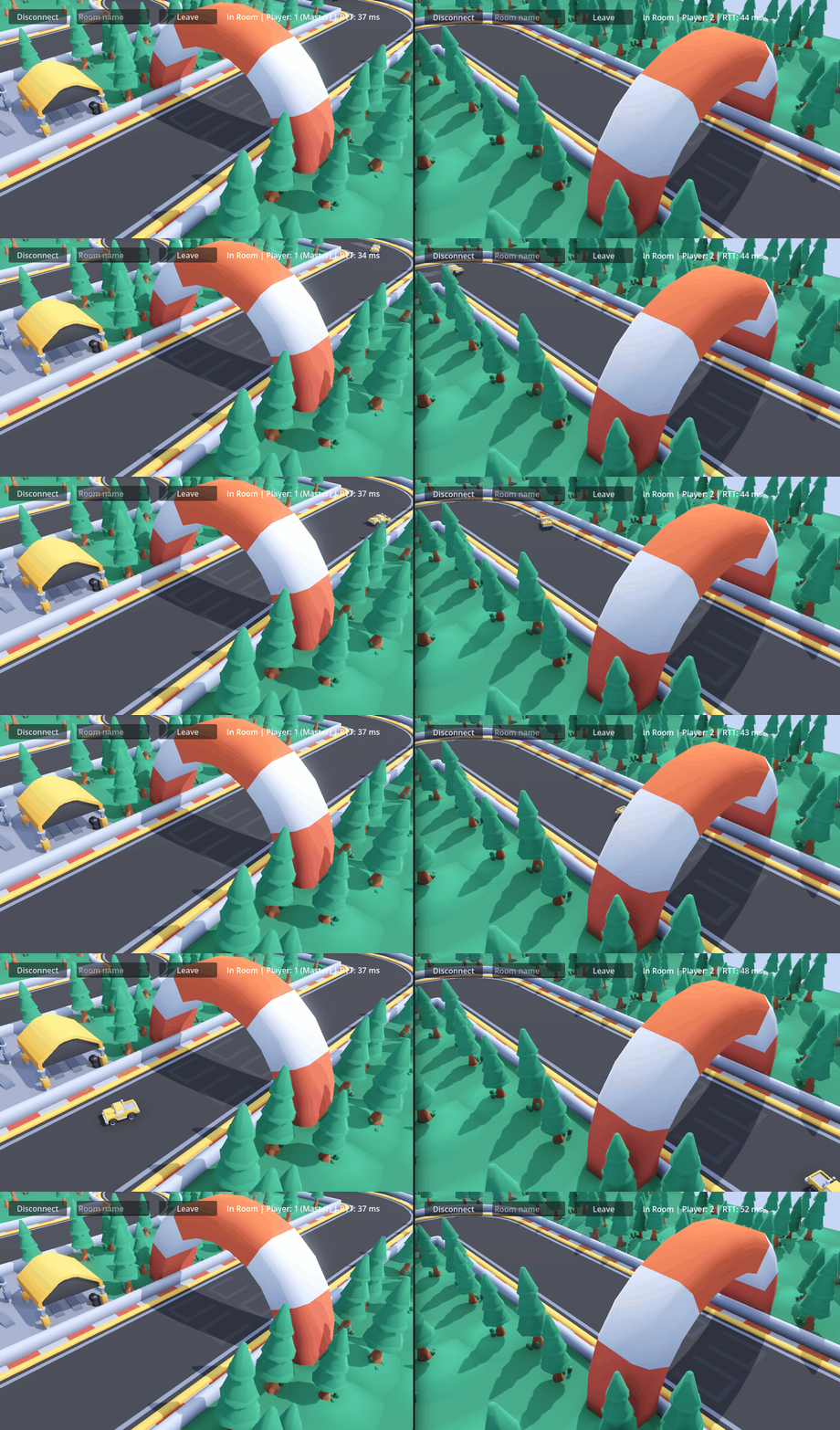
Stiffness, damping and teleport thresholds are all tunable in the inspector for fine control.
See Physics Replication for tuning guidelines.
Custom RPCs
Replication keeps continuous state in sync, but games also need one-shot events, like a weapon firing, a chat message, or activating an ability. RPCs let any client invoke a function on other clients without storing anything in the replication buffer. Fusion provides three target strategies: send to everyone, send to a specific role for that object (master client or owner) or send to a specific player by ID.
RPCs also come in two flavors: object-targeted (routed through the object's replicator to a specific networked object) and broadcast (delivered globally to all registered receivers). Both use Godot's standard @rpc annotation and support most built-in types including networked node root references.
See RPCs for the full reference.
GDScript
@rpc("any_peer", "call_local")
func take_damage(amount: int):
    health -= amount

func attack():
    Fusion.rpc(take_damage, 25)
Where to Go Next

Last updated on
Back to top