mocopi Photon Bridge
Overview
The mocopi Photon Bridge sample demonstrates how to share remotely motion data received from local Sony mocopi sensors.
The mocopi sensors’ data are sent to the mocopi mobile application, which itself sends it over UDP to an application using the mocopi Receiver SDK. The application will then use the Photon SDK to share the motion data with remote users.

Technical Info
- This sample uses the Shared Mode topology,
- The project has been developed with Unity 6000.0.58f2, Fusion 2.0.9, Mocopi Receiver 1.1.0
Before you start
To run the sample :
- Create a Fusion AppId in the PhotonEngine Dashboard and paste it into the
App Id Fusionfield in Real Time Settings (reachable from the Fusion menu). - Send the motion data to the machine running the sample, or you can also send it using BVH Sender.
- Then load the scene and press
Play.
Download
| Version | Release Date | Download |
|---|---|---|
| 2.0.9 | 4月 17, 2026 | mocopi Photon Bridge 2.0.9 |
Motion Data Synchronization Options
The mocopi Receiver SDK showcases how to retrieve the mocopi motion data, and change an avatar pose using them.
Once the receiver has collected the data, there are 2 main options for sending the data to remote users:
- Position synchronization: Shares the local position/rotation of bones, computed from the motion data, to remote users.
- Motion Data synchronization: Shares directly the motion data, and remote users can use them as they wish.
Option 1: Position Synchronization
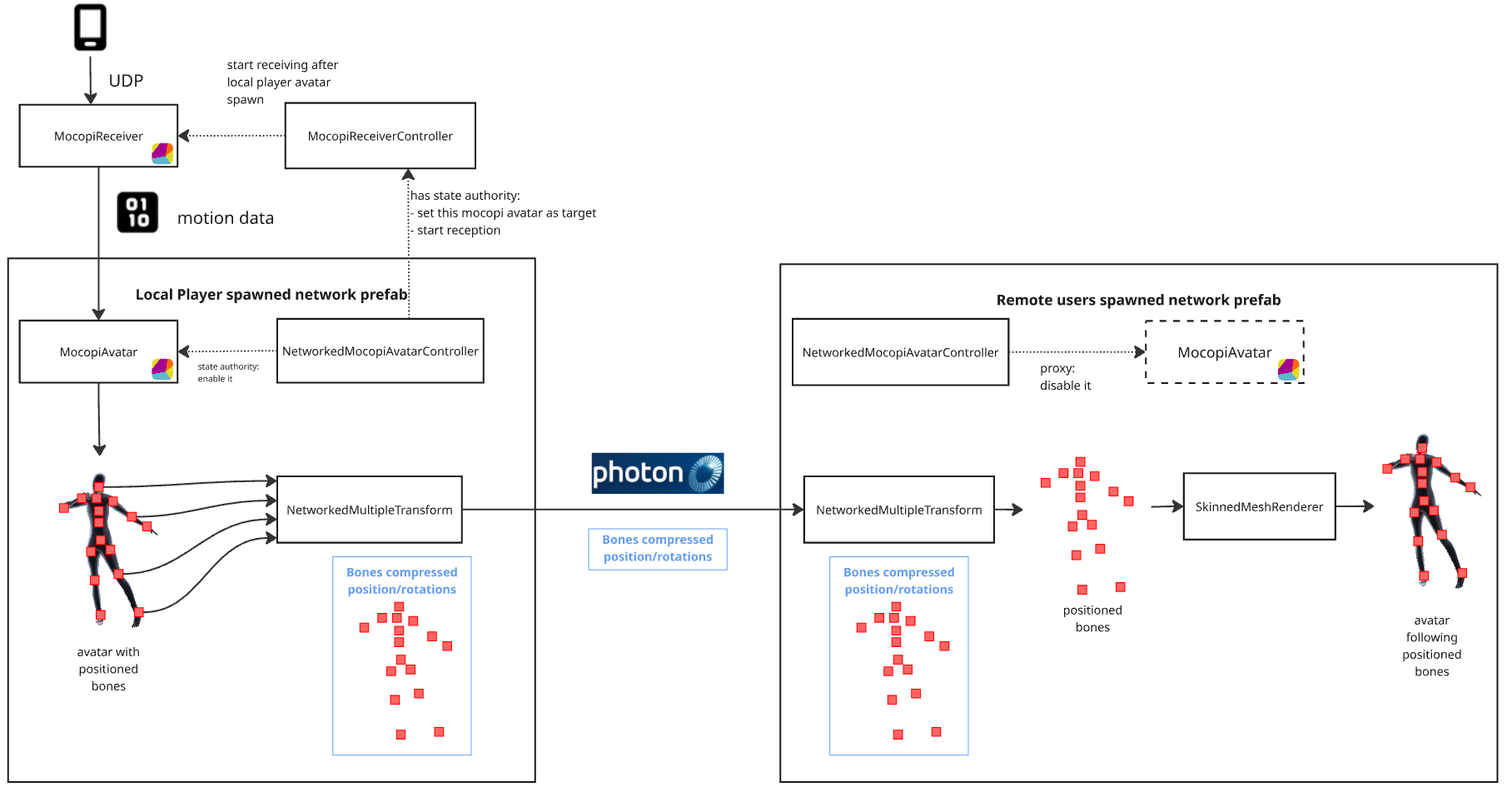
The position synchronization option is more straightforward, and will probably be relevant for most use cases. This option lets the MocopiAvatar script of the mocopi receiver SDK position the avatar's bones locally as usual, then use Fusion components to synchronize their bones to remote users.
On the remote user's side, bone positions are then interpolated using Fusion's interpolation. Finally, the skinned mesh renderer will position the avatar mesh properly.
Option 2: Motion Data Synchronization
The motion data synchronization option lets you collect motion data from the MocopiSimpleReceiver in the mocopi Receiver SDK, and send it directly to remote users.
On the remote user's side, bone positions can either be used to feed a MocopiAvatar variant. In this case, the MocopiAvatars own interpolation will be used to move an avatar. Alternatively, bone positions can be interpolated using Fusion's interpolation, allowing them to be used for any purpose.
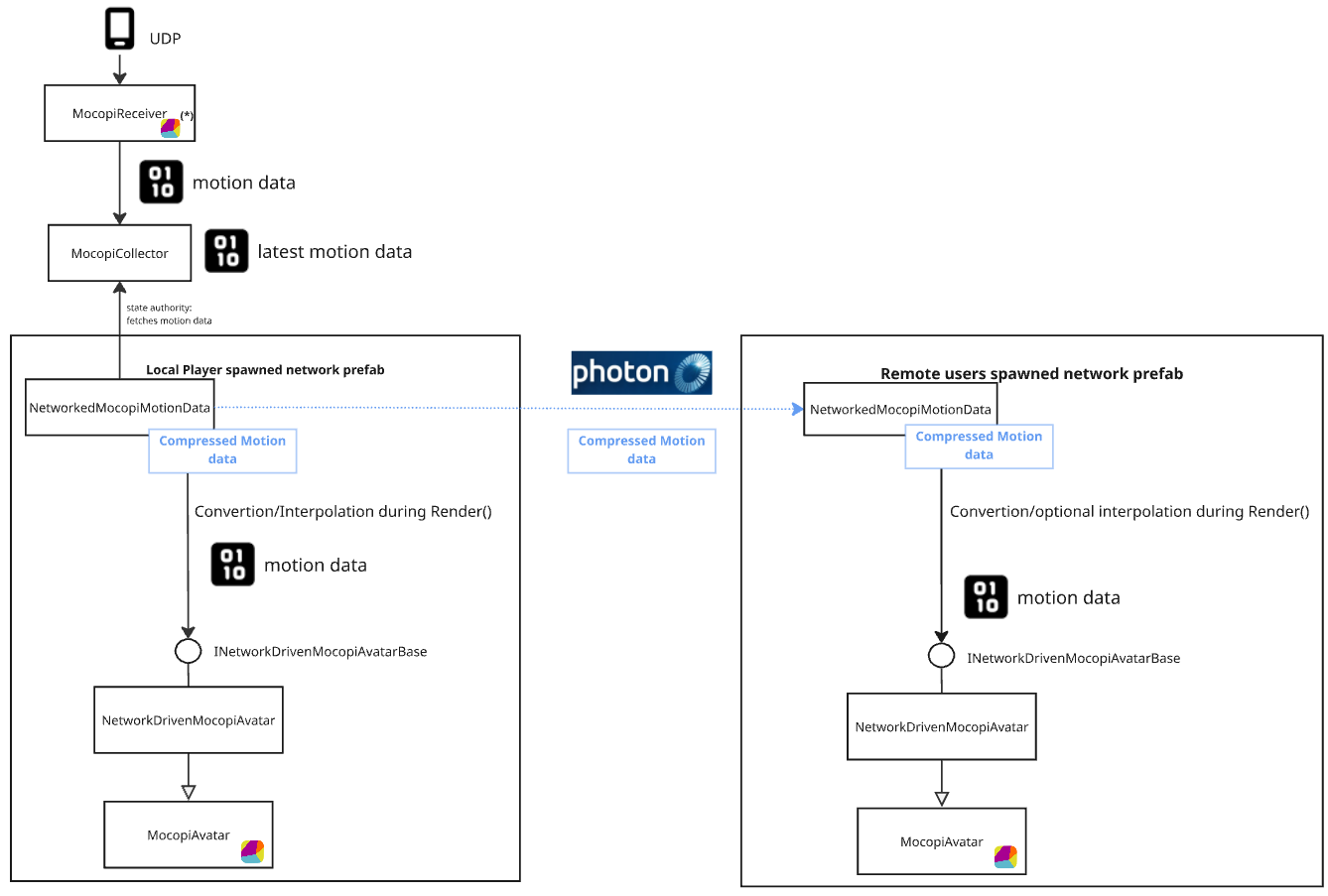
Note that this second option implementation requires some small editions to the mocopi SDK, that are provided in the sample project.
Those changes are here to simplify the integration with the mocopi SDK, by allowing subclassing, and avoid code duplication. Don't hesitate to contact us if you want to use this second option and need help applying those changes on an updated mocopi SDK.
Project Content
The project contains 4 scenes:
| Path | Description |
|---|---|
| /Scenes/NTSync/NetworkMultipleTransformVersion | Position Synchronization example using NetworkMultipleTransform |
| /Scenes/NTSync/NetworkTransformVersion | Position Synchronization example using regular NetworkTransform |
| /Scenes/MotionDataSync/NetworkedMotionData_MocopiAvatarVersion | Motion Data Synchronization example using custom MocopiAvatar |
| /Scenes/MotionDataSync/NetworkedMotionData_SimpleRepresentationVersion | Motion Data Synchronization example using mocopi simple representation instead of MocopiAvatar |
NetworkMultipleTransformVersion
This is the recommend version for most use cases.
Position synchronization could be done by placing a NetworkTransform on each of the 27 bones. However, since the range of bone movement is limited (the bones cannot move far from their parent), using a specific component helps optimize bandwidth usage.
So the NetworkMultipleTransform component mimics Fusion’s NetworkTransform logic, in a more simple way suited for that needs.
- All 27 bones can be synchronized using a single component (reducing overhead from multiple
NetworkTransformcomponents) - Position and rotation are compressed
NetworkTransformVersion
This version uses regular NetworkTransforms for position synchronization. While it uses more bandwidth and is therefore less practical than other versions, it can be seen as a very simple example that requires only basic Fusion usage knowledge.
NetworkedMotionData_MocopiAvatarVersion
Note that this might not be needed in most cases.
This is an reference implementation of motion data synchronization. It does not perform interpolation, instead relying on MocopiAvatars own interpolation.
For advanced developers who need full control over raw motion data, this version can be a relevant choice. This is the same whether using the Fusion interpolation option or subclassing NetworkedMocopiMotionData to implement custom data processing in Render() calls.
NetworkedMotionData_SimpleRepresentationVersion
This implementation does not use a MocopiAvatar component, and simply positions the bones so that the mesh renderer modifies the avatar mesh accordingly.
Last updated on
Back to top