Connection & Matchmaking
Before any game objects can sync, players must connect to a server and be grouped into a shared session. Photon uses a two-tier architecture: clients first connect to a master server for matchmaking, then get routed to a game server hosting a room. A room is an isolated session where a fixed group of players share game state, exchange RPCs and replicate objects.
This page covers the full connection lifecycle, from initialization and server connection through room creation, joining and disconnection.
App ID Configuration
Fusion needs a Photon App ID to connect. There are two ways to provide it.
Project Settings (recommended) — set fusion/connection/app_id in Project Settings > Fusion > Connection. This is the default path and works for most projects.
Runtime override — call Fusion.set_app_id("your-app-id") before connecting. Use this when the App ID is determined at runtime: per-build flavor, remote config, feature flags, or anything else you cannot bake into Project Settings.
GDScript
# Runtime override — must be called before connect_to_photon()
Fusion.set_app_id("my-runtime-app-id")
The app_version is always read from Project Settings (fusion/connection/app_version) unless you pass it explicitly to connect_to_photon().
Connecting
Use connect_to_photon() to connect to the Photon Cloud. All parameters are optional — empty values are filled from Project Settings:
GDScript
# Simplest: everything from Project Settings
Fusion.connect_to_photon()

# With a specific user ID
Fusion.connect_to_photon("player_123")

# With a specific region (forces Cloud mode)
Fusion.connect_to_photon("player_123", "us")
Connection mode (Cloud vs Local) is determined by Project Settings > Fusion > Connection > Mode unless a region is explicitly provided.
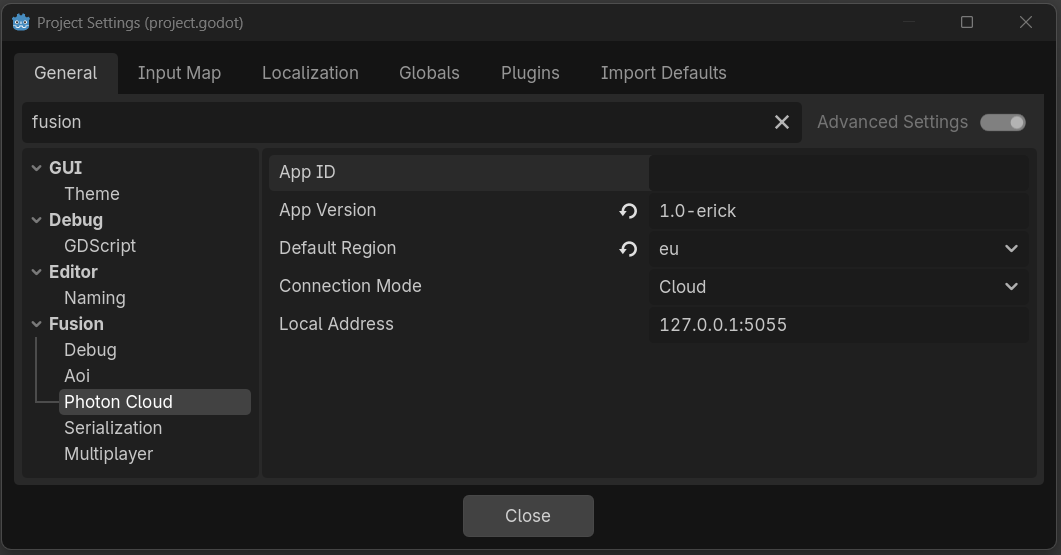
Connecting and Joining
Connecting and joining are separate steps. Connect to the Photon Cloud first, then join or create a room once the connection succeeds.
GDScript
Fusion.connect_to_photon("player_123", "us")

# Wait for connection, then join
Fusion.connected_to_photon.connect(func():
    Fusion.join_or_create_room("lobby")
)
For local development, set fusion/connection/mode to Local in Project Settings.
The call to Fusion.connect_to_photon adds an internal processor node to the scene tree. When executing from within _ready() or _enter_tree(), its call should be deferred: Fusion.connect_to_photon.call_deferred("player_123", "us")
Room Operations
A room is a shared session where players sync objects and exchange RPCs. Fusion provides methods to create, join or leave rooms.
GDScript
# Create a new room (fails if it already exists)
Fusion.create_room("my_room", options)

# Join an existing room (empty name = random room)
Fusion.join_room("my_room", options)

# Join if exists, create if not
Fusion.join_or_create_room("my_room", options)

# Leave current room (stays connected for re-matchmaking)
Fusion.leave_room()
The options parameter is an optional instance of FusionRoomOptions. Omit it or pass null for defaults.
Room Options
Pass an FusionRoomOptions instance to customize room behavior when creating or joining.
| Key | Type | Description |
|---|---|---|
max_players |
int | Maximum players allowed in the room |
is_visible |
bool | Whether the room appears in lobby queries |
is_open |
bool | Whether the room accepts new players |
player_ttl_ms |
int | Milliseconds before an inactive player slot is freed |
empty_room_ttl_ms |
int | Milliseconds before an empty room is destroyed |
lobby_properties |
Array[String] | Which custom properties are visible in lobby listings |
plugins |
Array[String] | Server plugin names to load for this room |
custom_properties |
Dictionary of bool, int, float, or String | Custom room property (e.g. "map", "game_mode") |
Connection Status
Fusion tracks a linear state machine from disconnected through connecting, connected, joining and finally in-room.
STATUS_DISCONNECTED(0) - not connectedSTATUS_CONNECTING_TO_PHOTON(1) - establishing connection to the Photon CloudSTATUS_CONNECTED_TO_PHOTON(2) - connected to the Photon Cloud, can join roomsSTATUS_JOINING_ROOM(3) - join in progressSTATUS_IN_ROOM(4) - in a room, can spawn and syncSTATUS_ERROR(5) - connection error
Query methods: is_initialized(), is_connected_to_photon(), is_in_room(), is_master_client(), get_local_player_id(), get_network_time().
Signals
Use signals to react to connection and room events without polling status each frame.
room_joined- successfully entered a room (safe to spawn objects)room_left- left a room (voluntarily or disconnected)connection_failed(error: String)- connection attempt failedconnection_status_changed(status: int)- status changedconnected_to_photon- connected to the Photon Cloudplayer_joined(player_id: int, user_id: String)- a remote player joined the roomplayer_left(player_id: int, is_inactive: bool)- a remote player left the room.is_inactiveis true while the peer is within the room'splayer_ttl_msgrace window and may still rejoinscene_load_requested(index: int, path: String)- scene change requested (CUSTOM load mode)scene_ready(index: int)- all scene objects registered after loadscene_unloaded(index: int, path: String)- scene unloaded
Disconnecting
Call disconnect_from_photon() to cleanly leave the current room and close the Photon Cloud connection.
GDScript
Fusion.disconnect_from_photon()
Example
A complete script that connects to the Photon Cloud, joins a room with custom options and prints when the player enters.
GDScript
extends Node

func _ready():
    Fusion.room_joined.connect(_on_room_joined)
    Fusion.connection_failed.connect(func(e): print("Failed: ", e))

    Fusion.connect_to_photon.call_deferred("player_%d" % randi())

    Fusion.connected_to_photon.connect(func():
        var options := FusionRoomOptions.new()
        options.max_players = 8
        options.is_visible = true
        options.lobby_properties = ["map"]
        options.custom_properties = {"map": "arena"};
        Fusion.join_or_create_room("lobby", options)
    )

func _on_room_joined():
    print("In room as player ", Fusion.get_local_player_id())
Last updated on
Back to top