Fusion MR Room Minimap
Overview
The MR Room Minimap sample demonstrates how Fusion can be used to mix colocalized users remote users in a mixed reality scenario, using the Anchors add-on.
Note: this sample focus on manual re-positioning of the various user rooms. To see a sample with an automatic mixed reality rooms alignment, designed to progressively build a common working table, see the Collaboration Desk sample.

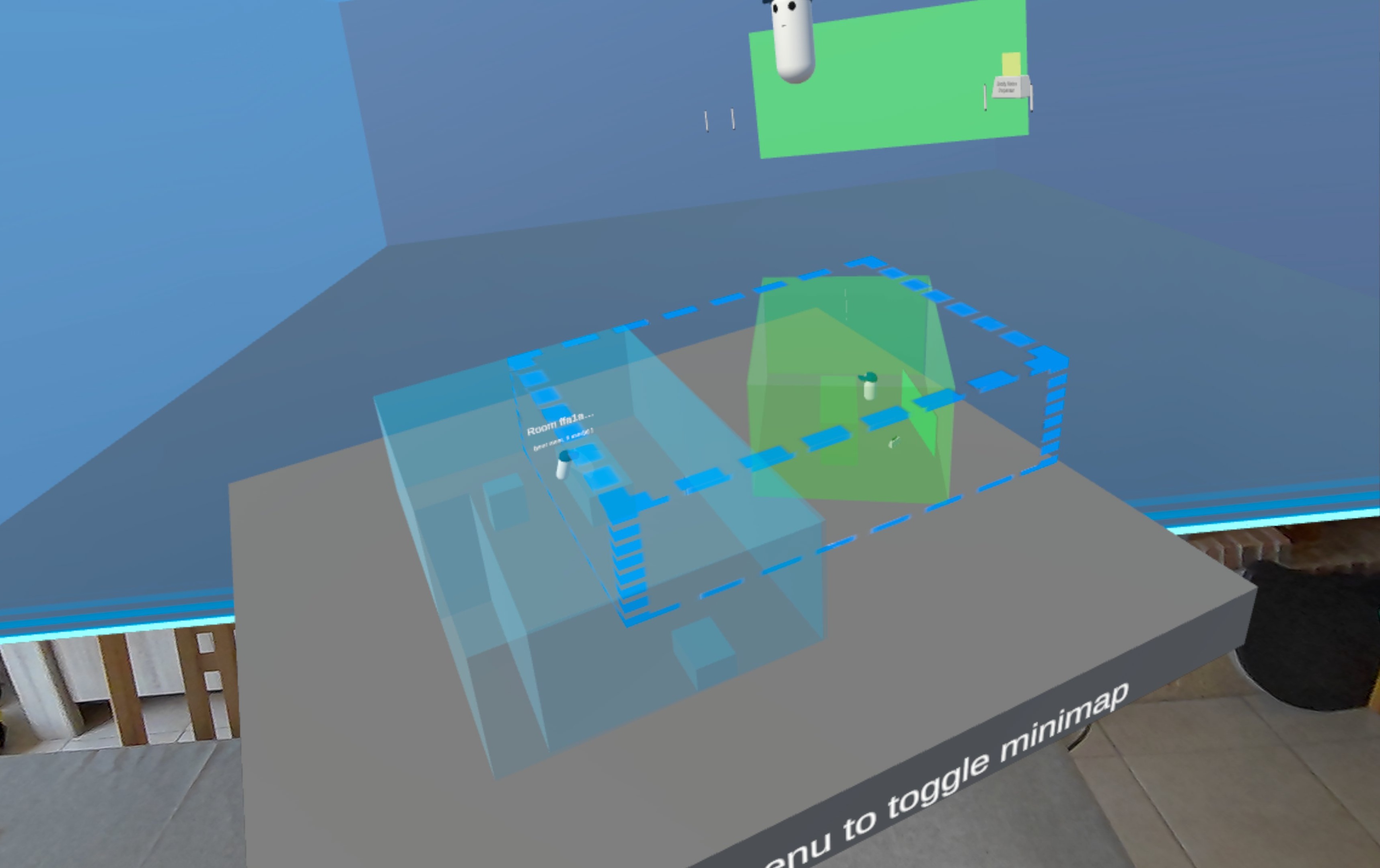
Each user has locally a minimap, showing:
- remote users and their room walls
- the combined remote room provided by the Anchors add-on, to give a VR background to remote users and objects outside of the local real life room
- virtual objects marked to be on the map (here, a magnetic board, and post-it dispensers)
Technical Info
This sample uses the
Shared Authoritytopology,The project has been developed with Unity 6.3, Fusion 2 and tested with the following packages :
- Meta XR Core SDK 85.0.0 : com.meta.xr.sdk.core
- Meta MRUK 85.0.0 : com.meta.xr.mrutilitykit
- OpenXR plugin 1.16.1 : com.unity.xr.openxr
Headset firmware version: v85
Before you start
To run the sample :
Create a Fusion AppId in the PhotonEngine Dashboard and paste it into the
App Id Fusionfield in Real Time Settings (reachable from the Fusion menu).Create a Voice AppId in the PhotonEngine Dashboard and paste it into the
App Id Voicefield in Real Time Settings
Download
| Version | Release Date | Download |
|---|---|---|
| 2.0.12 | 4월 14, 2026 | Fusion MR Room Minimap 2.0.12 |
Folder Structure
The main folder /MRRoomMinimap contains all elements specific to this sample.
The /Photon folder contains the Fusion and Photon Voice SDK.
The /Photon/FusionAddons folder contains the Industries Addons used in this sample.
The /Photon/FusionAddons/FusionXRShared folder contains the rig and grabbing logic coming from the VR shared sample, creating a FusionXRShared light SDK that can be shared with other projects.
The /XR folder contains configuration files for virtual reality.
Architecture overview
The MR Room Minimap sample is based on the XR Shared add-on, notably for the rig synchronization.
Aside from this base, the sample, like the other XR samples, contains some extensions to the XR add-ons, to handle some reusable features like marker detection, mixed reality rooms repositioning, large data synchronization or touching.
Sticky notes and drawing pens
The simple illustrating drawing use case is provided by:
- the TextureDrawing,
- the LineDrawing,
- and the StickyNotes add-ons.
Mixed reality rooms handling
The Anchors addon provides:
- the colocation logic, to ensure users in the same room can share the same spatial reference, after scanning a common visual marker,
- the combined remote room, providing a VR background context for remote users or objects when they are outside of the local room limits,
- the room repositioning logic,
- the minimap itself
SceneFocusedElement components have been placed on the post-it dispensers and magnetic board, to ensure they appear on the minimap, and have a virtual background behind them if outside of the local user real life room.
To appear on the minimap, the player network rig contains:
- a
NetworkIRLRoomMembercomponent (it also enable colocation scenario) - a
NetworkIRLRoomAssociatedPartcomponent, with aUserpart type
Hardware rig construction
The hardware rig has been generated by the Meta's core building blocks, and is synchronized to the network rig with the MetaCoreIntegration Addon's components.
Network Connection
The network connection is managed by the Meta building blocks [BuildingBlock] Network Manager && [BuildingBlock] Auto Matchmaking.
[BuildingBlock] Auto Matchmaking set the room name and Fusion topology (Shared mode).
[BuildingBlock] Network Manager contains the Fusion's NetworkRunner. The UserSpawnercomponent, placed on it, spawns the user prefab when the user joins the room and handles the Photon Voice connection.
Used XR Addons & Industries Addons
To make it easy for everyone to get started with their 3D/XR project prototyping, we provide a comprehensive list of reusable addons.
See Industries Addons for more details.
Here are the addons we've used in this sample.
XRShared
XRShared addon provides the base components to create a XR experience compatible with Fusion.
It is in charge of the players' rig parts synchronization, and provides simple features such as grabbing and teleport.
See XRShared for more details.
Voice Helpers
The VoiceHelpers addon is used for the voice integration.
See VoiceHelpers Addon for more details.
Anchors
The Anchors addon is used for colocation, room repositioning, the combined remote room, and the room minimap.
See Anchors Addon for more details.
Dynamic Audio group
The dynamic audio group addon is used to enable users to chat together, while taking into account the distance between users to optimize comfort and bandwidth consumption. The ColocDynamicAudioGroupMember component ensures to also cut the voice transmission for colocalized users (as they are in the same real life room, no need to sync their voice when they are close).
See Dynamic Audio Group XR Addon for more details.
Data Sync Helpers
This addon is used here to synchronize the 3D/2D drawing points, camera picture & sticky note drawing points.
See Data Sync Helpers XR Addon for more details.
Blocking contact
This addon is used to block 2D pens on post-it surfaces.
See Blocking Contact XR Addon for more details.
Sticky notes
This addon allows users to spawn sticky notes in the scene.
See Sticky Notes Addons for more details.
Texture Drawing
This addon is used to synchronized the texture edition on sticky notes.
See Texture Drawings for more details.
Magnets
Notes can be snapped on the board thanks to the Magnet addon.
See Magnet Addons for more details.
Meta Core Integration
The MetaCoreIntegration addon is used to network the Meta's building block rig, and synchronize players' hands.
See MetaCoreIntegration Addon for more details.
Feedback
The Feedback addon is used to centralize sounds used in the application and to manage haptic & audio feedbacks.
See Feedback Addon for more details.
3rd Party Assets and Attributions
The sample is built around several awesome third party assets:
- Meta XR SDKs
- Meta Lipsync
- Meta Sample Framework hands
- Sounds
- Overview
- Architecture overview
- Sticky notes and drawing pens
- Mixed reality rooms handling
- Hardware rig construction
- Used XR Addons & Industries Addons
- XRShared
- Voice Helpers
- Anchors
- Dynamic Audio group
- Data Sync Helpers
- Blocking contact
- Sticky notes
- Texture Drawing
- Magnets
- Meta Core Integration
- Feedback
- 3rd Party Assets and Attributions