Sample Project
Overview
The Playground is a small top-down room for learning the Game Tags addon by playing with it. Every rule in it is a tag rule, every character shows its tags above it and the Game Tags Log explains each decision in terms of tags.
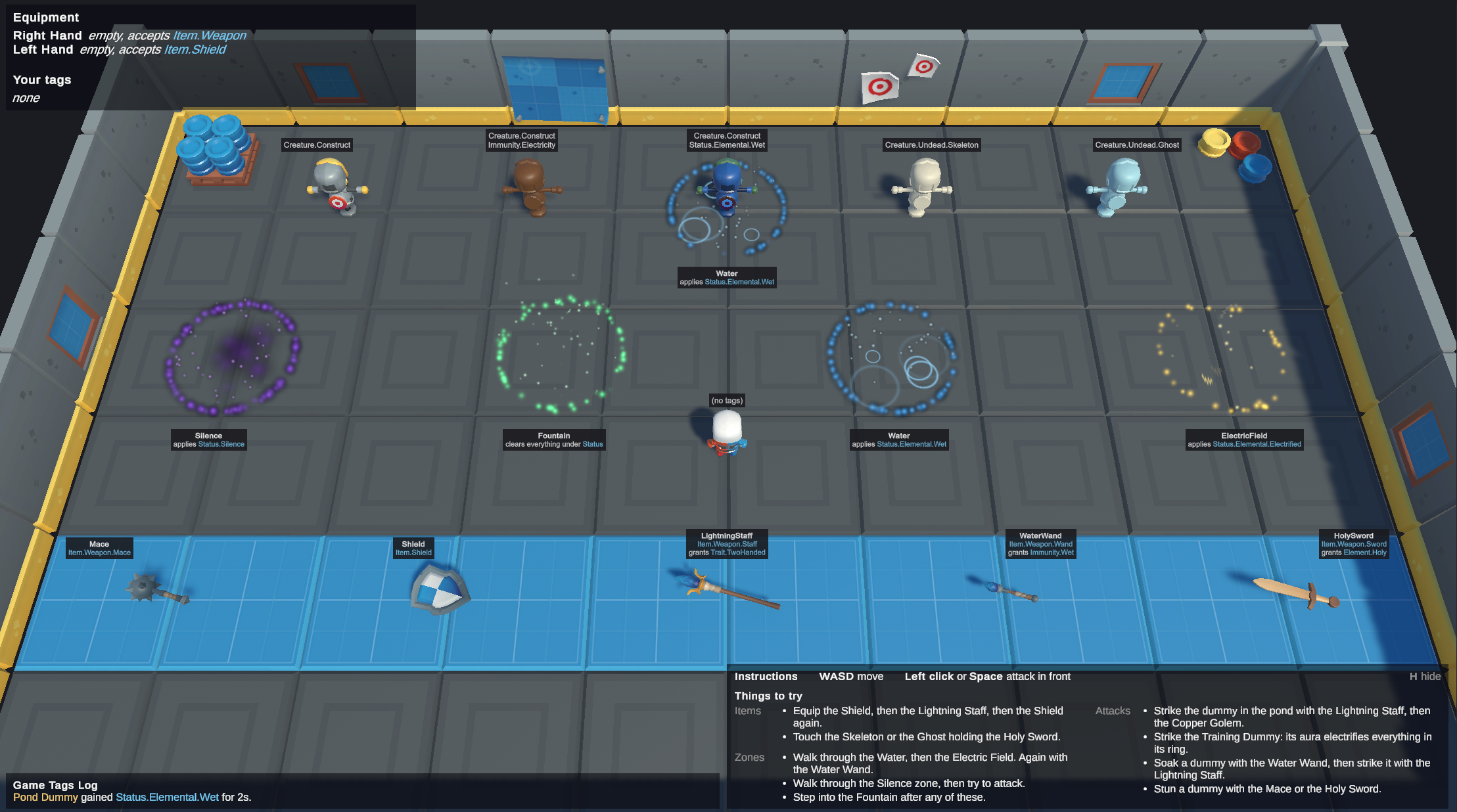
The rules are not in code. Each one is a tag list on an asset, picked in the inspector with the addon's tag picker, and the systems only follow those lists.
Importing the Sample
The sample comes with the Game Tags package.
Open Window > Package Manager, select Photon Quantum Game Tags, open the Samples tab and click Import next to Playground.
Unity copies the sample into Assets/Samples.
Open Scenes/GameTagsPlayground.unity in the imported folder and press Play.
There is nothing else to set up: the scene's runner already points at the sample's config and systems config.
Controls
W,A,S,D- MoveLeft clickorSpace- Attack in front of the character, with the item in the Right HandH- Show or hide the instructions
What to Try
| Try | What happens | What it shows |
|---|---|---|
| Walk over any weapon | It goes in the Right Hand, which accepts Item.Weapon. |
A parent tag matches every tag under it: Item.Weapon.Mace is an Item.Weapon. |
| Equip the Shield, then the Lightning Staff | The Lightning Staff grants Trait.TwoHanded. The Left Hand is blocked while you have it, so the Shield drops. |
Items granting tags, and a slot rule that reads the wearer's tags. |
| Then pick up the Shield again | The Lightning Staff drops instead, because it grants the tag that blocks the Left Hand. | Comparing two tag collections with ContainsAny. |
| Walk through the Water, then the Electric Field | Wet and Electrified together trigger the Conduction reaction, which stuns you. You can't move or attack while stunned. | Reacting to OnGameTagsChanged with HasAll. Movement is blocked by Status.CrowdControl, so Status.CrowdControl.Stun blocks it. |
| Do it again holding the Water Wand | Wet is refused, because the wand grants Immunity.Wet. Without Wet, Conduction never triggers. |
An effect refused by a tag the target has. |
| Strike the dummy in the pond with the Lightning Staff | The same reaction stuns the dummy. | Rules apply to every entity, not only the player. |
| Strike the Copper Golem with the Lightning Staff | Nothing happens: Immunity.Electricity is one of its prefab's initial tags. |
Initial tags on entity prototypes. An immunity works the same whether a prefab or an item gives it. |
| Strike the Training Dummy with the Lightning Staff | It gets an electrified aura, and everything inside its ring gets electrified too. | A tag that brings a component with it. See The Electrified Aura. |
| Walk through the Silence zone, then attack | Attacking is blocked by Status.Silence. Moving is not. Silence never runs out: it stays until the Fountain clears it. |
Two systems reading different tag lists, and an effect with no timer. |
| Touch the Skeleton or the Ghost while holding the Holy Sword | Either one is knocked down. The Holy touch rule is Element.Holy touching anything under Creature.Undead. |
One rule covering Creature.Undead.Skeleton and Creature.Undead.Ghost. |
| Step into the Fountain after any of these | It clears everything under Status. |
Clear with clearDescendants: true. |
Add a Rule Without Code
This is the clearest demonstration of the addon and takes a minute:
- Open Tools > Quantum > Game Tags and add
Status.CrowdControl.Freeze. - Duplicate
Configs/Effects/Stun.asset, name it Freeze and set its Tag toStatus.CrowdControl.Freeze. - Select
Configs/Reactions/Conduction.assetand set its Applies to Freeze. - Press Play and walk through the Water, then the Electric Field.
You are frozen instead of stunned: you can't move or attack and your character is tinted like a stunned one.
No code knows about Status.CrowdControl.Freeze.
Movement, attacking and the tint all read Status.CrowdControl, so they cover it, and the Fountain's Status covers it too.
How It Is Built
Rules on Assets
Every tag rule is a field on one of these assets.
| Asset | Tag fields | In the sample |
|---|---|---|
PlaygroundConfig |
MovementBlockedBy, CastingBlockedBy, the LeftHand and RightHand slots, ElectrifiedTag, Reactions, KnockdownRules |
Movement is blocked by Status.CrowdControl. Attacking is blocked by Status.CrowdControl and Status.Silence. The Right Hand accepts Item.Weapon. The Left Hand accepts Item.Shield and is blocked while the wearer has Trait.TwoHanded. The Holy touch knockdown rule is Element.Holy against Creature.Undead. |
EffectConfig |
Tag, BlockedBy |
Wet (2 s, blocked by Immunity.Wet), Electrified (3 s, blocked by Immunity.Electricity), Electrified Aura (2 s, applies Status.Elemental.Electrified.Indirect), Stun (2 s) and Silence (no timer). |
ItemConfig |
Tags, Grants, CastEffect |
Mace and Holy Sword stun. The Holy Sword grants Element.Holy. The Lightning Staff electrifies and grants Trait.TwoHanded. The Water Wand wets and grants Immunity.Wet. The Shield fits the Left Hand and has no attack. Each item also names its own pickup prefab in Pickup. |
ZoneConfig |
Applies, ClearsWithDescendants |
Water applies Wet, the Electric Field applies Electrified, the Silence zone applies Silence and the Fountain clears Status with its descendants. |
ReactionConfig |
WhenHasAll, Clears, Applies |
Conduction: when a character has both Status.Elemental.Wet and Status.Elemental.Electrified, clear both and apply Stun. |
PlaygroundConfig is referenced from the RuntimeConfig through a GameTagsPlaygroundConfig field.
The dummies' initial tags are on their prefabs: Creature.Construct on the Training Dummy, Creature.Construct and Immunity.Electricity on the Copper Golem, Creature.Undead.Skeleton on the Skeleton and Creature.Undead.Ghost on the Ghost.
Systems
In the order of Configs/Game/PlaygroundSystemsConfig.asset, after Quantum's core systems:
| System | What it does |
|---|---|
PlayerSpawnSystem |
Creates a character for each player that joins. |
MovementSystem |
Moves the character from input, unless it has a tag in MovementBlockedBy. |
EquipmentSystem |
Equips the items a player walks over. An item goes in the hand whose Accepts matches its tags and the item already there drops. An item's Grants go on the wearer. A hand can't hold an item while the wearer has a tag in its BlockedWhileWearerHas. |
CastingSystem |
On attack, applies the Right Hand item's CastEffect to every character in a circle in front of the player, unless the player has a tag in CastingBlockedBy. |
ZoneSystem |
Every tick, applies a zone's effect to whoever stands in it and clears its ClearsWithDescendants tags. |
ElectrifiedAuraSystem |
Gives each entity with exactly Status.Elemental.Electrified an aura and applies the Electrified Aura effect to the characters inside it. See The Electrified Aura. |
KnockdownSystem |
Knocks a dummy down when a player bumps into it and a knockdown rule matches both, and stands it up again after 3 seconds. |
EffectSystem |
Applies effects through the ApplyEffect signal and clears timed tags when their timer ends. |
ReactionSystem |
On OnGameTagsChanged, applies the first reaction whose WhenHasAll the character has. |
Effects
An effect is a tag with an optional timer.
The tag lives in GameTags.
The sample's TimedTags component only remembers when to clear it, and forgets the timer if something else clears the tag first.
An effect that does not expire, such as Silence, sets the tag and no timer.
Attacks, zones, auras and reactions all apply effects by raising the sample's ApplyEffect signal, and only EffectSystem handles it.
That keeps the immunity check and the timers in one place:
- If the target has a tag in the effect's
BlockedBy, the effect is refused. - Otherwise the timer restarts.
- If the target doesn't have the tag yet, it is set on the target's
GameTagscomponent.
Applying an effect the target already has only restarts its timer and raises no signal, which is what lets zones and auras reapply their effect every tick.
Equipment
Worn items are not entities.
The Equipment component stores the item in each hand as an AssetRef<ItemConfig>, and EquipmentView shows its model.
Equipping the Shield, then the Lightning Staff, shows two kinds of check:
- The Staff's tags include
Item.Weapon.Staff, whichContainsAnyof the Right Hand'sAccepts(Item.Weapon), so it goes in the Right Hand. - Its
Grantsare set on the wearer'sGameTags, so the wearer now hasTrait.TwoHanded. - The wearer
HasAnyof the Left Hand'sBlockedWhileWearerHas, so the Shield drops.
Picking the Shield up again, the new item wins.
The Left Hand is blocked by Trait.TwoHanded, and the Staff's Grants ContainsAny of that list, so the Staff drops instead.
Dropping an item clears its Grants from the wearer, and the item goes back on the floor as its own pickup prefab, where it was picked up.
Reactions
ReactionSystem listens to OnGameTagsChanged and checks the reactions in order.
Only the first match is applied: it clears the reaction's Clears and applies its Applies.
Clearing and applying raise OnGameTagsChanged again.
By then the reaction no longer matches, because Clears removed part of its condition, and any reaction the new tags complete is applied by that nested call.
The Electrified Aura
Most rules in the sample run when something happens: a tag changes, a player touches a dummy, an attack lands. Electrified auras run every tick, because an electrified character electrifies the characters around it for as long as it stays electrified.
Checking the tags of every character every tick would work, but a Quantum filter is cheaper, so the tag brings a component with it. This is the pattern described in Tags and Per-Tick Logic.
ElectrifiedAuraSystem does both halves:
- It listens to
OnGameTagsChangedandISignalOnComponentAdded<GameTags>, the second because an entity spawned with initial tags never raisesOnGameTagsChanged. The signal says that an entity's tags changed, not which tag, so it compares: does the entity have exactly the config'sElectrifiedTag, and does it have an aura? If not, it creates an aura entity with anElectrifiedAuracomponent and a trigger collider, or destroys it. - It filters for
ElectrifiedAurato move each aura with its source every tick. Its trigger callback applies the Electrified Aura effect to the characters inside it.
The Electrified Aura effect applies Status.Elemental.Electrified.Indirect, not Status.Elemental.Electrified.
That prevents an endless loop: if auras applied the tag itself, every character in an aura would get an aura of its own and two neighbors would keep each other electrified forever.
The Indirect tag sits under Status.Elemental.Electrified, so it still counts as electrified for every rule that uses Has: Conduction stuns a character in an aura and in water, the Copper Golem's Immunity.Electricity blocks it and the character is tinted.
Only the aura check uses Has with exact: true, so a character in an aura never becomes a source.
The Unity Side
The view never decides a rule. It either turns a simulation event into text or reads the predicted frame.
| Script | What it does |
|---|---|
GameTagsDebugger |
From the addon. It is on every character and lists its tags above it. |
CharacterView |
Tints a character by the first tag of its list the character has. It uses Has, so a Status.CrowdControl tint also covers Status.CrowdControl.Stun. It also plays the run and attack animations and tips over a knocked-down dummy. |
TagIndicatorView |
Shows an object while the entity has a tag or a tag under it, such as stars while stunned. |
ElectrifiedAuraView |
Shows an aura's ring, stretched to its collider. |
EquipmentView |
Shows each worn item's model in its hand. |
PickupView |
Shows an item on the floor, with a label listing its tags and what it grants. |
ZoneView |
Labels a zone with what it does, read from its config. |
AttackVisualsView |
Plays the item's attack visual where each attack lands. |
GameTagsLog |
Turns the simulation's events into sentences that explain, in tags, what just happened. It only describes what the simulation decided and never works out a rule itself. |
PlaygroundHUD |
Shows the local player's equipment and tags and the Game Tags Log. |
PlaygroundInput |
Reads the Move and Attack input actions into Quantum input. |
Project Structure
| Folder | Contents |
|---|---|
Scenes/ |
The GameTagsPlayground scene and its map. |
Configs/ |
The effects, items, reactions and zones. Game/ holds PlaygroundConfig, the systems config, the sample's tag database and its own simulation and physics configs, and Input/ and URP/ hold the input actions and render settings. |
Prefabs/ |
The player, the dummies with their initial tags, a pickup for each item, the zone, the aura and the attack and zone visuals. |
Scripts/Simulation/ |
The QTN, the asset types in Configs/ and the systems in Systems/. |
Scripts/View/ |
Input, HUD, Game Tags Log and entity views. |
3rdParty/ |
Character, weapon and prop models from KayKit. Their licenses are listed in Third Party Notices.md. |
Last updated on
Back to top