Large Scenes
Fusion supports loading and unloading multiple scenes simultaneously. Each load_scene() call returns a slot index; pass it to unload_scene(index) to free that specific slot. The snippets below cover the single-scene case; see the multi_scene demo for two scenes loaded and toggled independently.
Most multiplayer frameworks only handle dynamically spawned objects - entities created at runtime by player actions. But many games have static world elements (doors, switches, elevators, pickups) that exist in the scene from the start and still need to sync state across clients.
Fusion supports these as "scene objects." Unlike spawned objects, scene objects do not need a FusionSpawner - they derive their network identity deterministically from their node name, so every client can identify them without a spawn message. This page covers how to load and register scenes that contain these pre-placed networked nodes.
Overview
Large scenes contain dozens, hundreds, or even thousands of pre-placed networked nodes (doors, elevators, pickups) - each with its own FusionSharedReplicator - as opposed to simple scenes where a single replicator handles all replication.
These scene objects use deterministic IDs derived from node names and do not require a FusionSpawner. Any FusionSharedReplicator not bound by a FusionSpawner is treated as a scene object when notify_scene_ready() scans the tree.
Scene Loading Modes
Choose a loading mode based on whether you need custom loading logic (progress bars, streaming) or prefer Fusion to handle it automatically.
- Auto (
SCENE_LOAD_AUTO) - Fusion loads the scene, parents it and registers scene objects internally - Custom (
SCENE_LOAD_CUSTOM) - Fusion emitsscene_load_requested; you load the scene and callnotify_scene_ready()
Setup (Auto Mode)
In Auto mode, Fusion loads and parents the scene internally - no manual tree management needed.
GDScript
const ArenaScene = preload("res://maps/arena.tscn")

func _ready():
    Fusion.set_scene_load_mode(Fusion.SCENE_LOAD_AUTO)
    Fusion.set_scene_parent(self)
    Fusion.scene_ready.connect(func(idx): print("Scene objects synced: ", idx))

func start_game():
    Fusion.load_scene(ArenaScene)  # master client only
Setup (Custom Mode)
Use Custom mode when you need control over how scenes are loaded - for example to show a loading screen or stream sub-scenes.
GDScript
func _ready():
    Fusion.set_scene_load_mode(Fusion.SCENE_LOAD_CUSTOM)
    Fusion.scene_load_requested.connect(_on_load)

func _on_load(index: int, scene: PackedScene):
    var instance = scene.instantiate()
    add_child(instance)
    Fusion.notify_scene_ready(instance, index)
Scene Structure
Each node that needs syncing gets its own FusionSharedReplicator with custom properties configured in the bottom panel.
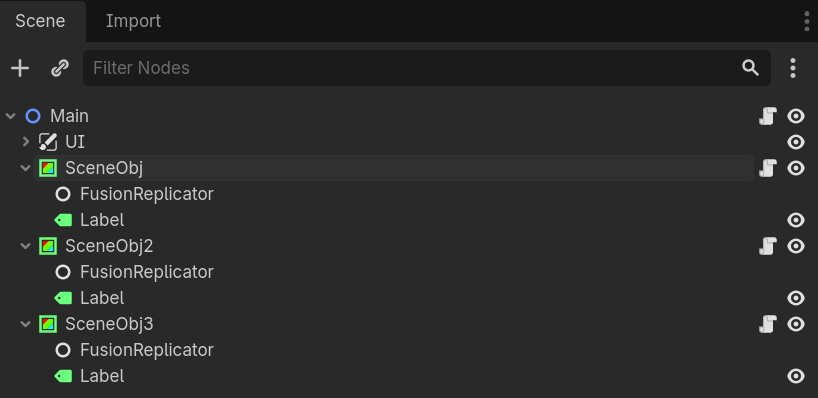
Add a FusionReplicator to nodes that need syncing and configure custom properties via the bottom panel.
Node names must be unique within the scene.
Deterministic IDs are derived from node name hashes - duplicates cause collisions.
Late-joining clients automatically receive current state from the server cache.
Back to top