Syncing Properties
In a multiplayer game, each client runs its own copy of the simulation. Replication is the mechanism that keeps these copies consistent: the authority (a client in Shared-Authority, or the simulation server in Client-Server) writes the definitive values for an object's properties, and the Photon Cloud distributes them to every other client. Without replication, each player would see a different game.
Fusion replicates at the property level. Individual values like position, health or score are tracked independently. The server only sends properties that have changed since the last update, minimizing bandwidth.
For how authority is assigned and transferred between clients, see Ownership Modes.
The Replicator Node
FusionSharedReplicator handles property sync for networked objects. Add it as a child of your networked scene's root node. The authority client writes values to the server; remote clients receive and optionally smooth them.
Root Replication Modes
The replication mode controls which properties the replicator syncs automatically based on the root node type.
- REPLICATION_NONE - no auto-sync; add custom properties via the replicator's bottom panel
- REPLICATION_AUTO - auto-detects root node type and syncs accordingly:
- RigidBody2D/3D → position, rotation, linear_velocity, angular_velocity (forecast smoothing)
- CharacterBody2D/3D → position, rotation, velocity (interpolation smoothing)
- Other nodes → position, rotation (interpolation smoothing)
Smoothing
root_interpolation_mode controls how remote values are applied to the root node.
The editor exposes the type-appropriate pair: physics roots (RigidBody2D/3D) see None / Forecast, all other roots see None / Exponential.
Exponential blends each received value toward the local node using exponential decay; Forecast predicts ahead from the latest velocity and corrects against incoming targets; None writes every received value directly.
object_interpolation_time (default 0.150 s) is the shared decay constant used by the Exponential root mode and by per-property interpolation (see Per-Property Interpolation below).
Custom Properties
Custom properties are added directly via the replicator's bottom panel in the editor. Use this for game data (health, score, name) beyond what the replication mode auto-syncs. Transform and physics properties should not be added. They are handled by REPLICATION_AUTO.
Supported types: bool, int, float, String, Vector2, Vector3, Vector4, Quaternion, Color, Node references, PackedByteArray, PackedFloat32Array, PackedInt32Array, PackedVector2Array.
Not yet supported (object and general-array replication are planned):
- Custom class instances (e.g. an inner class held as a property on a node)
- General untyped
Array([]); for now only thePacked*Arraytypes above replicate Dictionary; use individual properties or aPacked*Arrayinstead
Custom properties snap to each received value by default.
Opt-in per-property interpolation is available via the Interpolate column on each replication-config entry; see Per-Property Interpolation below.

Property Path Syntax
Property paths use a node:property syntax relative to the replicator's root node.
:property- property on the root nodechild:property- property on a child nodechild/grandchild:property- nested child
GDScript
":health"             # Root node
"Sprite2D:modulate"   # Child Sprite2D
Strings and Arrays
Strings use 2 words (StringHeap handle + generation). Handles are freed automatically when the value changes.
Arrays (PackedFloat32Array, PackedInt32Array, PackedVector2Array, etc.) require a fixed max_capacity set before spawning.
If an array grows beyond its max_capacity at runtime, the excess elements are silently dropped during replication. Remote clients will receive a truncated array with no error. Always size max_capacity for the worst case your game needs.
Node References
Properties of type Node (or Object) can reference other networked root nodes. On the wire, each reference is stored as a Fusion ObjectId (2 words: Origin + Counter).
The referenced node must be a networked root, the parent node of a replicator. This includes spawned object roots, sub-object roots and scene object roots. Child nodes within a networked object cannot be referenced. Non-networked nodes and null both serialize as (0, 0) and resolve to null on the remote end.
GDScript
# Authority sets a reference to another networked node
partner = get_node("/root/Main/Player2")

# Remote must null-check - reference resolves to null if target is outside AoI or destroyed
if partner:
    print(partner.name)  # "Player2"
Resolution rules:
- If the referenced node is in the remote client's Area of Interest, it resolves to the local Node.
- If the referenced node is outside AoI, destroyed, or not yet spawned, it resolves to
null. - Setting the property to
nullor a non-networked node on authority sendsnullto all remotes. - Scene objects loaded via
Fusion.load_scene()work the same way. The reference resolves once the remote client has loaded the scene.
Per-Property Interpolation
Each entry in FusionReplicationConfig has an Interpolate column with three values.
When set to Interpolate or Interpolate Angle, the received value is held as a shadow target on remote clients and applied per frame instead of being written immediately.
| Value | Behavior |
|---|---|
| None | Default. Each received value is written directly to the node. |
| Interpolate | For numeric types (FLOAT, VECTOR2, VECTOR3, QUATERNION) the local value blends toward the target each frame using exponential decay over object_interpolation_time. Other supported types (BOOL, INT, STRING, packed arrays, etc.) are time-gated: the target is held until object_interpolation_time / 2 of network time has elapsed since receive, then committed. |
| Interpolate Angle | Identical to Interpolate, except FLOAT uses Math::lerp_angle and VECTOR3 applies lerp_angle per axis (treats the vector as Euler radians). For all other types it behaves the same as Interpolate. |
Per-property interpolation is decoupled from root smoothing.
It runs whether or not the root is networked, and whether root_interpolation_mode is None, Exponential, or Forecast.
The authority writes locally without delay; only non-authority instances shadow and lerp toward the target.
On spawn, interest-area re-enter, or teleport, all shadow targets snap directly to their nodes before lerping resumes.
The same exponential-decay function is exposed on the Fusion singleton for manual use, useful when you keep Interpolate set to None on a property and smooth a local copy yourself (for example a UI-side display value derived from the raw replicated state):
GDScript
var smoothed_health: float = 0.0
var smoothed_yaw: float = 0.0

func _process(delta: float) -> void:
    smoothed_health = Fusion.interpolate_exponential(smoothed_health, health, 0.15, delta)
    smoothed_yaw    = Fusion.interpolate_exponential_angle(smoothed_yaw, target_yaw, 0.15, delta)
Both helpers accept FLOAT, VECTOR2, VECTOR3, and QUATERNION; other types return target and emit a warning. The _angle variant uses shortest-arc lerp_angle for FLOAT and per-axis lerp_angle for VECTOR3 (treats the vector as Euler radians); for VECTOR2 and QUATERNION it is identical to the plain function.
Runtime override
set_property_interpolation switches the mode and/or installs a custom callable for a single property at runtime, without modifying the saved FusionReplicationConfig:
GDScript
replicator.set_property_interpolation(
    property: NodePath,
    mode: int,                       # FusionReplicationConfig.INTERPOLATE_NONE / LERP / ANGLE
    callable: Callable = Callable()  # empty Callable = no custom interpolator
) -> void
The callable replaces the default lerp / time-gated step and is invoked each frame with the current node value, the latest received target, the configured object_interpolation_time, and the frame delta:
GDScript
# Typed signature (recommended): types must match the property's runtime Variant type.
func smooth_health(current: float, target: float, decay_time: float, delta: float) -> float:
    return lerp(current, target, 1.0 - exp(-delta / decay_time))

func _ready() -> void:
    replicator.set_property_interpolation(
        ^":health",
        FusionReplicationConfig.INTERPOLATE_LERP,
        smooth_health)

    # Switch mode without a callable
    replicator.set_property_interpolation(^":yaw", FusionReplicationConfig.INTERPOLATE_ANGLE)

    # Disable both for a property
    replicator.set_property_interpolation(^":health", FusionReplicationConfig.INTERPOLATE_NONE)
A registered callable forces the slot to shadow incoming values, even when mode is None. Calling set_property_interpolation with the default empty Callable() clears any previously installed callable for that slot. The override lives on the cached slot and is purely runtime; the saved replication config is never touched.
Interest Management (AOI)
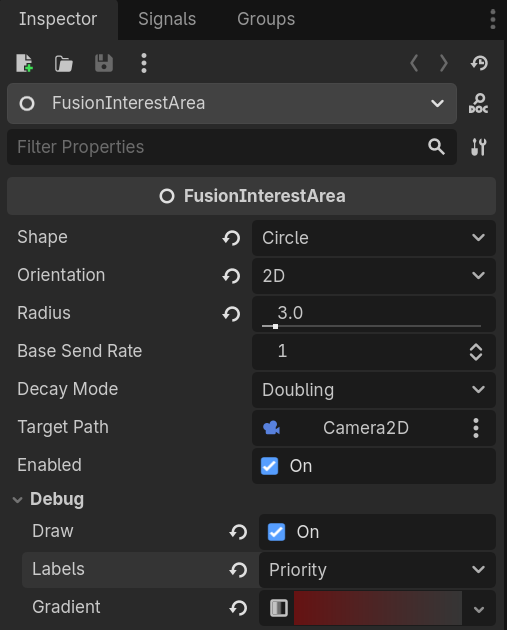
Interest management controls which objects each client receives updates for, reducing bandwidth in large worlds. Objects publish an interest key via interest_mode on the replicator; clients subscribe to keys via Fusion.
- INTEREST_GLOBAL (default) - visible to all clients
- INTEREST_AREA - spatial grid key auto-computed from position (cell size in Project Settings
fusion/interest_management/area_of_interest_cell_size) - INTEREST_USER - custom group key via
interest_key
Subscribe with one or more FusionInterestArea nodes (auto-manages grid subscriptions, typically following camera or player node) or manually:
GDScript
Fusion.set_area_keys([[cell_key, 0]])   # area keys (refresh each frame)
Fusion.add_user_key(42)                  # user keys (persistent)
Enter/exit signals: Fusion.interest_enter / interest_exit.
Key Properties
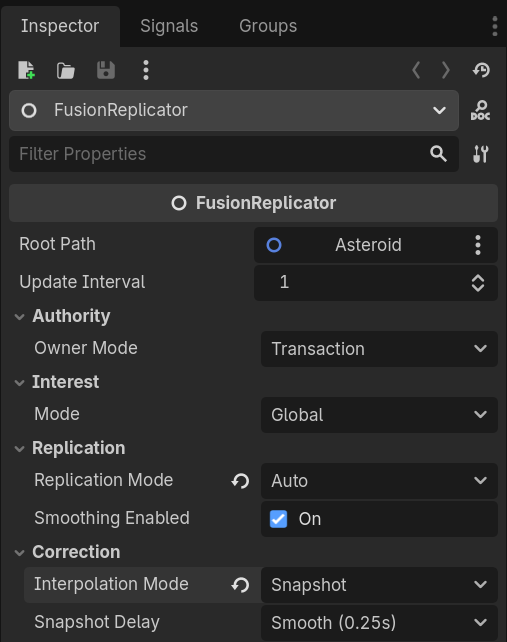
These inspector properties control replication behavior on each replicator instance.
root_path(NodePath,"..") - node whose properties are syncedroot_replication_mode-NoneorAutoroot_interpolation_mode-None/Exponential(non-physics roots) orNone/Forecast(physics roots); default matches the root typeobject_interpolation_time(float,0.150s) - shared decay constant forExponentialroot smoothing and per-propertyInterpolateupdate_interval(int,1) - server send interval in ticksroot_teleport_threshold(float,100.0) - snap if error exceeds thisroot_spring_stiffness(float,50.0) /root_spring_damping(float,10.0) - physics correction tuning (visible only on physics replicators with non-blend correction mode)
Signals
The replicator emits signals when authority changes or the network stomps state.
authority_changed(has_authority: bool)- ownership changedstate_reset(info: FusionStateResetInfo)- network reset this replicator's state.info.reasonidentifies the cause:REASON_REMOTE_RECEIVED(regular inbound sync),REASON_PREDICTION_RESET(client-server prediction rollback), orREASON_STATE_OVERRIDE(cloud stomped the authority). Not emitted on the local authority's outbound ticks.
authority_requested(requester_id: int) -> bool- Transaction / Player Attached: granted when any connected handler returnstrueauthority_response(accepted: bool)- Transaction / Player Attached: fires on the requester after the handshake resolves
See Ownership Modes for authority transfer patterns.
Advanced: reset_state()
reset_state() resets the node to the current Fusion network buffer, bypassing smoothing. Emits state_reset(REASON_REMOTE_RECEIVED).
Intended for custom prediction on replicated nodes - when your script advances the node's state manually and needs a lever to resync with the server buffer in between normal state-reset calls (which are still called normally).
GDScript
@onready var replicator: FusionSharedReplicator = $FusionSharedReplicator

func _physics_process(delta: float) -> void:
    position += velocity * delta   # custom prediction

# Elsewhere, on whatever trigger your game defines:
replicator.reset_state()
For full control, combine with root_interpolation_mode = None. reset_state() itself bypasses smoothing, but leaving the mode on Exponential or Forecast means the root smoothing handler keeps applying toward the last-received target between your frames - typically fighting your custom extrapolation.
Per-property Interpolate is independent of the root mode: if a custom property is set to Interpolate or Interpolate Angle, disable it on that entry too when you need direct writes.
If your goal is just non-smoothed auto-replication on changed data (no custom prediction involved), setting root_interpolation_mode = None is enough. Every receive then snaps directly.