プロパティの同期
マルチプレイヤーゲームでは、各クライアントがそれぞれシミュレーションをコピーして実行します。レプリケーションとは、それらコピーの一貫性を保つ仕組みです。権限者(共有権限型ならクライアント、クライアントサーバー型ならシミュレーションサーバー)がオブジェクトのプロパティの正しい値を書き込むと、Photon Cloudはそれを他すべてのクライアントへ配信します。レプリケーションが行われなければ、プレイヤーごとに異なるゲーム画面が表示されてしまうでしょう。
Fusionはプロパティ単位でレプリケーションを行います。個別の値(位置・体力・スコアなど)は独立して追跡されます。サーバーは、前回更新以降に変更されたプロパティのみを送信するため、帯域は最小限に抑えられます。
クライアント間で権限がどのように割り当て・移行されるかについては、所有権モードをご覧ください。
複製ノード
FusionSharedReplicatorは、ネットワークオブジェクトのプロパティ同期を処理します。これをネットワークシーンのルートノードの子に追加してください。権限を持つクライアントはサーバーに値を書き込み、リモートクライアントはそれを受け取って必要に応じてスムージングを行います。
Root Replication Mode
Replication Modeによって、ルートノード型に基づいて、どのプロパティを自動的に同期するかが制御されます。
- REPLICATION_NONE - 自動同期無効:
FusionReplicatorの下部パネルから手動でカスタムプロパティを追加してください - REPLICATION_AUTO - ルートノード型を自動的に検知して、以下のプロパティを同期します:
- RigidBody2D/3D → position, rotation, linear_velocity, angular_velocity (forecast smoothing)
- CharacterBody2D/3D → position, rotation, velocity (interpolation smoothing)
- Other nodes → position, rotation (interpolation smoothing)
Smoothing
root_interpolation_modeによって、ルートノードにリモートの値がどのように適用されるかが制御されます。
エディター上では、型に応じたペアが表示されます。物理オブジェクトルート(Rigidbody2D/3D)の場合はNone/Forecast、それ以外のルートの場合はNone/Exponentialです。
Exponentialは、指数関数的な減衰によって受信した値をローカルノードにブレンドします。Forecastは、最新の速度から予測を行って受信した値を補正します。Noneは、受信した値を直接書き込みます。
object_interpolation_time(デフォルト0.150秒)は減衰定数で、Exponentialルートモードや、プロパティごとの補間で使用されます。
カスタムプロパティ
カスタムプロパティは、エディター上で複製ノードの下部パネルから直接追加できます。ここには、Replication Modeで自動同期されないゲームデータ(体力・スコア・名前など)を追加してください。Transformや物理プロパティは、REPLICATION_AUTOによって処理されるため、ここには追加しないでください。
サポートされる型: bool, int, float, String, Vector2, Vector3, Vector4, Quaternion, Color, Node references, PackedByteArray, PackedFloat32Array, PackedInt32Array, PackedVector2Array.
未サポート(オブジェクトと一般的な配列の複製はサポート予定):
- カスタムクラスインスタンス(例:ノードのプロパティとして保持される内部クラス)
- 一般的な型指定なしの
Array([]):現時点ではPacked*Array型のみが複製されます Dictionary:かわりに個別のプロパティまたはPacked*Arrayを使用してください
デフォルトでは、カスタムプロパティは受信した値にスナップします。
各レプリケーション設定項目のInterpolate列から、プロパティごとの補間を個別に有効化できます。詳細はプロパティごとの補間をご覧ください。

プロパティパス構文
プロパティのパスは、複製ノードのルートノードを基準としたnode:property構文を使用します。
:property- ルートノードのプロパティchild:property- 子ノードのプロパティchild/grandchild:property- 孫ノードのプロパティ
GDScript
":health"             # ルートノード
"Sprite2D:modulate"   # 子ノードのSprite2D
文字列と配列
String(文字列)は2ワード(StringHeap handle + generation)を使用します。値が変更されると、handleは自動的に解放されます。
Array(配列:PackedFloat32Array・PackedInt32Array・PackedVector2Arrayなど)は、生成時に固定max_capacityを設定する必要があります。
実行時に配列長がmax_capacityを超えた場合、余分な要素はレプリケーション時に自動的に削除されます。リモートクライアントには、切り詰められた配列がエラーなしで送信されます。そのため、配列サイズmax_capacityはゲームで想定される最大ケースに合わせて設定してください。
ノードの参照
Node(Object)型のプロパティによって、他のネットワークオブジェクトのルートノードを参照できます。通信上、各参照はFusionのObjectId(2ワード:Origin + Counter)として保存されます。
参照するノードは、FusionReplicatorの親ノードであるネットワークオブジェクトのルートである必要があります。これには、スポーンされたオブジェクトのルート・サブオブジェクトのルート・シーンオブジェクトのルートが含まれます。ネットワークオブジェクトの子ノードは参照できません。ネットワークオブジェクトでないノードやnullは、どちらも(0, 0)としてシリアライズされ、リモートではnullとして解決されます。
GDScript
# 権限者が別のネットワークオブジェクトノードの参照を設定する
partner = get_node("/root/Main/Player2")

# リモートはnullチェック必須 - 対象が関心領域外または破棄されていた場合、参照はnullで解決される
if partner:
    print(partner.name)  # "Player2"
解決ルール:
- 参照ノードが、リモートクライアントの関心領域内にある場合、ローカルノードとして解決されます。
- 参照ノードが、関心領域外にある・破棄されている・まだスポーンしていない場合、
nullとして解決されます。 - 権限者上で、プロパティに
nullまたはネットワークオブジェクトでないノードを設定すると、すべてのリモートにnullが送信されます。 Fusion.load_scene()経由でロードされたシーンオブジェクトも同様に動作します。リモートクライアント上でシーンの読み込みが完了すると、参照が解決されます。
プロパティごとの補間
FusionReplicationConfigの各要素には、3つの値を含むInterpolate列があります。
Interpolate/Interpolate Angleに設定されている場合、受信した値はリモートクライアント上で車道ターゲットとして保持され、即座に書き込まれるのではなくフレームごとに適用されます。
| 値 | 動作 |
|---|---|
| None | デフォルト値。受信した値はノードに直接書き込まれます。 |
| Interpolate | 数値型(FLOAT, VECTOR2, VECTOR3, QUATERNION)の場合、ローカル値はobject_interpolation_timeの間に指数関数的な減衰を使用してフレームごとに目標値へブレンドされます。その他サポートされている型(BOOL, INT, STRING, packed arrays など)の場合、一時待機処理が行われます。ネットワーク時間がobject_interpolation_time / 2経過するまで受信した値が保持され、その後に適用されます。 |
| Interpolate Angle | Interpolateと動作は同じですが、FLOAT型はMath::lerp_angleを使用し、VECTOR3型は軸ごとに(ベクトルをラジアン単位のオイラー角として扱って)lerp_angleを適用します。その他の型はInterpolateと同じ動作です。 |
プロパティごとの補間は、ルートのスムージングとは分けられています。
ルートがネットワーク同期しているか、root_interpolation_modeがNone/Exponential/Forecastのいずれかであるかにかかわらず補間が実行されます。
権限者は遅延なしでローカルに書き込み、それ以外がシャドウターゲットへの補間を行います。
スポーン時・関心領域への再進入時・テレポート時は、すべてのシャドウターゲットをノードに直接スナップした後、補間が再開されます。
指数関数的減衰関数は、Fusionシングルトンから手動で利用できるようになっています。プロパティのInterpolateをNoneに設定したまま、ローカルコピーを独自にスムージングする(例:複製されたステートからUI側に表示する値を求める)場合に便利です。
GDScript
var smoothed_health: float = 0.0
var smoothed_yaw: float = 0.0

func _process(delta: float) -> void:
    smoothed_health = Fusion.interpolate_exponential(smoothed_health, health, 0.15, delta)
    smoothed_yaw    = Fusion.interpolate_exponential_angle(smoothed_yaw, target_yaw, 0.15, delta)
どちらのヘルパー関数も、FLOAT・VECTOR2・VECTOR3・QUATERNIONを受け付けます。それ以外の型を指定した場合は、targetが返されて警告が出力されます。_angleバージョンは、FLOATに対しては最短弧のlerp_angle、VECTOR3に対しては軸ごと(ベクトルをラジアン単位のオイラー角として扱って)のlerp_angleを使用します。VECTOR2/QUATERNIONに対しては通常の関数と同じ動作です。
実行時の上書き
set_property_interpolationは、FusionReplicationConfigを変更することなく、実行時に個別のプロパティのモード切り替え/カスタムCallable設定を行うことができます:
GDScript
replicator.set_property_interpolation(
    property: NodePath,
    mode: int,                       # FusionReplicationConfig.INTERPOLATE_NONE / LERP / ANGLE
    callable: Callable = Callable()  # 空のCallable = カスタム補間なし
) -> void
Callableは、デフォルトの線形補間/一時待機ステップを置き換えるものです。各フレームごとに、ノードの現在値・最新の受信値・object_interpolation_time設定・フレームのdeltaと共に呼び出されます:
GDScript
# 型付きシグネチャ(推奨):プロパティの実行時のVariant型が一致している必要がある
func smooth_health(current: float, target: float, decay_time: float, delta: float) -> float:
    return lerp(current, target, 1.0 - exp(-delta / decay_time))

func _ready() -> void:
    replicator.set_property_interpolation(
        ^":health",
        FusionReplicationConfig.INTERPOLATE_LERP,
        smooth_health)

    # Callableなしでモードを切り替え
    replicator.set_property_interpolation(^":yaw", FusionReplicationConfig.INTERPOLATE_ANGLE)

    # どちらも無効にする
    replicator.set_property_interpolation(^":health", FusionReplicationConfig.INTERPOLATE_NONE)
登録されたCallableは、modeがNoneの場合でも、受信値のシャドウ作成が強制されます。デフォルトの空のCallable()を渡してset_property_interpolationを呼び出すと、以前に渡されていたCallableはクリアされます。この上書きはキャッシュ上に存在し、実行時のみ有効です。保存されたレプリケーション設定には一切影響しません。
インタレストマネジメント(AOI)
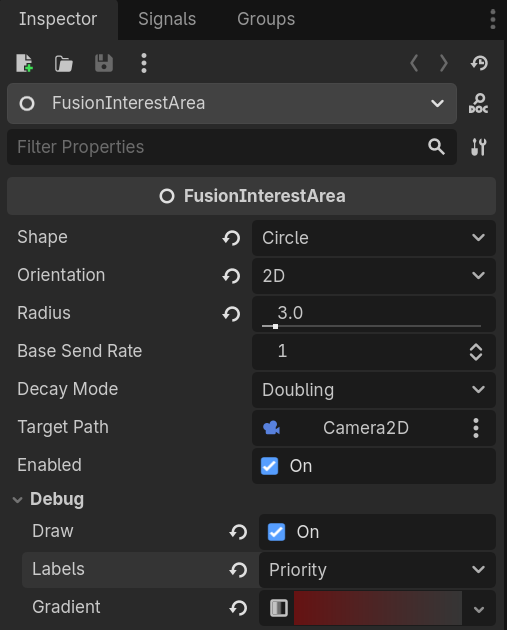
インタレストマネジメントによって、各クライアントがどのオブジェクトの更新を受信するかを制御し、広大なワールドにおける帯域を削減できます。オブジェクトは複製ノードのinterest_modeからinterest_keyを発行し、クライアントはFusionを介してキーを購読します。
- INTEREST_GLOBAL(デフォルト) - すべてのクライアント上で表示される
- INTEREST_AREA - 位置からグリッド空間のキーが自動的に計算される(セルサイズはプロジェクト設定の
fusion/interest_management/area_of_interest_cell_size) - INTEREST_USER - カスタムグループキーを
interest_keyに設定する
1つ以上のFusionInterestAreaノードを購読する(グリッドの購読は自動で、通常はカメラ/プレイヤーノードに設定)か、手動で指定します:
GDScript
Fusion.set_area_keys([[cell_key, 0]])   # エリアキー(フレーム毎にリフレッシュされる)
Fusion.add_user_key(42)                  # ユーザーキー(永続する)
Enter/Exitシグナル: Fusion.interest_enter / interest_exit
主要プロパティ
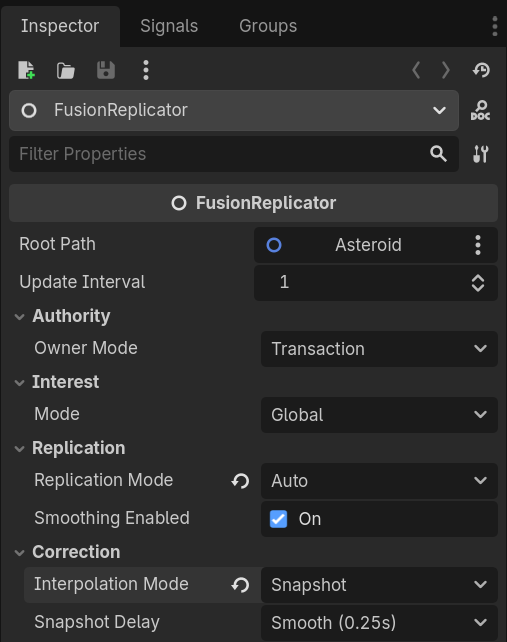
インスペクター上のプロパティから、各複製ノードにおけるレプリケーションの動作を制御できます。
root_path(NodePath,"..") - プロパティが同期されるノードroot_replication_mode-NoneまたはAutoroot_interpolation_mode-None/Exponential(非物理) またはNone/Forecast(物理);ルートノード型によってデフォルトが決まるobject_interpolation_time(float,0.150s) -ExponentialのスムージングとプロパティごとのInterpolateで共有される減衰定数update_interval(int,1) - サーバーへ送信する間隔(ティック単位)root_teleport_threshold(float,100.0) - 位置ズレがこの値を超えたらスナップするroot_spring_stiffness(float,50.0) /root_spring_damping(float,10.0) - 物理補正の調整値(ブレンド補正モードではない物理複製ノードでのみ表示される)
シグナル
複製ノードは、権限が変更された場合やネットワークステートが更新された場合にシグナルを発火します。
authority_changed(has_authority: bool)- 所有権が変更された場合state_reset(info: FusionStateResetInfo)- ネットワークによって複製ノードの状態がリセットされた場合。info.reasonから原因を判別可能:REASON_REMOTE_RECEIVED(一般的な受信値の同期)・REASON_PREDICTION_RESET(クライアントサーバー型での予測のロールバック)・REASON_STATE_OVERRIDE(権限の変更)。権限者ローカル上の送信ティック時には発火しません。
authority_requested(requester_id: int) -> bool- Transaction / Player Attached:ハンドラーがtrueを返した場合は許可されるauthority_response(accepted: bool)- Transaction / Player Attached:ハンドシェイク完了後にリクエスト元で発火される
権限移行パターンについては、所有権モードをご覧ください。
上級トピック:reset_state()
reset_state()は、スムージングを省略して、ノードの状態を現在のFusionネットワークバッファにリセットします。その際にstate_reset(REASON_REMOTE_RECEIVED)が発火します。
これによって複製されるノードのカスタム予測が可能になります。スクリプトからノードの状態を手動で進め、通常通り呼び出されるリセットまでの間に、サーバーのバッファと再同期するための手段が必要な場合に使用できます。
GDScript
@onready var replicator: FusionSharedReplicator = $FusionSharedReplicator

func _physics_process(delta: float) -> void:
    position += velocity * delta   # カスタム予測

# ゲームの好きなタイミングでトリガーできる:
replicator.reset_state()
完全に制御するためには、root_interpolation_mode = Noneを組み合わせてください。reset_state()自体はスムージングをスキップしますが、モードがExponential/Forecatのままでは、ルートのスムージング処理によって、フレーム間の最新の受信値に対してスムージングが適用され続けるため、カスタム予測処理と競合することになります。
プロパティごとのInterpolateはルートモードと独立しています。カスタムプロパティがInterpolate/Interpolate Angleに設定されていて、直接書き込みが必要な場合は、補間を無効にしてください。
変更データに対して(カスタム予測を行わない)スムージングなしの自動レプリケーションを行いたいのであれば、root_interpolation_mode = Noneに設定するだけで十分です。これですべての受信値が直接スナップされます。