接続とマッチメイキング
ゲームオブジェクトを同期する前に、プレイヤーはまずサーバーへ接続して、共有セッションのグループに入る必要があります。Photonは2層アーキテクチャを採用していて、クライアントは最初にマッチメイキングのためにマスターサーバーへ接続し、その後にルームをホストするゲームサーバーへ転送されます。ルームは独立したセッションで、プレイヤーのグループがゲーム状態の共有・RPCの交換・オブジェクトの複製を行う場所になります。
このページでは、初期化・サーバーへの接続・ルーム作成/参加/切断を含む、接続ライフサイクル全体について説明します。
AppIDの設定
Fusionの接続にはPhotonのAppIDが必要です。この設定には2つの方法があります。
プロジェクト設定(推奨) — プロジェクト設定 > Fusion > Connectionからfusion/connection/app_idを設定します。これは標準的な方法で、ほとんどのプロジェクトで動作します。
実行時に上書き — 接続前にFusion.set_app_id("your-app-id")を呼び出します。AppIDが実行時に決定される場合(ビルドごとの設定・リモート設定・機能フラグ・その他プロジェクト設定に組み込めない状況)にはこれを使用してください。
GDScript
# 実行時に上書き — connect_to_photon()前に呼び出す必要がある
Fusion.set_app_id("my-runtime-app-id")
app_versionは、connect_to_photon()で明示的に値を渡さない場合は、常にプロジェクト設定(fusion/connection/app_version)から読み込まれます。
接続
connect_to_photon()を使用することで、Photon Cloudに接続できます。パラメーターはすべてオプションで、空の値はプロジェクト設定から読み込まれます:
GDScript
# すべてをプロジェクト設定から読み込む最もシンプルな形
Fusion.connect_to_photon()

# 特定のユーザーIDを指定
Fusion.connect_to_photon("player_123")

# 特定のリージョンを指定(Cloud接続モードを強制的に使用)
Fusion.connect_to_photon("player_123", "us")
リージョンを明示的に指定しない場合、接続モード(CloudかLocal)はプロジェクト設定 > Fusion > Connection > モードから決定されます。
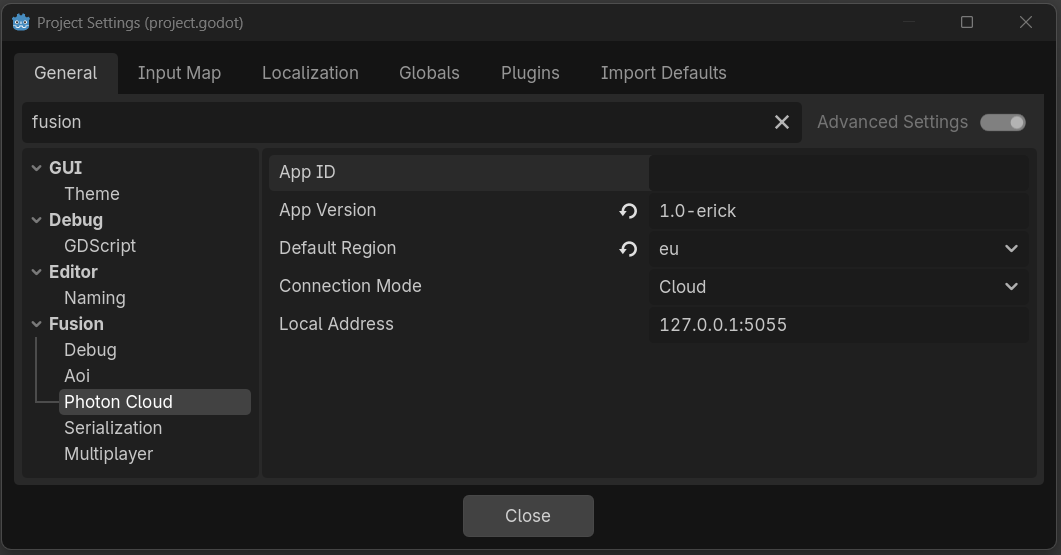
接続と参加
「接続」と「参加」は別ステップです。最初にPhotonのマスターサーバーへ接続し、接続が成功したらルームの参加/作成を行います。
GDScript
Fusion.connect_to_photon("player_123", "us")

# 接続完了後にルームへ参加
Fusion.connected_to_photon.connect(func():
    Fusion.join_or_create_room("lobby")
)
ローカル開発では、プロジェクト設定のfusion/connection/modeをLocalに設定してください。
ルーム操作
ルームとは、プレイヤーがオブジェクトを同期しRPCを交換するための共有セッションのことです。Fusionには、ルームの作成/参加/退出を行うメソッドが用意されています。
GDScript
# 新しいルームの作成(既に存在する場合は失敗)
Fusion.create_room("my_room", options)

# 既存のルームに参加(ルーム名を空にするとランダム参加)
Fusion.join_room("my_room", options)

# ルームが存在するなら参加、存在しないなら作成
Fusion.join_or_create_room("my_room", options)

# 現在のルームから退出(接続は切断されず、再マッチメイキング可能)
Fusion.leave_room()
optionsパラメーターは辞書型です。省略するか{}を渡すと、デフォルト値が適用されます。
ルームオプション
ルームの作成/参加時に、ルームの動作をカスタマイズするオプション辞書型を渡すことができます。
| キー | 型 | 説明 |
|---|---|---|
max_players |
int | ルームに参加できる最大プレイヤー数 |
is_visible |
bool | ロビーのクエリにルームが表示されるかどうか |
is_open |
bool | ルームに新しいプレイヤーが参加できるかどうか |
player_ttl_ms |
int | 使用されていないプレイヤースロットが解放されるまでの秒数(ミリ秒) |
empty_room_ttl_ms |
int | 空のルームが破棄されるまでの秒数(ミリ秒) |
lobby_properties |
Array[String] | ロビーのリストに表示されるカスタムプロパティ |
plugins |
Array[String] | このルームでロードするサーバープラグイン名 |
| any other key | bool, int, float, or String | ルームのカスタムプロパティ(例:"map"・"game_mode") |
接続ステータス
Fusionは、切断状態・接続中・接続状態・参加中・ルーム内を含む、線形の状態遷移を追跡しています。
STATUS_DISCONNECTED(0) - 未接続STATUS_CONNECTING_TO_PHOTON(1) - Photon Cloudへの接続を確立中STATUS_CONNECTED_TO_PHOTON(2) - Photon Cloud接続済み、ルーム参加可能STATUS_JOINING_ROOM(3) - 参加中STATUS_IN_ROOM(4) - ルーム内、スポーンや同期が可能STATUS_ERROR(5) - 接続エラー
クエリメソッド: is_initialized(), is_connected_to_photon(), is_in_room(), is_master_client(), get_local_player_id(), get_network_time()
シグナル
シグナルを使用することで、フレーム毎にステータスをポーリングすることなく、接続やルームのイベントに反応できます。
room_joined- 正常にルームに入った(安全にオブジェクトをスポーン可能)room_left- ルームを抜けた(自発的 or 切断)connection_failed(error: String)- 接続の試行が失敗connection_status_changed(status: int)- ステータスが変更されたconnected_to_photon- Photon Cloudへ接続したplayer_left(player_id: int, is_inactive: bool)- リモートプレイヤーがルームから抜けた(そのプレイヤーは、ルームのplayer_ttl_ms猶予期間中はis_inactiveがtrueとなり、再参加が可能)scene_load_requested(index: int, path: String)- シーン変更がリクエストされた(カスタムロードモード)scene_ready(index: int)- ロード後にすべてのシーンオブジェクトが登録されたscene_unloaded(index: int, path: String)- シーンがアンロードされた
現在、意図的にplayer_joinedシグナルを実装していません。元になるPhotonイベントは、ローカルのFusion起動が完了する前の、ルーム参加時のハンドシェイク中に発火するため、既にルームに存在するプレイヤーを検知できないためです。ルーム内のプレイヤーを確認するには、room_joined後にFusionRoomのプレイヤーリストを反復してください。信頼性の高い参加通知(内部ブロードキャストRPC経由)は、今後のリリースで実装される予定です。
切断
disconnect_from_photon()を呼び出すと、現在のルームを退出してPhoton Cloud接続を閉じます。
GDScript
Fusion.disconnect_from_photon()
実装例
Photon Cloudへ接続し、カスタムオプションを設定してルームに参加し、プレイヤー参加時にメッセージを表示するスクリプトの全容です。
GDScript
extends Node

func _ready():
    Fusion.room_joined.connect(_on_room_joined)
    Fusion.connection_failed.connect(func(e): print("Failed: ", e))

    Fusion.connect_to_photon("player_%d" % randi())

    Fusion.connected_to_photon.connect(func():
        Fusion.join_or_create_room("lobby", {
            "max_players": 8,
            "is_visible": true,
            "map": "arena",
            "lobby_properties": ["map"],
        })
    )

func _on_room_joined():
    print("In room as player ", Fusion.get_local_player_id())