Meta Wearables Camera Streaming
Overview
The Meta Wearables Camera Streaming sample demonstrates how to stream the camera feed from Meta smart glasses (Ray-Ban Meta) to remote users using Fusion and Photon Video SDK.
This sample uses the Meta DAT SDK (Device Access Toolkit) to access the camera of paired wearable glasses via Bluetooth. The video feed is captured and converted to RGBA by the Android Kotlin plugin, then encoded in H264 on the Unity side by Photon's built-in encoder before being transmitted over the network to remote viewers.
The glasses camera is accessed through the Meta DAT SDK on an Android smartphone, which acts as the bridge between the glasses and the Unity application.

This sample streams live video from smart glasses. Always obtain explicit consent from individuals before recording or streaming their image. Ensure your use complies with applicable privacy laws and regulations in your jurisdiction.
Technical Info
This sample uses the Fusion Shared Authority topology.
The project has been developed with:
- Unity 6.3
- Fusion 2
- Voice & Video SDK v2.63
The Android Kotlin plugin is built with:
- Meta Wearables DAT SDK v0.5.0
- Kotlin 2.0.21
Tested with:
- Meta Ray-Ban Wayfarer G2 Firmware v22.0
- Meta AI app v263
Graphics API must be set to Vulkan
Before You Start
To run the sample:
Create a Fusion AppId in the PhotonEngine Dashboard and paste it into the
App Id Fusionfield in Real Time Settings (reachable from the Fusion menu).Create a Voice AppId in the PhotonEngine Dashboard and paste it into the
App Id Voicefield in Real Time Settings.Ensure you have a pair of Meta smart glasses paired with the Android device via the Meta AI app.
The Meta AI app must have completed device registration.
The application must be deployed on an Android 12+ (API 31+) device.
Set a
GITHUB_TOKENenvironment variable with a GitHub personal access token (classic) that has at leastread:packagesscope. This is required by the Unity Gradle build to download the Meta DAT SDK dependencies from GitHub Packages. See SDK for Android setup for details.
Download
| Version | Release Date | Download |
|---|---|---|
| 2.0.10 | Mar 25, 2026 | Fusion Meta Werable Streaming 2.0.10 |
Folder Structure
The main folder /Fusion-MetaWearables-CameraStreaming contains all elements specific to this sample.
The /Photon folder contains the Fusion and Photon Voice & Video SDK.
The /Photon/FusionAddons folder contains the XR Addons used in this sample.
The /Plugins/Android/ folder contains the compiled Android Kotlin plugin and Gradle files that define the dependencies required by Unity to build the APK.
Architecture Overview
The sample bridges four technology layers to deliver real-time video from Meta smart glasses to remote users:
- the Meta DAT SDK to access the glasses camera and receive I420 video frames
- an Android Kotlin plugin to bridge the DAT SDK's Kotlin APIs to Unity
- Unity C# scripts to manage the video pipelines, UI, and Photon integration
- Photon Fusion + Voice + Video SDK to handle network sessions, audio, and H264 video transport
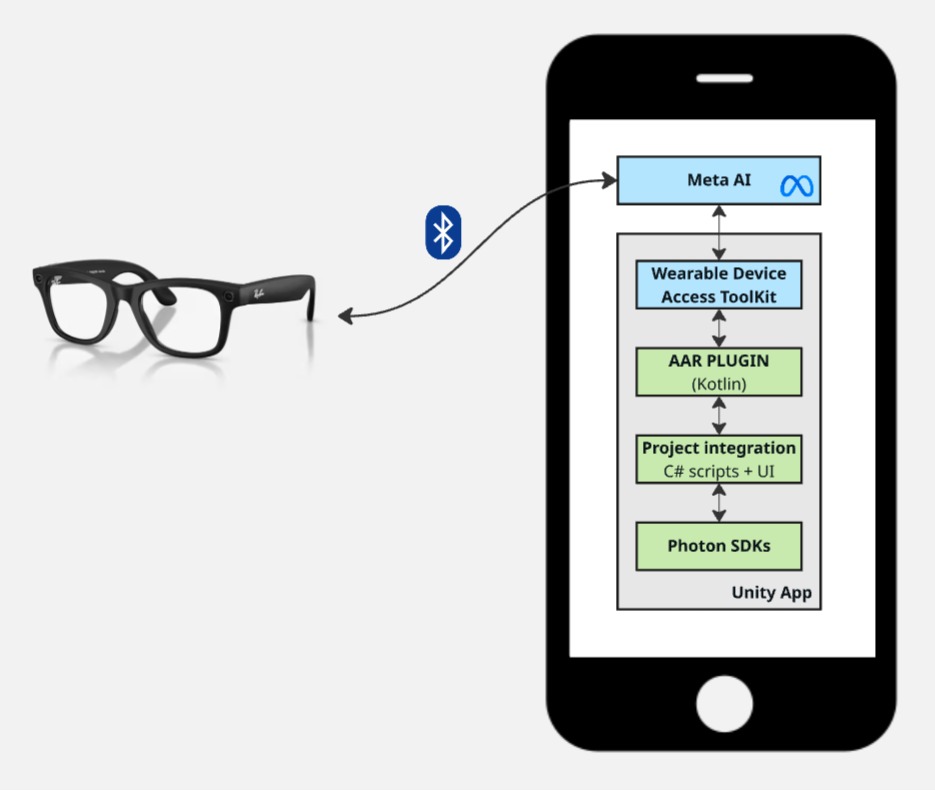
DAT SDK (Device Access Toolkit)
The Meta DAT SDK provides access to Meta wearable devices (smart glasses) from Android applications. It handles:
- Device discovery and registration: connecting to paired glasses via Bluetooth
- Camera streaming: delivering I420 video frames at configurable quality levels (LOW, MEDIUM, HIGH)
- Photo capture: single-frame capture in JPEG/HEIC format
- Permission management: camera access permission flow through the Meta AI app
The SDK communicates with the Meta AI companion app installed on the Android device, which manages the Bluetooth connection to the glasses.
For more details, see the Meta Wearables Developer Documentation and the Wearables Android DAT API Reference.
Android Kotlin Plugin
The Android Kotlin plugin (MetaWearablesPlugin.aar) acts as an intermediary between the Meta DAT SDK and Unity. Since the DAT SDK is a native Android library with Kotlin coroutine-based APIs, it cannot be called directly from Unity C#.
The plugin exposes a JNI-compatible API that Unity can call, and uses UnitySendMessage to send events back to Unity.
It converts the DAT SDK's I420 video frames to RGBA32 and makes them available to Unity via a double-buffered JNI polling API (see Video Pipelines).
H264 encoding for network streaming is handled entirely on the Unity side by Photon's built-in AndroidTextureVideoEncoder.
See the Android Kotlin Plugin chapter for full details.
Unity Integration
The Unity side consists of C# scripts that handle:
- JNI bridge: calling the Kotlin plugin and receiving events
- Video display: converting raw pixel data to Unity textures
- Photon integration: custom video recorder that feeds the RGBA texture to Photon's built-in H264 encoding pipeline
- UI management: buttons, status display, and in-app log
- Permission gating: ensuring microphone permission before Photon Voice activation
See the Unity chapter for full details.
Photon Integration (Fusion + Voice + VideoSDK)
The sample uses three Photon SDKs together:
- Fusion for network session management (in shared authority topology)
- Voice for audio transport layer. It also carries the H264 video stream as a voice channel
- Video for H264 encoding/decoding framework with vulkan support
While this sample does not use Fusion's networked state synchronization, Fusion is required because the Screensharing addon, which manages the entire H264 video pipeline, is built as a Fusion addon. Fusion also provides the session management that Voice and Video SDK rely on.
Permissions
Permission handling spans both the Android Kotlin plugin and the Unity C# layer. Three distinct permissions are required for full functionality.
Android System Permissions
BLUETOOTH_CONNECT
Required for communication with the Meta smart glasses via Bluetooth. Requested in Unity's MetaWearablesUIManager before DAT SDK initialization using Permission.RequestUserPermission("android.permission.BLUETOOTH_CONNECT").
RECORD_AUDIO
Required by Photon Voice for the audio transport channel that carries both voice and video data. Managed by VoiceRecordingPermissionGate, which:
- Disables Photon Voice
Recordercomponents onAwake(before they attempt to capture audio) - Requests the permission proactively on
Start - Polls for permission grant in
Updateand re-enables recording once granted
This ensures that audio capture by the Photon Voice Recorder works correctly from the very first app launch.
DAT SDK Camera Permission
The CAMERA permission for the Meta smart glasses is managed entirely through the DAT SDK, not through Android's standard permission system. The flow involves two separate JNI calls:
- Unity calls
MetaWearablesBridge.CheckCameraPermission()→ JNI →checkCameraPermission()→Wearables.checkPermissionStatus(Permission.CAMERA)→ result sent to Unity viaUnitySendMessage("OnPermissionCheckResult", ...) - If not granted, the C#
HandlePermissionChecked()handler callsMetaWearablesBridge.RequestCameraPermission()→ JNI →requestCameraPermission()→ launches aPermissionProxyActivity(a transparent intermediary Activity) that callsregisterForActivityResult(Wearables.RequestPermissionContract()) - The user grants permission through the Meta AI app (redirected automatically)
- Result is sent back to Unity via
UnitySendMessage("OnPermissionCheckResult", ...)
Detailed Architecture
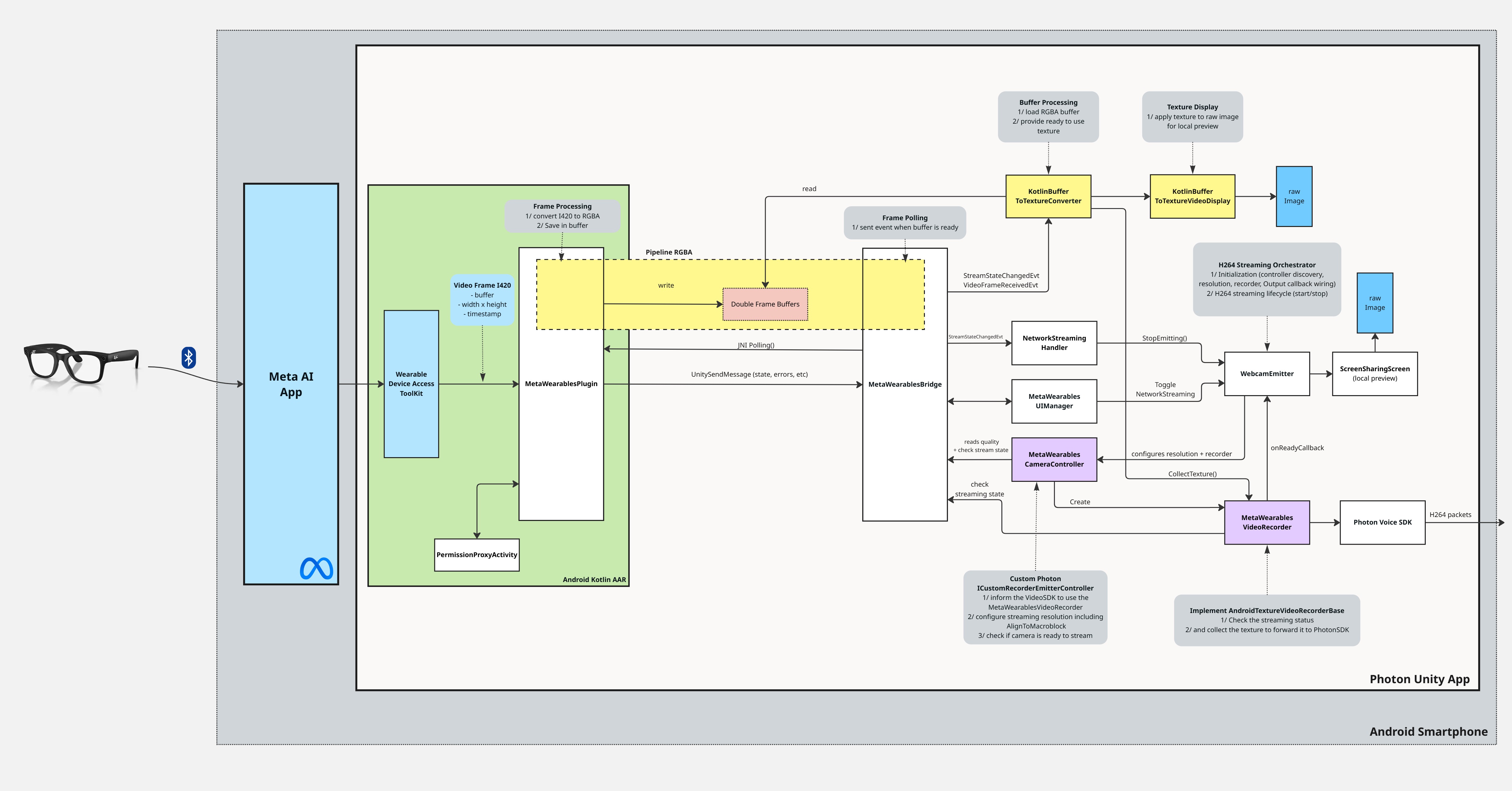
Emission
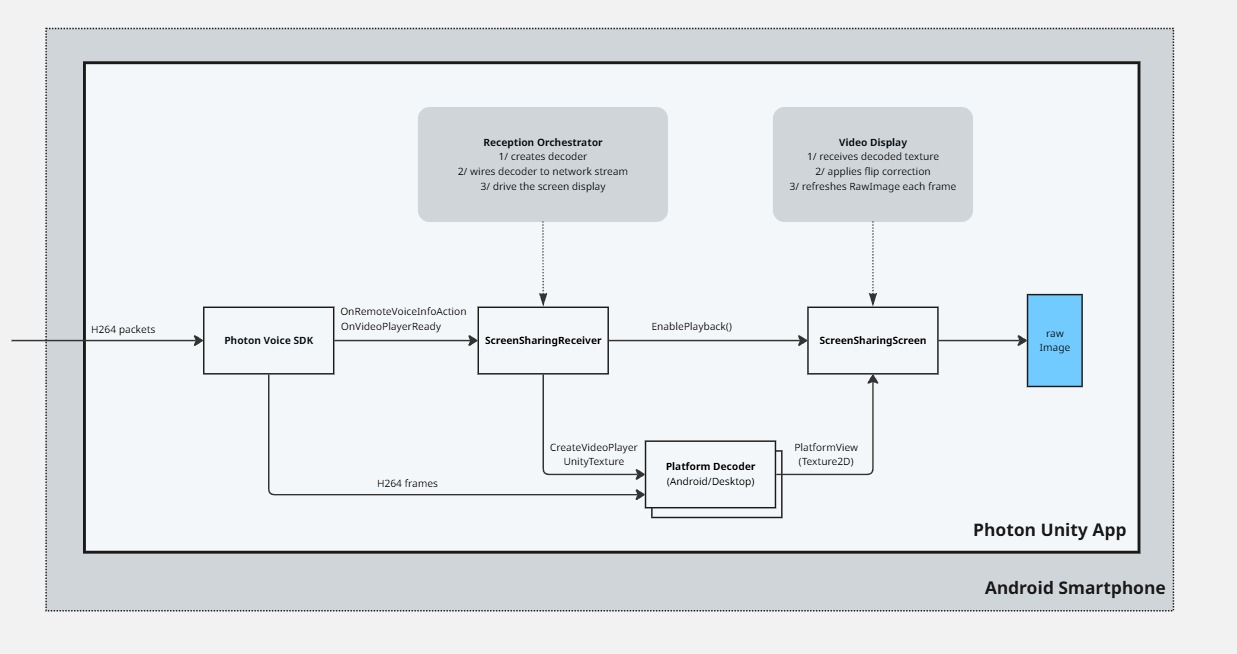
Reception
Android Kotlin Plugin
Plugin Architecture
The Android plugin is created by Unity with new AndroidJavaObject("...MetaWearablesPlugin", activity), which passes the current Activity to the Kotlin constructor. Then initialize() is called (no parameters) to set up the DAT SDK. The plugin converts the DAT SDK's I420 video frames to RGBA32 and exposes them to Unity via a double-buffered JNI polling API (see Video Pipelines).
Communications: Kotlin → Unity
For state changes, errors, and non-video data, the plugin calls UnitySendMessage("MetaWearablesBridge", callbackName, jsonData).
The target GameObject in Unity must be named "MetaWearablesBridge".
The following callbacks are sent by the plugin to Unity:
OnInitializeResult: SDK initialization success/failureOnRegistrationStateChanged: glasses registration state changeOnStreamStateChanged: camera stream state change (STOPPED, STARTING, STARTED, STREAMING, STOPPING, CLOSED)OnPhotoReceived: photo capture completed (base64 JPEG)OnDeviceListChanged: paired devices list updatedOnActiveDeviceChanged: active glasses device changedOnPermissionCheckResult: permission check/request resultOnError: error occurred
Communications: Unity → Kotlin
Unity controls the plugin through JNI method calls:
initialize(): initialize DAT SDK (Activity is passed to the Kotlin constructor, not to this method)startRegistration(): open Meta AI app for glasses registrationstartUnregistration(): unregister from the Meta AI appcheckCameraPermission(): check DAT camera permission statusrequestCameraPermission(): request DAT camera permission via PermissionProxyActivitygetRegistrationState(): get current registration state (returns JSON string)getDeviceList(): get paired devices list (returns JSON string)startStreaming(quality, fps): start camera stream at specified qualitystopStreaming(): stop camera streamcapturePhoto(): capture a single photodispose(): clean up all resources
JNI Polling (Video Data)
Video frame data is too large and frequent for UnitySendMessage (which serializes to JSON strings).
Instead, Unity polls the plugin at each frame using lightweight JNI calls:
hasNewFrame()→Boolean: lightweight check, no allocationpollFrame()→ByteArray?: RGBA32 pixel data (front buffer copy)getFrameMetadata()→String: returns"width|height|timestamp"
Unity
Scene Description
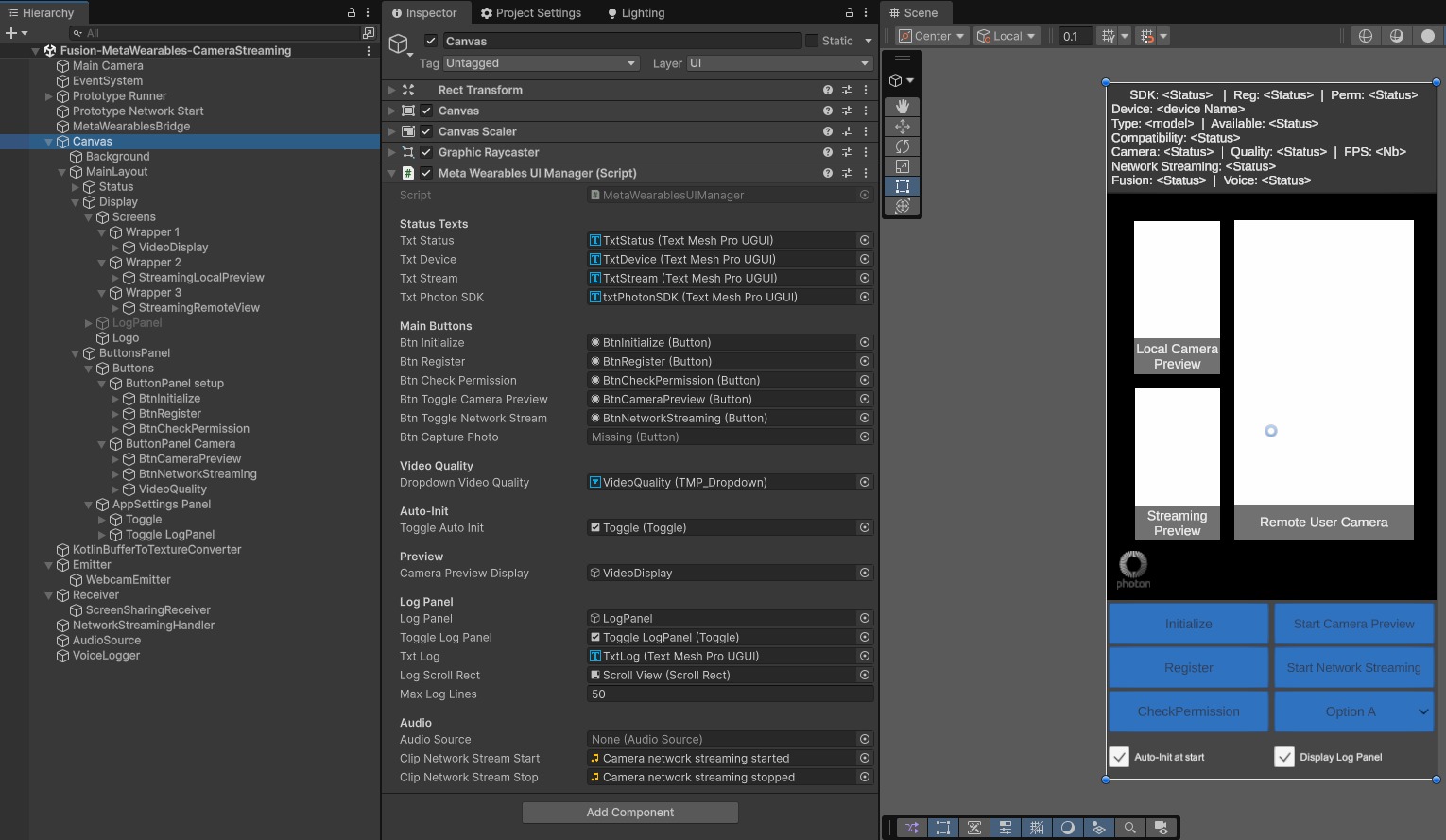
The main scene Fusion-MetaWearables-CameraStreaming (in Assets/MetaWearablesCameraStreaming/Scenes/) contains the following GameObjects:
- Prototype Runner:
NetworkRunner,FusionVoiceClient,VoiceRecordingPermissionGate: manages the Photon Fusion network session and voice/video transport - Prototype Network Start:
FusionBootstrap: handles Fusion session startup - MetaWearablesBridge:
MetaWearablesBridge: singleton that handles communication between the Kotlin plugin and Unity scripts - Canvas:
MetaWearablesUIManager: main UI canvas in Screen Space - Camera mode, contains all buttons and panels. It containsKotlinBufferToTextureVideoDisplayand twoScreenSharingScreento display the video frames - KotlinBufferToTextureConverter:
KotlinBufferToTextureConverter: converts polled RGBA frames toTexture2D - Emitter:
WebcamEmitter,MetaWearablesCameraControllerandWebcamController: manages the H264 video emission pipeline. - Receiver:
ScreensharingReceiver: manages the reception of screen sharing streams - NetworkStreamingHandler:
NetworkStreamingHandler: stops emission when stream enters STOPPED or CLOSED state
C# Scripts
The following scripts have been specifically developed for this sample. They are located in Assets/MetaWearablesCameraStreaming/Scripts/.
MetaWearablesBridge.cs
Singleton that handles all communication between the Kotlin plugin and Unity scripts. It exposes JNI methods to control the plugin (initialize, register, check permission, start/stop streaming) and receives UnitySendMessage callbacks that are dispatched as C# events (StreamStateChangedEvt, VideoFrameReceivedEvt, etc.). In its Update() loop, it polls the Kotlin plugin for RGBA video frames via JNI and fires VideoFrameReceivedEvt with the raw pixel data.
KotlinBufferToTextureConverter.cs
Singleton that subscribes to MetaWearablesBridge.VideoFrameReceivedEvt and converts the received RGBA byte arrays into a Unity Texture2D. It creates or recreates the texture automatically when the resolution changes, and exposes a frameVersion counter that consumers can poll to detect new frames.
KotlinBufferToTextureVideoDisplay.cs
Displays the local preview of the glasses camera on a RawImage component. It reads from KotlinBufferToTextureConverter.texture using the frameVersion check and is completely independent of the Photon network streaming pipeline. The RawImage starts transparent and becomes visible on the first received frame, then returns to transparent when streaming stops.
MetaWearablesCameraController.cs
Implements ICustomRecorderEmitterController to integrate the Meta glasses camera into Photon's video emission pipeline. It computes the emission resolution dynamically from the current DAT SDK video quality level, aligned to 64-pixel boundaries for MediaCodec Surface mode compatibility.
Its GetVideoRecorder() method creates a MetaWearablesVideoRecorder that provides the glasses camera texture to Photon's built-in encoding pipeline.
MetaWearablesVideoRecorder.cs
Extends Photon's AndroidTextureVideoRecorderBase (included in the Screensharing addon), which implements the IVideoRecorderPusher interface. Subclasses indicate whether texture collection is possible (IsCollectingPossible()) and provide the texture (CollectTexture()) when it is. During the collection phase, the base class forwards the texture to the AndroidTextureVideoEncoder encoder.
In this sample, IsCollectingPossible() checks that the DAT SDK stream is in STREAMING state, and CollectTexture() returns the RGBA Texture2D from KotlinBufferToTextureConverter. The base class exposes a previewRenderTexture as PlatformView for Photon local preview.
MetaWearablesUIManager.cs
Manages the full UI lifecycle with buttons for initialization, registration, permission checking, camera preview, and network streaming. It dynamically enables/disables buttons based on the current state via RefreshAllButtons(). It also includes an in-app scrollable log that displays all events and status changes.
NetworkStreamingHandler.cs
Subscribes to MetaWearablesBridge.StreamStateChangedEvt and automatically stops the WebcamEmitter when the camera stream enters STOPPED or CLOSED state. This ensures that the Photon emission session is properly cleaned up when the glasses disconnect, are folded, or the stream is terminated.
VoiceRecordingPermissionGate.cs
Gates the Photon Voice Recorder until the Android RECORD_AUDIO permission is granted. It disables RecordingEnabled and recordWhenJoined on the FusionVoiceClient.PrimaryRecorder in Awake() (before it attempts to capture audio), requests the permission on Start(), and polls for the grant in Update(). This ensures that audio capture works correctly from the very first app launch.
ScreenSharing Addon Scripts
The sample relies on scripts from the ScreenSharing XR Addon for the Photon video emission and reception framework. Two scripts are placed on the Emitter GameObject alongside MetaWearablesCameraController:
WebcamEmitter.cs (addon)
Orchestrates the full video emission lifecycle. It discovers the active IEmitterController (in our case, MetaWearablesCameraController), calls ShouldForceEmissionResolution() to get the 64-pixel aligned resolution, and GetVideoRecorder() to create the custom recorder. It then calls CreateLocalVoiceVideo() which connects Photon's built-in AndroidTextureVideoEncoder to the transport layer, enabling H264 data to be sent over the network. StartEmitting() and StopEmitting() are called from the UI and from NetworkStreamingHandler.
WebcamController.cs (addon)
Generic webcam controller from the ScreenSharing addon that handles webcam authorization and device selection on standard platforms. In this sample, it is not the active controller on Android - MetaWearablesCameraController takes priority via IsPlatformController(). It remains on the WebcamEmitter GameObject as a fallback for non-Android platforms (debugging in Unity Editor).
UI Description
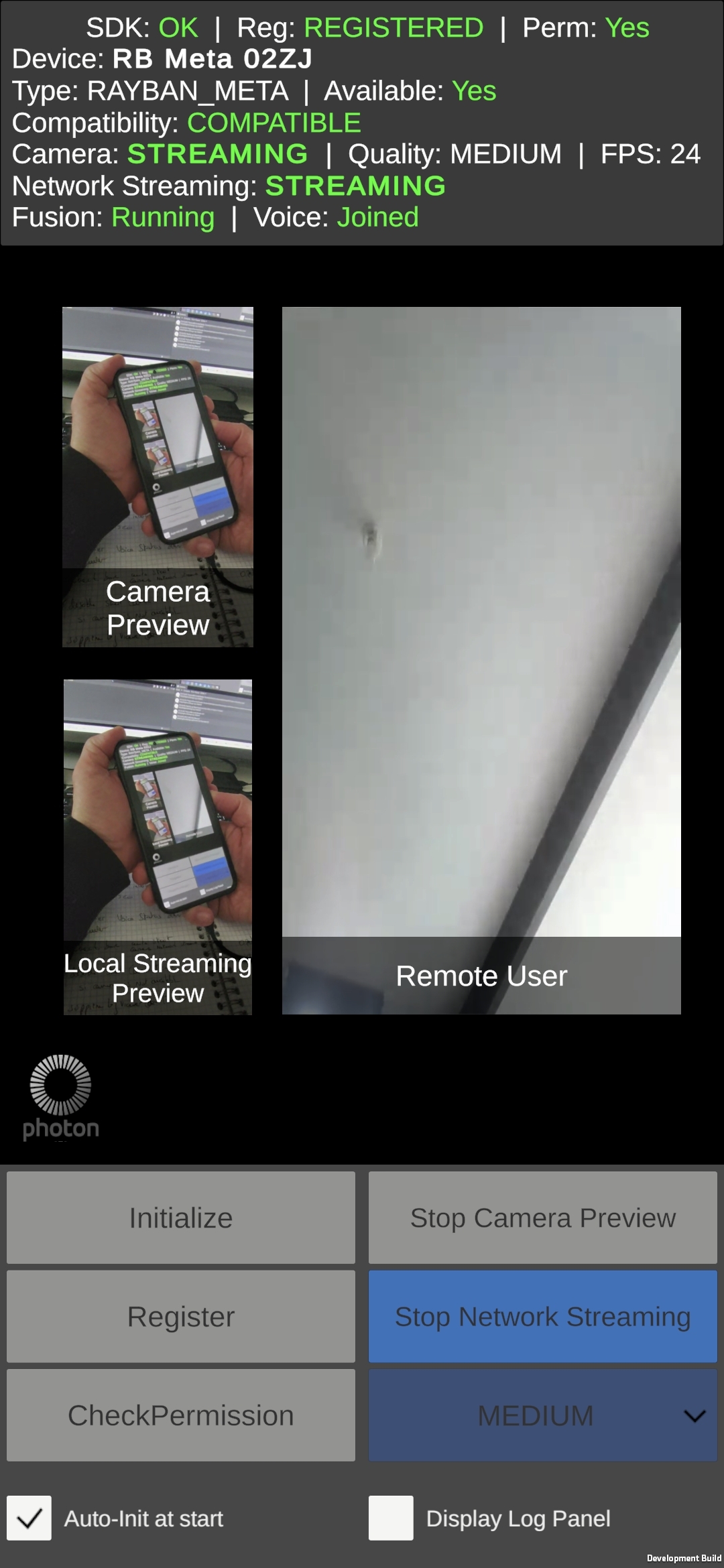
The UI provides buttons for the full device lifecycle:
Initialize: initializes the DAT SDK (requests BLUETOOTH_CONNECT first)
Register: opens the Meta AI app for glasses registration
Check Permission: checks RECORD_AUDIO (Android) and CAMERA (DAT SDK) permissions
Start/Stop Camera Preview: starts/stops the glasses camera stream
Start/Stop Network Streaming: starts/stops H264 emission via Photon
Auto-init at start checkbox can be used to automatically handle the DAT SDK init, app registration & permission verification processes when the application starts.
Display Log Panel checkbox displays/hides an in-app scrollable log panel to display all events and status changes for debugging.
Button states are dynamically updated based on the current stream state (RefreshAllButtons()). For example, "Start Network Streaming" is only enabled during STREAMING state, while "Stop Network Streaming" is also enabled during STARTED (glasses paused).
Video Pipelines
The video data flows through two pipelines that share the same RGBA Texture2D produced by the Kotlin plugin:
RGBA Pipeline (Local Preview)
This pipeline provides a real-time local preview of the glasses camera feed:
- I420 → RGBA32 conversion: the Kotlin plugin performs color space conversion with vertical flip (for Unity's bottom-up texture coordinate convention)
- Double buffering: new frames are buffered in the plugin to avoid blocking the camera thread
- JNI polling:
MetaWearablesBridgepolls the plugin every frame inUpdate()and notifiesKotlinBufferToTextureConverterwhen a new frame is ready to be read - Texture creation:
KotlinBufferToTextureConverterloads the RGBA data into aTexture2D - Display:
KotlinBufferToTextureVideoDisplayreads the texture and displays it on aRawImage
H264 Pipeline (Network Streaming)
This pipeline encodes the camera feed in H264 for transmission over the Photon network. The encoding is handled entirely on the Unity side by Photon's built-in encoder:
- Texture collection:
MetaWearablesVideoRecorder.CollectTexture()returns the same RGBATexture2Dproduced by the RGBA pipeline - Resolution alignment:
Graphics.Blitscales the texture to 64-pixel aligned dimensions (see Video Quality & Resolution) - H264 encoding: Photon's
AndroidTextureVideoEncodercopies theRenderTextureto a MediaCodec Surface viaVulkanSurfaceDrawer, where MediaCodec performs hardware H264 encoding - Photon transport: Photon Voice transmits the H264 data over the network
- Remote decoding: the platform's native H264 decoder renders the stream on the receiver's
ScreenSharingScreen
Video Quality & Resolution
The DAT SDK delivers frames at three quality levels. Since MediaCodec in Surface mode internally aligns to 64-pixel boundaries, the emission resolution is aligned to multiples of 64:
- LOW: 360×640 → aligned to 384×640 (+24px width)
- MEDIUM: 504×896 → aligned to 512×896 (+8px width)
- HIGH: 720×1280 → aligned to 768×1280 (+48px width)
The resolution alignment is computed in Unity by MetaWearablesCameraController.ShouldForceEmissionResolution(), which reads the current quality level from MetaWearablesBridge.CurrentVideoQuality and applies AlignToMacroblock(). The scaling from native to aligned resolution is done by Graphics.Blit in Photon's AndroidTextureVideoRecorderBase.
Workflows
Camera Streaming (Emission)
The end-to-end workflow for starting a camera stream and emitting it over the network:
- Initialize: requests BLUETOOTH_CONNECT permission, then calls
MetaWearablesBridge.Initialize()→ DAT SDK initialized - Register:
MetaWearablesBridge.StartRegistration()→ Meta AI app opens → glasses paired - Check Permissions: RECORD_AUDIO and DAT CAMERA permission
- Start Camera Preview:
MetaWearablesBridge.StartStreaming(quality, fps)→ DAT SDK begins delivering I420 frames → RGBA pipeline starts (local preview only) - Start Network Streaming:
WebcamEmitter.StartEmitting():
a.MetaWearablesCameraController.WaitForWebcamAvailability()waits for STREAMING state
b.ShouldForceEmissionResolution()computes the 64-pixel aligned resolution
c.GetVideoRecorder()creates aMetaWearablesVideoRecorder(extendsAndroidTextureVideoRecorderBase)
d.CreateLocalVoiceVideo()connects Photon's built-inAndroidTextureVideoEncoderto the transport layer - Streaming active: the base class collects the RGBA texture, blits it to a RenderTexture, and Photon's encoder sends it to MediaCodec via VulkanSurfaceDrawer → H264 → Photon transport → remote viewers
Stream Reception (Remote View)
On the receiving side:
- ScreensharingReceiver detects a new voice connection carrying a video stream
- A platform-native H264 decoder is created (
AndroidVideoPlayerUnityTextureon Android,VideoPlayerUnityon desktop) ScreenSharingScreen.EnablePlayback()is called with the decoded textureSetupRawImage()configures theRawImagewith the correct flip correctionUpdateRawImageTexture()continuously refreshes theRawImagetexture from the decoder
Glasses Lifecycle
The Meta smart glasses have several physical states that affect the streaming session:
Stream States (DAT SDK):
STOPPED: session inactiveSTARTING: transitioning to streaming (timeout: 10 seconds)STARTED: session active, camera idle (glasses touch-paused)STREAMING: session active, frames being producedSTOPPING: transitioning to stoppedCLOSED: session terminated (terminal state)
Touch Button Pause/Resume:
When the user touches the glasses touchpad button during streaming, the state cycles: STREAMING → STARTED → STREAMING. During STARTED, the Photon session stays alive but no video frames are collected by the recorder.
Fold/Unfold:
Folding the glasses during streaming causes STREAMING → STOPPED, which terminates the current session. Restarting requires a new streaming session. The STARTING timeout is set to 10 seconds to account for the extra time the glasses camera needs to re-initialize after being unfolded.
Please, note that the DeviceMetadata.linkState property reflects Bluetooth connectivity only, not the physical fold state of the glasses. It stays CONNECTED even when the glasses are folded.
NetworkStreamingHandler:
The NetworkStreamingHandler component automatically stops the WebcamEmitter when the stream state transitions to STOPPED or CLOSED, ensuring the Photon session is properly cleaned up when the glasses disconnect or are folded.
Used XR Addons
ScreenSharing
The ScreenSharing addon provides the framework for video emission and reception over Photon Voice channels. This sample extends it with Meta Wearables-specific components.
The sample implements ICustomRecorderEmitterController through MetaWearablesCameraController, which provides the Meta glasses camera texture to Photon's built-in encoding pipeline instead of the default smartphone camera. Without the custom controller, Photon would stream the phone's camera instead of the glasses camera.
The ScreenSharingScreen has been extended with RawImage support as an alternative to the default MeshRenderer approach.
See ScreenSharing Addon for more details on the base addon.
Known Limitations
Graphics API must be Vulkan: OpenGLES3 causes
AndroidTextureView getTexID error: Preview texture ID is 0on ANGLE devices (Samsung and others). The Video SDK v2.63 supports Vulkan.Android only: the plugin to bridge the Meta DAT SDK to Unity is Android-specific. The
useInEditorflag onMetaWearablesCameraControllerallows testing the pipeline structure in the Unity Editor.H264 codec required: the
WebcamEmittercodec must be set to H264 in the Inspector to match Photon's built-inAndroidTextureVideoEncoder.First camera access may fail: the first camera feed access may fail after the glasses are switched on.
3rd Party Assets and Attributions
The sample is built around the following third-party components:
- Meta Wearables Android DAT SDK: Device Access Toolkit for smart glasses