RPC's In Depth
The Fusion Unreal SDK 3.0.0 is provided as development snapshots and is not intended to be used for live or released games. There may be blocker bugs and the API can change or break during the preview phase.
Custom RPC Node
As mentioned in the quick start guide the preferred way to add RPCs to your project is to use the fusion node.
Right click on the event graph and create a Custom Fusion RPC.

Send Options
Send To All Clients
- The most common option, will attempt to execute event on all connected clients in the room.
Send To Owner
- Will attempt to execute event on the current owner of the actor, components will defer to whoever the actor is and check ownership.
Send To Master Client
- Will attempt to execute event on the master client, this is useful for requesting map changes.
This is due to the fact that only the master client has the authority to change the active map.
The master client can change while inside of a room and cannot be used reliably to target a specific client.
Send To Everyone Else
- Will attempt to execute event on all clients excluding "this" client.
Default Unreal Function Node
Fusion also supports running normal builtin replicated events. This is to support already existing projects.
- Create a custom event and set it up as Replicates with:
Multicast. - Create a custom event and set is up as Replicated with:
Run on Server. - Call the
Run on Serverfunction using some form of input. Even though fusion does not have a definition of a server, unreal engine requires Multicast RPC's to run from a function scope with server authority.
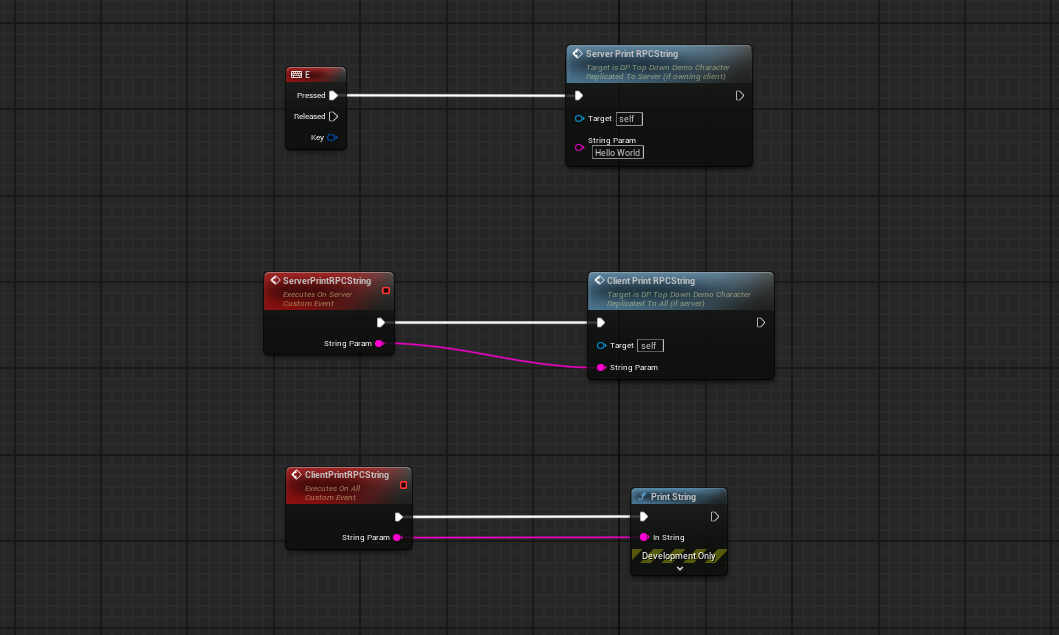
C++
Fusion supports the same functionality in c++ as in blueprint using the Custom Fusion RPC node.
Below is a fairly minimal example.
C++
#pragma once

#include "CoreMinimal.h"
#include "GameFramework/Character.h"
#include "FusionMacros.h"
#include "DemoCharacter.fusion.h"
#include "DemoCharacter.generated.h"

UCLASS()
class PHOTONFUSIONUNREAL_API ADemoCharacter : public ACharacter
{
GENERATED_BODY()
FUSION_BODY();

public:
// Sets default values for this character's properties
ADemoCharacter(const FObjectInitializer& ObjectInitializer);

protected:
// Called when the game starts or when spawned
virtual void BeginPlay() override;


public:
// Called every frame
virtual void Tick(float DeltaTime) override;

SEND_FUSIONRPC(TargetObjectOwner)
void MyRPCTest(int& first, float second, FString& third, struct FMyCustomStruct& fourth);
void MyRPCTest_Receive(int& first, float second, FString& third, struct FMyCustomStruct& fourth);

};
- Include
FusionMacros.h - Define a header where generated code will be placed
(headername).fusion.h - Below
GENERATED_BODY()define the fusion macroFUSION_BODY() - Define fusion RPC macro
SEND_FUSIONRPC("target") - Define the actual function that we can call. Do not implement this function, the header tool will generate it.
- Define a receive function with the same name, important that the name ends with
_Receivesuffix, and that the parameters match that of the call function. - Implement the receive function.
C++
#include "DemoCharacter.h"

#include "FusionOnlineSubsystem.h"
#include "MyCustomStruct.h"

ADemoCharacter::ADemoCharacter(const FObjectInitializer& ObjectInitializer)
{
    PrimaryActorTick.bCanEverTick = true;
}

// Called when the game starts or when spawned
void ADemoCharacter::BeginPlay()
{
    Super::BeginPlay();
}

// Called every frame
void ADemoCharacter::Tick(float DeltaTime)
{
    Super::Tick(DeltaTime);
}

void ADemoCharacter::MyRPCTest_Receive(int& first, float second, FString& third, FMyCustomStruct& fourth)
{
    UE_LOG(LogTemp, Warning, TEXT("First: %d Second: %f  third: %s fourth.bool: %d  fourth.inner.int: %d"), first, second, *third, fourth.SomeBool, fourth.SomeStruct.SomeInt);
}
Send Options
Similar to the blueprint node the c++ function can be defined with the following options, these options will map to the same functionality described above.
- TargetAllClients
- TargetObjectOwner
- TargetMasterClient
- TargetEveryoneElse
Sending global RPC's
Sometimes there is a need to send an event to all connected clients regardless of their local state and what map they have currently loaded.
To do this define a blueprint event or implement it via c++ as described above on the GameInstance.
In fusion the GameInstance is networked as a global object and will always be valid as long as we are in the Room.