Bandwidth Limits and Best Practices
This page describes Fusion 2.1.
Introduction
Each network send carries a limited amount of data, about 2,200 bytes. This space is shared by:
- Changes to
[Networked]properties, see Networked Properties - RPCs, see Remote Procedure Calls
- API calls that send a message, see APIs That Send a Message
- Client input (the
INetworkInputstruct) in the Client-Server topology, see Client-Server Player Input
When a peer sends more than fits, nothing is lost, but everything arrives later, because the data is spread across several sends.
Reliable Large Data RPCs and Data Streaming are sent separately, one packet of about 1,100 bytes per send, and do not compete for this space. A transfer still adds a packet to every send while it runs, so only send what you need.
Quick Rules
- Use
[Networked]properties for values that change often, such as positions or health. - Use RPCs for one-off events.
- Do not send an RPC every frame or every tick unless you have to.
- Some API calls, such as
RequestStateAuthority(), send a message just like an RPC.- Like RPCs, call them when something needs changing, not every frame.
- With no changing state, a peer can send about 130 small messages per send, which is about 2,000 per second at the default Shared Mode send rate.
- To send large data, use Reliable Large Data RPCs or Data Streaming.
How Sending Works
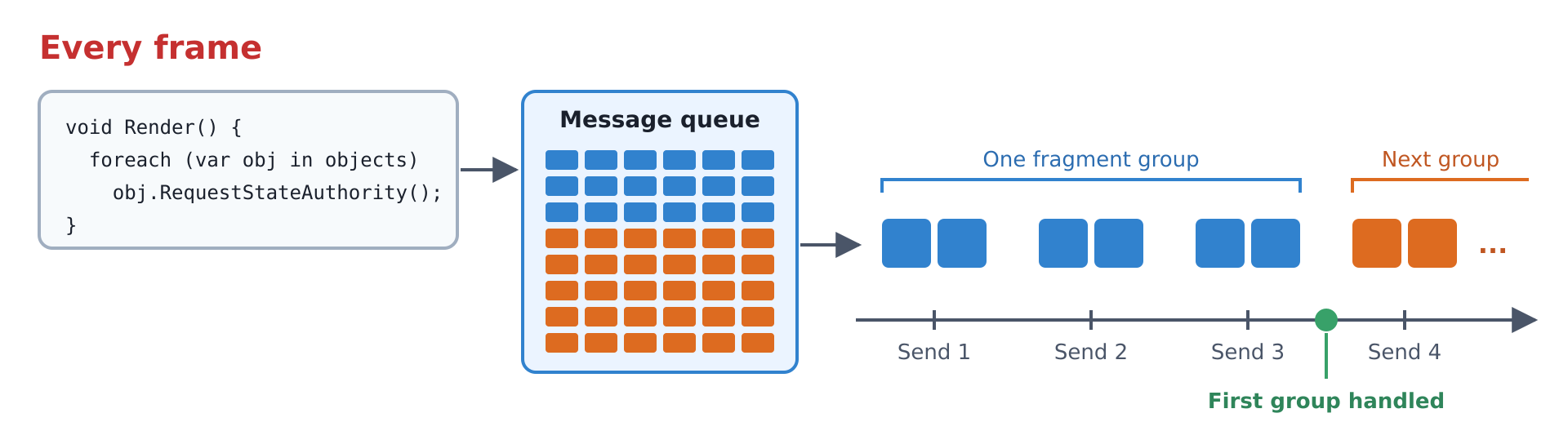
Each peer sends at a fixed rate, the send rate. Each send works like this:
- RPCs and other messages are added to a queue as you call them.
- At the send, Fusion writes all queued messages and the changed state into one block of data.
- The block is split into packets of about 1,100 bytes each, called a fragment group.
- The packet size is the MTU minus protocol overhead (IPv6, UDP, Photon Realtime and Fusion headers). The MTU is fixed at 1,280 bytes and can't be configured, which leaves about 1,100 bytes of payload per packet.
- At most 2 packets leave per send.
- A group of 5 packets takes 3 sends to leave.
- If you follow the Quick Rules, a group rarely needs more than one send.
- Fusion does not prepare the next block until every packet of the group has left.
Messages you send in the meantime wait in the queue for the next block.
- If you send messages faster than they can leave, each block is bigger than the last and messages arrive later and later.
- If you follow the Quick Rules, this does not happen.
- The receiver handles the block only after all of its packets have arrived.
- It handles the messages in the order they were sent.
Messages are reliable or unreliable.
Only RPCs on RpcChannel.Unreliable are unreliable.
APIs that send messages are reliable.
Reliable and unreliable RPCs are both part of the regular send described above and use the same space.
Only Reliable Large Data RPCs are sent separately.
The only difference is what happens when a packet is lost, as described below, so making an RPC unreliable does not let you send more of them.
If one packet of a group is lost, the whole group is lost:
- Reliable messages are queued again and go into the next block, which makes it bigger.
- Unreliable RPCs in the group are dropped.
- State changes in the group are sent again.
- Bigger groups take more sends to leave and are more likely to lose a packet.

After 8 or more packets have been lost without a delivery in between, Fusion switches to a reliable fallback for the next blocks. The fallback sends 1 packet per send, resends lost packets and does not start the next block until the current one has arrived. Fusion returns to normal sending as soon as a block is delivered.
The host or dedicated server can raise the number of packets it sends to each client per send with NetworkProjectConfig.Network.GameChannelSendCount and, for the reliable fallback, NetworkProjectConfig.Network.GameReliableChannelSendCount.
These settings are only available in code, can only be raised and are capped at 4.
Clients and all Shared Mode peers use the defaults.
Raising them increases bandwidth use, which can increase costs, so reduce what you send first.
APIs That Send a Message
Each call to one of these APIs sends one message.
Where NetworkObject has a method of the same name, it sends the same message.
| API | Approximate size |
|---|---|
| RPCs | 16 bytes + arguments |
Runner.RequestStateAuthority(), Runner.ReleaseStateAuthority() |
17 bytes |
Runner.BatchRequestStateAuthority(), Runner.BatchReleaseStateAuthority() |
81 bytes, for 1 to 16 objects |
Runner.AddPlayerAreaOfInterest() |
25 bytes |
Runner.SetPlayerAlwaysInterested() |
21 bytes, only when interest management is enabled |
Runner.SetPlayerObject() |
13 bytes |
NetworkObject.SetPriority() |
17 bytes |
In the Client-Server topology, only RPCs send messages and the host or dedicated server applies the other calls directly.
- Call these APIs when something changes, not every frame or tick.
SetPriority(),SetPlayerAlwaysInterested()andSetPlayerObject()need one call per change. - Call
AddPlayerAreaOfInterest()at most once per tick, fromFixedUpdateNetwork(). In Shared Mode each call replaces the previous area, so a second call in the same tick is wasted. - A state authority request gets no reply when it is refused. Requesting State Authority shows how to retry without filling the queue.
- To request state authority over many objects at once, use
Runner.BatchRequestStateAuthority()or spread the calls over several ticks.
Best Practices
Requesting State Authority
In Shared Mode, RequestStateAuthority() sends a message to the Photon Cloud.
If the Photon Cloud grants it, Object.StateAuthority changes on your peer about one round trip later, plus the wait for the next send at each end.
If the Photon Cloud refuses it, nothing comes back.
So a request that has not taken effect after twice the round trip time was refused, or is held up by a lost or full send.
Sending it again before then only adds messages to the queue and delays the answer further.

- Only request when you need to, for example when
Object.StateAuthorityisPlayerRef.None. - Wait at least
2 * Runner.GetPlayerRtt(Runner.LocalPlayer)before you request the same object again.GetPlayerRtt()returns seconds and does not include the wait for the next send, so keep a floor of a few hundred milliseconds. - Implement
IStateAuthorityChangedto react when the state authority changes. It is called on every peer, so checkObject.HasStateAuthorityinside it. - It is fine to check every frame, for example in
Render(), as long as the request itself is limited.
This example script takes state authority over an object whose previous state authority has left the session.
It follows the practices above.
Only the player with the lowest PlayerId requests it, so players do not compete for it.
C#
public class ClaimStateAuthority : NetworkBehaviour
{
  // GetPlayerRtt() does not include the wait for the next send, so keep a floor
  const float MinimumRetryDelay = 0.2f;

  float _lastRequestTime = -1;

  public override void Render()
  {
    // Only request state authority if the object has no valid state authority
    if (Object.StateAuthority != PlayerRef.None && Runner.IsPlayerValid(Object.StateAuthority)) {
      _lastRequestTime = -1;
      return;
    }

    // To stop all players requesting StateAuthority at the same time
    // which would lead to flip-flopping among them we elect the player
    // with the lowest id to request it.
    if (IsLowestActivePlayer() == false) {
      return;
    }

    // Rate limit how many requests we send, use 2 x the round trip time to allow
    // for a previous attempt's response to have returned to us.
    var retryDelay = Mathf.Max(MinimumRetryDelay, 2f * (float)Runner.GetPlayerRtt(Runner.LocalPlayer));
    if (_lastRequestTime >= 0 && Time.time - _lastRequestTime < retryDelay) {
      return;
    }

    // false means no request was sent, so it is safe to try again next frame
    if (Object.RequestStateAuthority()) {
      _lastRequestTime = Time.time;
    }
  }

  bool IsLowestActivePlayer()
  {
    foreach (var player in Runner.ActivePlayers) {
      if (player.PlayerId < Runner.LocalPlayer.PlayerId) {
        return false;
      }
    }
    return true;
  }
}
To request up to 16 objects at once, use Runner.BatchRequestStateAuthority().
It sends one message of 81 bytes for the whole batch, so it is smaller than separate requests from 5 objects upward.
Available from Fusion 2.1.3.
C#
var ids = new List<NetworkId>();
foreach (var networkObject in objectsToTake) {
  ids.Add(networkObject.Id);
}

// If any object cannot change state authority, none of them change.
Runner.BatchRequestStateAuthority(ids);
Sending Many Events at Once
If something produces many events in one frame, do not send one RPC per event. Combine them into one RPC with an array.
Instead of this:
C#
foreach (var point in newPoints) {
  RPC_AddPoint(point);
}

[Rpc(RpcSources.StateAuthority, RpcTargets.All)]
void RPC_AddPoint(Vector3 point) { }
Do this:
C#
RPC_AddPoints(newPoints.ToArray());

[Rpc(RpcSources.StateAuthority, RpcTargets.All)]
void RPC_AddPoints(Vector3[] points) { }
Each RPC has its own header of about 16 bytes. For 40 points, 40 separate RPCs use about 1,100 bytes. One RPC with an array uses about 500 bytes.
An RPC can carry at most 512 bytes of arguments, which is 42 Vector3 values.
For more data, use a Reliable Large Data RPC or spread the events over several ticks.
Calculating Your Limits
You can estimate how many messages fit in one send:
messages per send = (2,200 - state bytes) / message size
messages per second = messages per send x send rate
state bytes is the size of the changed [Networked] state the peer sends in that send.
With no changing state it is 0.
To estimate state bytes, use the Fusion Inspector.
It shows the networked state size of each object and component and how often their state changes, so you can see which objects send the most state.
RPC Argument Sizes
An RPC uses about 16 bytes plus its arguments.
Each argument is rounded up to a multiple of 4 bytes.
An int, a float, a bool or a byte uses 4 bytes and a Vector3 uses 12 bytes.
Arrays add 4 bytes for their length and pack their elements, so a byte[] uses 1 byte per element.
Strings add 4 bytes for their length and use UTF-8, which is one byte per character for English text.
The sizes of the other messages are listed in APIs That Send a Message.
Upper Limits
These are the most a peer can send with no changing state and no packet loss. The default send rate is 16 per second in Shared Mode and 32 per second in the Client-Server topology.
| Send rate | Small messages per send | Small messages per second |
|---|---|---|
| 16 | ~130 | ~2,000 |
| 32 | ~130 | ~4,000 |
A small message is one of 16 or 17 bytes, such as an RPC with no arguments or a state authority request.
For an RPC with one Vector3 and one int argument, each RPC would use about 16 + 12 + 4 = 32 bytes, so about 2,200 / 32 = 68 fit in one send.
But remember it will be rare for the 2,200 bytes to be free as its shared with the state changes, so to be conservative it might be best to aim for half as many.
Diagnosing
If a peer sends too much then that peer will appear to be sending data late and at a reduced send rate.
Fusion Statistics can show whether a peer sends too much. The statistics below are only collected with the Debug DLLs. To switch to them, use Tools > Fusion > Change Dll Mode > Debug.
On the Network page of Fusion Statistics:
- Game Queue Depth is often above 2: more packets are waiting than can leave in one send, so later sends are delayed.
- Fragment Groups Lost rises: groups are lost and their reliable messages are sent again.
- Fragment Group Size shows the size of the last lost group. Large values mean that big groups are being lost.
If you see these, reduce how many RPCs and other messages you send, using the practices above. To find which RPCs are sent most often, sort the RPCs overview of the Fusion Inspector by Sent.
Last updated on
Back to top