Entity View
Introduction
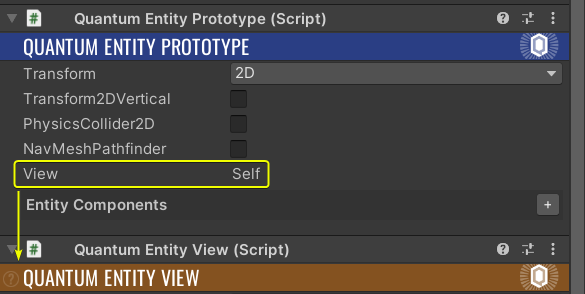
QuantumEntityViews are linked to Entities via the Quantum View component. It contains an AssetRef to the GameObject which represents the view and should be instantiated for a specific entity. When configuring an Entity Prototype prefab or scene object with a QuantumEntityView in Unity, the Quantum View component is automatically filled into the prototype.
The QuantumEntityViewUpdater is responsible for handling the view side of all entities in Unity such as destroying, creating and updating the view game objects of associated entities, based on data from the simulation. The QuantumEntityViewUpdater script needs to be added to all scenes that contain a QuantumMap.
QuantumEntityViewComponents can be used to add view related features to individual EntityViews. See the Entity View Component section.
Pooling
By default, the QuantumEntityViewUpdater creates new instances of the QuantumEntityView prefabs whenever an entity gets created and destroys the view GameObjects respectively.
To enable pooling of entity views add the QuantumEntityViewPool script to the QuantumEntityViewUpdater game object. The pool works seamlessly with the EVU and can be replaced by a custom implementation by using the IQuantumEntityViewPool interface.
| Property | Description |
|---|---|
| HidePooledObjectsInHierarchy | Toggle on to set HideFlags.HideInHierarchy on pooled objects |
| ResetGameObjectScale | Toggle on to reset the local scale of objects to one |
| Precache Items | Object will be instantiated during Awake() and made available in the pool |
EntityViews that subscribe to Quantum callbacks or events must make sure to either:
- Unsubscribe before the game objects are returned to the pool
- Must enable the
onlyIfActiveAndEnabledparameter as shown below
C#
QuantumEvent.Subscribe<EventPlayerKilled>(this, OnKilled, onlyIfActiveAndEnabled: true);
Bind Behaviour
The QuantumEntityView script in Unity has a property called Bind Behaviour which can be set to either:
Non Verified: the view Game Object can be created in Predicted framesVerified: the view Game Object can only be created in Verified frames
Using Non Verified is usually better for the views of entities which are instantiated in high frequency and/or they need to show up as quickly as possible on the player screen due to gameplay reaction time mechanics and such. For example, creating projectiles in a fast paced shooting game should be done using this alternative.
Using Verified on the other hand is mostly useful for views of entities which does not need to show up immediately and can afford the small delay of waiting for a Verified frame. This can be useful to avoid creating/destructing view objects during mispredictions. A good example of when to use this is for the creation of playable character entities.
Manual Disposal
If the Manual Disposal property is toggled on the destruction methods in the QuantumEntityViewUpdater are skipped. This allows for manual destruction using the OnEntityDestroyed callback of the QuantumEntityView or to destroy them via custom destroy events.
View Culling (Quantum 3.0.3)
The EntityViewUpdater can be extended to control which Quantum entities are synched with Unity views using the IQuantumEntityViewCulling interface adding it to the QuantumEntityViewUpdater GameObject. It can overwrite the iterators for dynamic and map entities.
The sample implements a basic culling algorithm using a sphere check while also re-using the prediction culling for non-verified views during online mode.
C#
namespace Quantum {
  using System.Collections.Generic;
  using Photon.Deterministic;
  using UnityEngine;

  /// <summary>
  /// Sample implementation of entity view culling using a sphere.
  /// Add this script to the same GameObject that has the <see cref="QuantumEntityViewUpdater"/>.
  /// </summary>
  public class QuantumEntityViewCulling : QuantumMonoBehaviour, IQuantumEntityViewCulling {
    /// <summary>
    /// The culling sphere center.
    /// </summary>
    public FPVector3 ViewCullingCenter;
    /// <summary>
    /// The culling radius.
    /// </summary>
    public FP ViewCullingRadius = 20;

    List<(EntityRef, View)> _dynamicEntities = new List<(EntityRef, View)>();
    List<(EntityRef, MapEntityLink)> _mapEntities = new List<(EntityRef, MapEntityLink)>();

    /// <summary>
    /// Only return dynamic entities inside the culling sphere.
    /// </summary>
    public unsafe IEnumerable<(EntityRef, View)> DynamicEntityIterator(QuantumGame game, Frame frame, QuantumEntityViewBindBehaviour createBehaviour) {
      _dynamicEntities.Clear();
      var radiusSqr = ViewCullingRadius * ViewCullingRadius;

      if (createBehaviour == QuantumEntityViewBindBehaviour.NonVerified && frame.IsPredicted) {
        // Use the prediction culling for non-verified bindings (this frame is predicted only in online mode)
        var filter = frame.Filter<View>();
        // Make sure to enabled prediction culling on the filter
        filter.UseCulling = true;
        while (filter.NextUnsafe(out var entity, out var view)) {
          _dynamicEntities.Add((entity, *view));
        }
      } else {
        // Use sphere distance check to cull entities
        var filter3D = frame.Filter<Transform3D, View>();
        while (filter3D.NextUnsafe(out var entity, out var transform, out var view)) {
          var distanceSqr = (transform->Position - ViewCullingCenter).SqrMagnitude;
          if (distanceSqr < radiusSqr) {
            _dynamicEntities.Add((entity, *view));
          }
        }

        var filter2D = frame.Filter<Transform2D, View>();
        while (filter2D.NextUnsafe(out var entity, out var transform, out var view)) {
          var distanceSqr = (transform->Position.XOY - ViewCullingCenter).SqrMagnitude;
          if (distanceSqr < radiusSqr) {
            _dynamicEntities.Add((entity, *view));
          }
        }
      }

      return _dynamicEntities;
    }

    /// <summary>
    /// Only return map entities inside the culling sphere.
    /// </summary>
    public unsafe IEnumerable<(EntityRef, MapEntityLink)> MapEntityIterator(QuantumGame game, Frame frame, QuantumEntityViewBindBehaviour createBehaviour) {
      _mapEntities.Clear();
      var radiusSqr = ViewCullingRadius * ViewCullingRadius;
      if (createBehaviour == QuantumEntityViewBindBehaviour.NonVerified && frame.IsPredicted) {
        // Use the prediction culling for non-verified bindings (this frame is predicted only in online mode)
        var filter = frame.Filter<MapEntityLink>();
        // Make sure to enabled prediction culling on the filter
        filter.UseCulling = true;
        while (filter.NextUnsafe(out var entity, out var link)) {
          _mapEntities.Add((entity, *link));
        }
      } else {
        // Use sphere distance check to cull entities
        var filter3D = frame.Filter<Transform3D, MapEntityLink>();
        while (filter3D.NextUnsafe(out var entity, out var transform, out var link)) {
          var distanceSqr = (transform->Position - ViewCullingCenter).SqrMagnitude;
          if (distanceSqr < radiusSqr) {
            _mapEntities.Add((entity, *link));
          }
        }

        var filter2D = frame.Filter<Transform2D, MapEntityLink>();
        while (filter2D.NextUnsafe(out var entity, out var transform, out var link)) {
          var distanceSqr = (transform->Position.XOY - ViewCullingCenter).SqrMagnitude;
          if (distanceSqr < radiusSqr) {
            _mapEntities.Add((entity, *link));
          }
        }
      }

      return _mapEntities;
    }

    /// <summary>
    /// Gizmo rendering of view culling sphere.
    /// </summary>
    public void OnDrawGizmosSelected() {
      Gizmos.DrawWireSphere(ViewCullingCenter.ToUnityVector3(), ViewCullingRadius.AsFloat);
    }
  }
}
View Flags
The view flags configure smaller details and allows performance tweaks on the entity views.
| Flag | Description |
|---|---|
| DisableUpdateView | QuantumEntityView.UpdateView() and QuantumEntityView.LateUpdateView() are not processed and forwarded to entity view components. |
| DisableUpdatePosition | Will completely disable updating the entity view positions. |
| UseCachedTransform | Use cached transforms to improve the performance by not calling Transform properties. |
| DisableEntityRefNaming | By default, the entity game object is named to resemble its EntityRef value. Set this flag to disable this behavior. |
| DisableSearchChildrenForEntityViewComponents | Disable searching the entity view game object children for entity view components. |
| DisableSearchInactiveForEntityViewComponents | Disable searching the entity view disabled game object children for entity view components. |
| EnableSnapshotInterpolation | Initializes a transform buffer so that updating with verified frames only can be switched on to guarantee smooth visuals. When in use, visuals are presented with latency proportional to ping. Turning this on only prepares the buffers and callbacks. Switching the interpolation mode is controlled with a separate toggle on the QuantumEntityView. |
Interpolation
The QuantumEntityView component has an Interpolation Mode dropdown with three options, plus Auto, a hybrid of the first two. Each mode reads a different set of fields in the inspector, and fields that do not apply to the selected mode are hidden. The interpolation mode is a prefab-time choice and should not be changed at runtime.
Prediction mode (clock-aliasing + error correction)
The default mode. It combines sub-tick smoothing with rollback error correction, and is the right choice for entities the local player controls or sees up close in a networked game.
The view lerps between the previous and current predicted simulation tick using the render-time alpha, so motion stays smooth at any frame rate. When a rollback corrects an earlier prediction, the resulting visual offset is slid away over several frames instead of snapping. Sub-tick lerping is always active; error correction only runs in networked predicted multiplayer and is a no-op for local or lockstep games.
The Prediction Error Correction section tunes the rollback smoothing:
| Field | Meaning |
|---|---|
| ErrorCorrectionRateMin | Minimum percentage of accumulated error corrected per second. Lower values produce a smoother slide. |
| ErrorCorrectionRateMax | Maximum percentage corrected per second once the error is large. |
| ErrorPositionBlendStart / ErrorPositionBlendEnd | Position-error magnitudes (meters) over which the rate ramps from Min to Max. |
| ErrorRotationBlendStart / ErrorRotationBlendEnd | Same ramp for rotation, expressed in radians. |
| ErrorPositionMinCorrection | Errors smaller than this (meters) are snapped in a single frame instead of being dragged out. |
| ErrorPositionTeleportDistance | Above this distance (meters), smoothing is abandoned and the view teleports. |
| ErrorRotationTeleportDistance | Same teleport threshold for rotation, in radians. |
As a rule of thumb, larger blend ranges and lower rates are smoother but laggier, while smaller ranges and higher rates are snappier but make corrections more visible. Scale the distances to the game's units and entity speeds.
Snapshot interpolation
Smooth and accurate, but always renders a few ticks in the past. It is the best choice for purely remote entities, or any view where being slightly late is preferable to ever being wrong.
The view plays back from a buffer of verified server frames, lerping between two past frames. Because it never shows a prediction, there are no rollback corrections to hide. EnableSnapshotInterpolation must be set in the view's ViewFlags; otherwise the mode falls back to Prediction mode and logs a warning.
This mode has no per-view tuning. The timing fields live on the QuantumEntityViewUpdater component, under Snapshot Interpolation:
| Field | Meaning |
|---|---|
| SnapshotReferenceLatencyTicks | How many ticks behind the verified frame the playback head sits (default ~4). Lower values are more responsive but more sensitive to jitter; higher values are smoother under poor network conditions. |
| TimeDilationPercentage | How much the playback clock may speed up or slow down (percent per tick) to keep itself inside the buffer window. |
| ElasticWindowTicks | Tolerance around the target latency before the clock starts dilating. |
The Auto option uses Snapshot interpolation only while an entity is prediction-culled and Prediction mode otherwise. It requires the same EnableSnapshotInterpolation flag.
Exponential decay
Introduced in Quantum SDK 3.1.
A lightweight, frame-rate-independent smoothing that exponentially eases the GameObject's Unity transform toward its target position and rotation each frame, rather than interpolating between fixed simulation snapshots. This makes it very cheap and visually smooth.
Each frame, the current Unity transform is lerped a fraction of the way toward the latest simulation transform. There is no prediction history and no error buffer, so when the simulation jumps the view eases in, and external writes to the transform (animation, tweens) blend naturally instead of being overwritten.
Though Quantum has a stable and fast update rate which improves the quality of this interpolation mode, abrupt movement changes (e.g. jumping and landing) could look rubber-band-ish and would require applying heuristics to it.
Also, if position updates are happening in a lower rate, time slicing optimization inside the simulation, the views require overriding the SmoothTime.
| Field | Meaning |
|---|---|
| ExponentialAlpha | Read-only debug readout of the current frame's alpha. |
| OverrideSmoothTime | Toggle on to override the smooth time. |
| SmoothTime | Time (seconds) to correct roughly 63% of the gap. Smaller values are snappier but jitterier; larger values are smoother but laggier. |
| TeleportWhenScreenChanged | Required when the view sits under a RectTransform. Resizing the canvas would otherwise make the view slide visibly; enabling this snaps it on a resolution change instead. |
Events
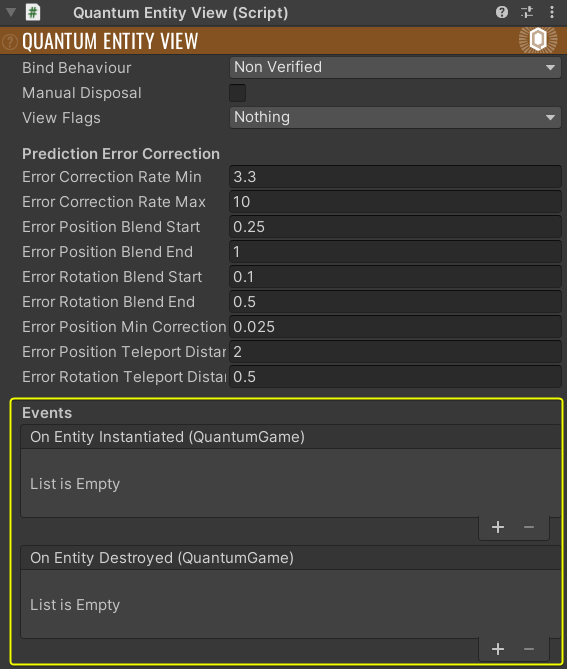
Add Unity events to the creation (also from the pool) and destruction of entity views. It uses UnityEvent<QuantumGame>
Teleporting Entities
The QuantumEntityView script interpolates the entity GameObject visuals by default. This adjusts for the difference in simulation rate, render rate and for error correction in terms of mis-prediction.
When moving an entity to a distant location in a single frame (i.e "teleporting" it), even though the entity data in the simulation snaps to the target position, the view interpolation will lerp it between the start and end positions over a few frames.
It can be noticeable and the view game object could be seen moving very fast on the screen, which is not desired.
In order to prevent this from happening, when an entity's Position should change so much (usually when respawning an entity or moving if the game has teleport features), use transform->Teleport(frame, newPosition);. This makes the Entity view component automatically apply non-lerped movement.
Finding Views
A very common use case is to find the view of a specific entity. Since the simulation side is not aware of QuantumEntityViews, EntityRefs must be passed to the view via events, or polled (read only) from the frames. The QuantumEnityViewUpdater has a GetView(EntityRef) function that can be used to find the view of a specific EntityRef. The views are cached in a dictionary, so the lookup is very efficient.
Events and Update Order
The OnObservedGameUpdated function on the QuantumEntityViewUpdater, which is responsible for creating, destroying and updating EntityViews, gets called before events get processed. This means that destroyed entities in an event might already had their views destroyed.
Custom Destroy Events
A common pattern is to destroy an entity but still wanting to execute an event with additional information about the destruction to the view. To prevent the QuantumEntityView from getting destroyed before the event gets processed set its Manual Disposal field to true.
This will keep the view alive instead of passing it into the QuantumEntityViewUpdater's DestroyEntityViewInstance function which by default destroys the GameObject.
With that the event handler can still find the view and execute the destroy event with the view present. The QuantumEntityView needs to be cleaned up manually by destroying it or returning it to the object pool.
AutoFindMapData
AutoFindMapData has to be enabled when using maps with QuantumEntityView on them. If enabled the view will search for the corresponding MapData object and match map entities with their views. Disable this if you are not using maps with entities to allow for having scenes without a MapData script present.
Customizations
The QuantumEntityViewUpdater gives the following possibilities to customize.
Overriding Create
To get the GameObjects from a pool instead of having them instantiated, override the CreateEntityViewInstance function. The function has a Quantum.EntityView parameter indicating which view to spawn. The QuantumEntityView.AssetGuid can be used as a key in a dictionary of pooled objects.
C#
protected override QuantumEntityView CreateEntityViewInstance(Quantum.EntityView asset, Vector3? position = null, Quaternion? rotation = null) {
    Debug.Assert(asset.View != null);

    // view pooling can also be customized by using IQuantumEntityViewPool
    QuantumEntityView view = _myObjectPool.GetInstance(asset);

    view.transform.position = position ?? default;
    view.transform.rotation = rotation ?? Quaternion.identity;

    return view;
}
The result of CreateEntityViewInstance() gets assigned to the Entity in OnEntityViewInstantiated(). This method is virtual as well and can be overridden but in most cases this is not necessary. When overriding it is important to keep the EntityRef assignment in place.
Overriding Destroy
To return views to the pool, instead of destroying them, override DestroyEntityViewInstance().
C#
protected override void DestroyEntityViewInstance(QuantumEntityView instance) {
    _myObjectPool.ReturnInstance(instance);
}
Map Entities
For map entities, ActivateMapEntityInstance() is responsible for activating the views and can be overridden for custom behavior if needed.
DisableMapEntityInstance() gets called which by default disables the GameObject. This function can be overridden for custom behavior as well.
Last updated on
Back to top