Movement
Move step
Following equation is used to calculate desired position delta for single move step:
Step Position Delta = (Dynamic Velocity + Kinematic Velocity) * Delta Time + External Delta
Dynamic Velocity
- Velocity that accumulates external forces
- Gravity, impulse from explosion, force field, jump pad
- Can push the KCC upwards on slopes
- Related API when using default
EnvironmentProcessor:KCCData.DynamicVelocityKCC.SetDynamicVelocity()KCC.AddExternalForce()KCC.AddExternalImpulse()KCC.Jump()
Kinematic Velocity
- Unconstrained velocity calculated from user input actions
- Usually based on
KCCData.InputDirection(entry point) - Only walkable surfaces push the KCC upwards to prevent artifacts on steep slopes (controlled by
KCCData.MaxGroundAngle) - Related API when using default
EnvironmentProcessor:KCCData.KinematicVelocityKCC.SetInputDirection()KCC.SetKinematicDirection()KCC.SetKinematicSpeed()KCC.SetKinematicVelocity()
External Delta
- Absolute position offset
- Useful for corrections on the end of move step (after depenetration)
- Related API:
KCCData.ExternalDeltaKCC.AddExternalDelta()KCC.SetExternalDelta()
Movement algorithm
The KCC virtual capsule always moves by calculated position delta and then depenetrates from overlapping colliders.
- ✅ This approach gives natural sliding against geometry.
- ✅ Most of the time single capsule overlap is needed which makes KCC very performant.
- ❌ Sometimes it results in jitter when moving against multiple colliders (usually some corners), but this can be usually resolved by running more depenetration steps.
Continuous Collision Detection (CCD)
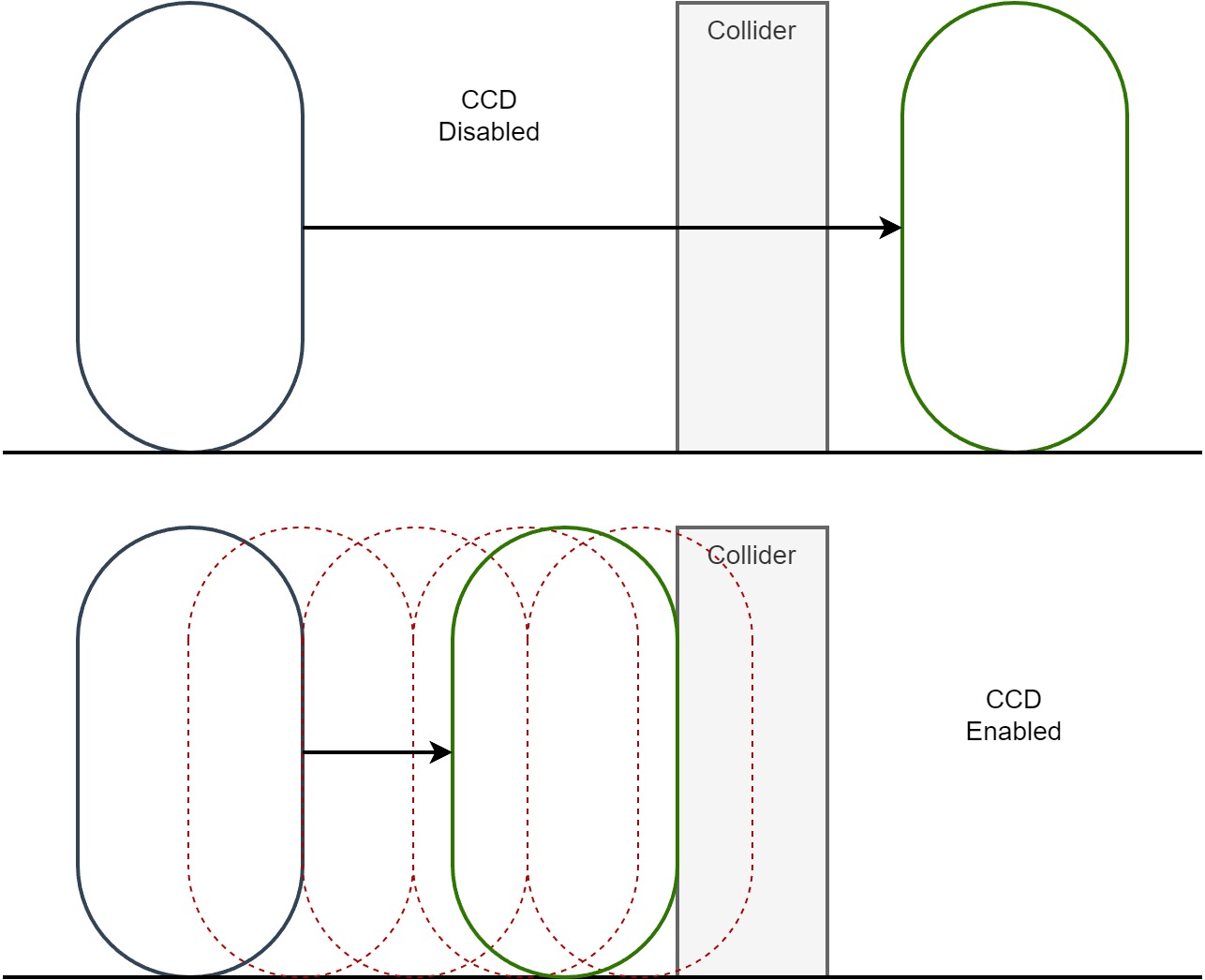
If the character moves too fast (position delta for single step is bigger than 75% of radius with default settings), the movement is divided into sub-steps to not pass through geometry.
- Movement is divided to smaller steps based on desired velocity.
- The maximum distance traveled in single step is 10-90% of radius and is controlled by
CCD Radius Multiplierproperty inKCC Settingsasset. - 75% is good in most cases, lower this value only if you have problems with KCC running through geometry.
- Before lowering
CCD Radius Multipliertry to increaseMax Penetration Steps(improves quality of depenetration) inKCC Settingsasset.
Collision filtering
- Primary filter is collision layer mask - controlled by
Collision Layer Maskproperty inKCC Settingsasset. The Layer Collision Matrix from Physics Settings is not used by KCC. - It is possible to explicitly ignore a static collider or an entity with
KCC.SetIgnoreCollider(). - Use
KCCContext.PrepareUserContext()to setResolveCollisiondelegate for application of additional filtering rules.
Sleeping
The KCC can fall asleep after a period of inactivity and skip physics processing entirely, reducing simulation cost of idle characters.
- Automatic sleeping is controlled by
Sleep Delayproperty inKCC Settingsasset and is disabled by default (Sleep Delay = 0). - The KCC is considered inactive when there is no pending input direction, velocity, force, impulse, external delta, jump or teleport.
- A sleeping KCC does not resolve penetration and does not update collisions - no
OnEnter()/OnExit()callbacks are fired until it is woken up. - Any activity (input, velocity, force, impulse, jump, teleport) wakes the KCC up automatically.
Related API:
KCC.IsAsleep- current sleep state.KCC.Sleep()- puts the KCC to sleep immediately, works independently ofSleep Delay.KCC.WakeUp()- wakes the KCC up, it stays awake until it is put to sleep manually or the inactivity timer is armed again by activity.KCC.WakeUp(FP time)- wakes the KCC up and sets the inactivity timer to a given time.
Call KCC.WakeUp() when surrounding geometry changes and the KCC needs to resolve penetration.
Last updated on
Back to top