Processors
Interaction
KCC processors play a major role when interacting with KCC.
KCC supports two interaction types:
- Collision
- Physics based interaction.
- Regular colliders and triggers are supported.
- Triggered when KCC starts/stops colliding with a scene object.
- Static collider - The processor asset must be linked as User Asset on Quantum static collider component.
- Entity - The
KCC Processor Linkcomponent must be added to entity prototype and Processor asset assigned.
- Modifier
- Manually registered
KCCProcessorasset viaKCC.AddModifier()andKCC.RemoveModifier().
- Manually registered
The KCCProcessor declares two important methods:
C#
public virtual bool OnEnter(KCCContext context, KCCProcessorInfo processorInfo, KCCOverlapHit overlapHit) => true;
- Invoked when the KCC starts colliding with a collider or when a modifier is registered with
KCC.AddModifier(). - Return value controls start of the interaction
- The interaction can be deferred until certain conditions are met (it is not registered within KCC until true is returned)
- For example when the player enters an area and gets a speed buff at full health only
C#
public virtual bool OnExit(KCCContext context, KCCProcessorInfo processorInfo) => true;
- Invoked when the KCC stops colliding with a collider or when a modifier is unregistered with
KCC.RemoveModifier(). - Return value controls end of the interaction
- Stopping interaction can be deferred until certain conditions are met (it keeps registered in KCC until true is returned)
- For example when the player enters an area and gets slowdown debuff, removal is deferred until the player is at full health (no matter if the player still stands within the area or not)
- Once the interaction ends (
OnExit()returns true or the modifier is removed), the processor no longer receives stage callbacks -IBeforeMove,IAfterMoveStep,IAfterMove- within the same update.
Stages
Stage is a sequence of specific method calls executed on processors. It is uniquely identified by an interface type.
KCC supports these stages executed during update:
IBeforeMove- executed at the beginning of the move. Used to configure KCC, enable/disable features, add forces, …IAfterMoveStep- executed after each move step (physics query + depenetration from colliders) and before updating collision hits and firingOnEnter()/OnExit()callbacks. Used for minor position corrections, vector projections, … This method can be called multiple times in a row if the KCC moves too fast (CCD is applied).IAfterMove- executed on the end of the move. Use to apply any post processing.
C#
public unsafe class StepUpProcessor : KCCProcessor, IAfterMoveStep
{
    public void AfterMoveStep(KCCContext context, KCCProcessorInfo processorInfo, KCCOverlapInfo overlapInfo)
    {
        // 1. Detect blocking geometry
        // 2. Push character upwards based on unapplied movement.
    }
}
Execution order
Processors of all sources (KCC settings, collisions, modifiers) are sorted before execution:
- Processors with higher priority are executed first - override
KCCProcessor.GetPriority()to control it. - If two processors have same priority, they are sorted by their source category: Settings > Collision > Modifier.
- If two processors from same category have same priority, they are sorted by the time of registration to KCC - first registered is first executed.
The priority affects all stages - IBeforeMove, IAfterMoveStep, IAfterMove.
Suppressing processors
A processor can suppress execution of other processors from within a stage callback:
KCCContext.StageInfo.SuppressProcessors<T>()- skips execution of all pending processors of typeTin the current stage.KCCContext.StageInfo.SuppressProcessor(KCCProcessor processor)- skips execution of all registrations of a specific processor in the current stage.KCCContext.StageInfo.SuppressProcessor(KCCProcessorInfo processorInfo)- skips execution of a single processor registration in the current stage and all remaining stages of the current update.
Following code example from JumpPadProcessor suppresses all other processors, effectively taking full control over the movement:
C#
public void BeforeMove(KCCContext context, KCCProcessorInfo processorInfo)
{
    // Applying gravity.
    context.KCC->Data.DynamicVelocity += context.KCC->Data.Gravity * context.KCC->Data.DeltaTime;

    // Suppress all other processors.
    context.StageInfo.SuppressProcessors<KCCProcessor>();
}
Default Processors
Following features have separate implementation which makes them very easy to strip or replace by a different implementation.
Environment Processor
- Default processor packed with KCC addon.
- Defines behavior for grounded and floating state.
- Projected movement along ground tangent.
- Simple acceleration and friction model.
- Custom Gravity.
- Jump multiplier.
- Implements
IBeforeMovestage - used to calculate desiredKCCData.DynamicVelocityandKCCData.KinematicVelocity. - Implements
IAfterMoveStepstage - used to recalculate properties after each move step (for example projection of kinematic velocity on ground). - Declares
IPrepareDatainterface - implement it in another processor to modifyKCCDataproperties (likeGravity) right before velocities are calculated. - The
EnvironmentProcessorasset is located atAssets\Photon\QuantumAddons\KCC\AssetDB\Processors.
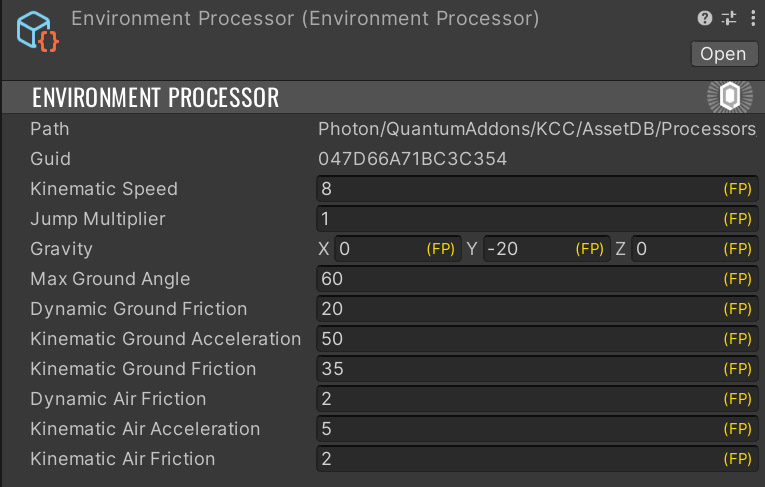
Speed of the character is defined by this processor and can be used on scene objects to simulate behavior in various environments like water, mud, ice.
Step Up Processor
- Allows detection of steps (geometry which blocks horizontal movement, with walkable surface at some height).
- If a step is detected, the KCC moves upwards until it gets grounded.
- Maximum step height is defined by
Step Height. - Forward step check distance is controlled by
Step Depth. - The upward movement is equal to unapplied horizontal movement.
- The speed of upward movement is multiplied by
Step Speedto compensate for loss of horizontal velocity. - The
StepUpProcessorasset is located atAssets\Photon\QuantumAddons\KCC\AssetDB\Processors.
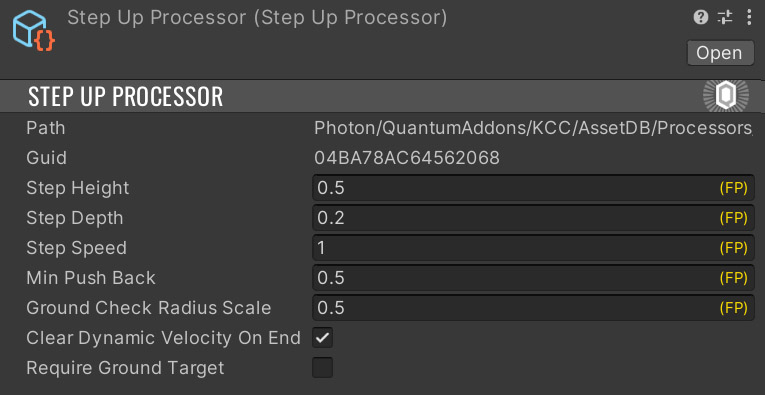
Following image shows process of detecting steps:
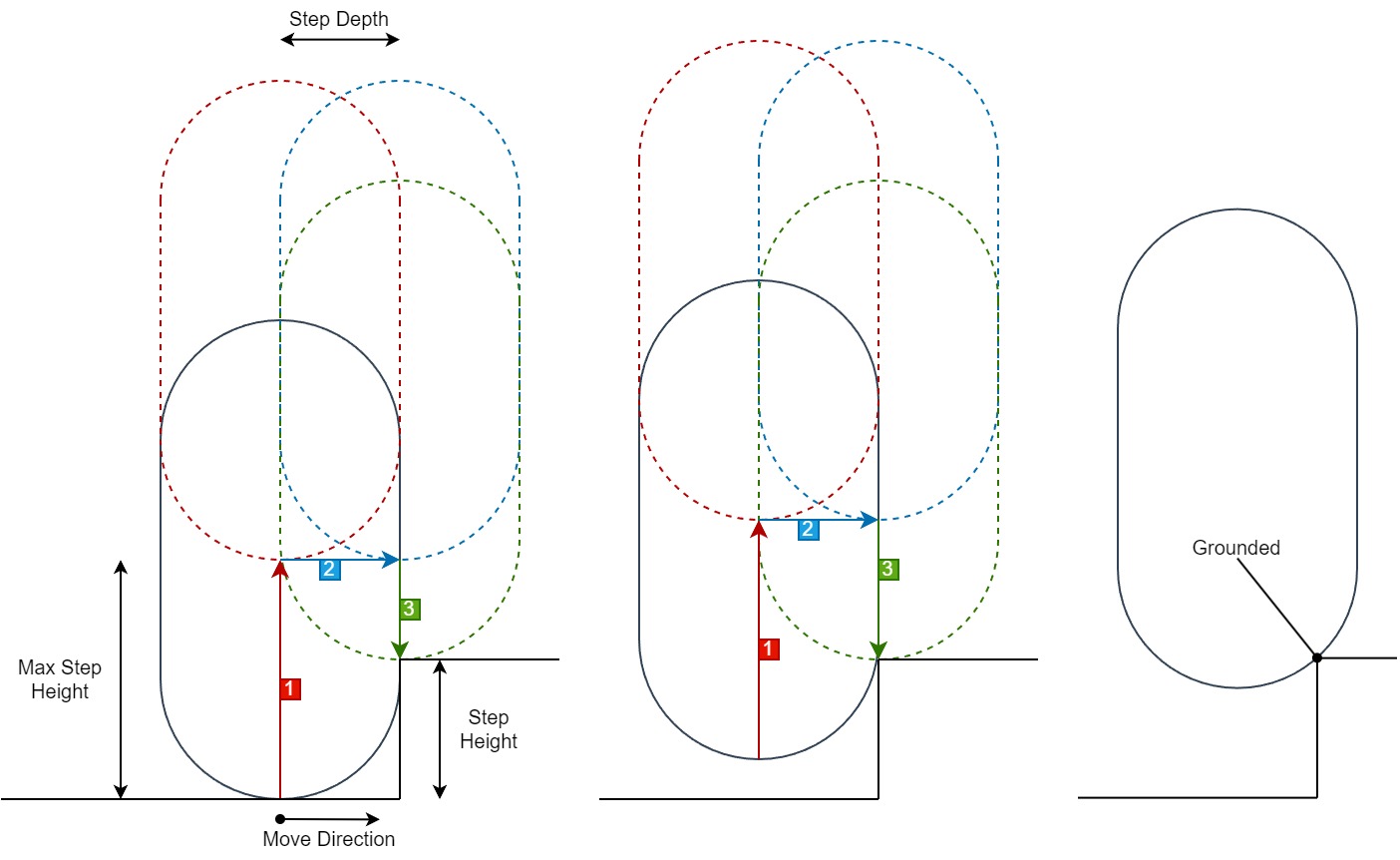
- Upward check when the character is blocked by an obstacle in horizontal direction.
- Forward check to detect if the space in front of the character is collision free.
- Ground snap check to detect if the ground is walkable.
- The character moves upwards as long as all 3 checks pass.
Ground Snap Processor
- Allows keeping grounded state when the contact with ground is lost (stairs, uneven terrain).
- Pushes character closer to ground if gravity is not enough.
- Maximum snap distance is defined by
Snap Distance. - The movement speed towards ground is defined by
Snap Speed. - The
GroundSnapProcessorasset is located atAssets\Photon\QuantumAddons\KCC\AssetDB\Processors.
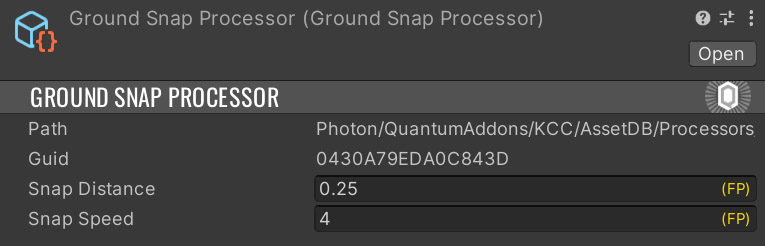
Following image shows process of ground snapping:
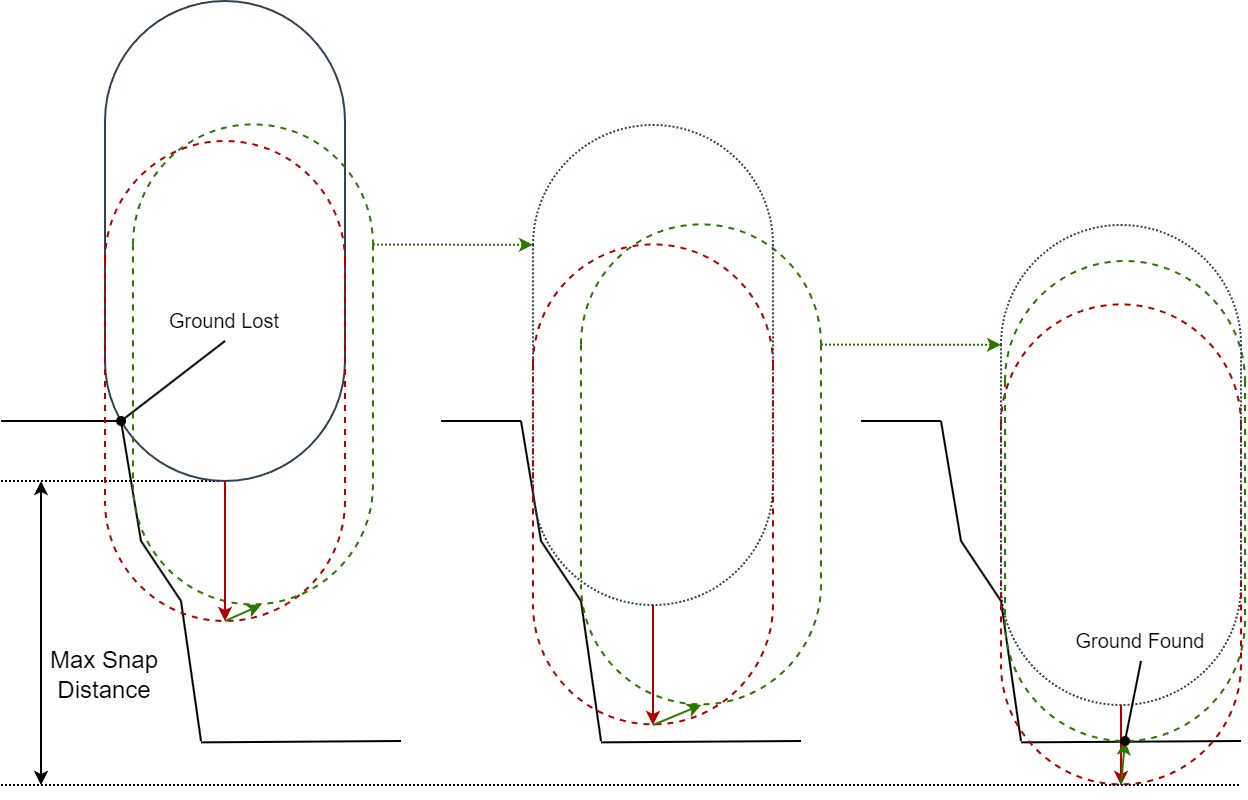
The character is virtually pushed downwards until one of following conditions are met:
- The character hits walkable ground => KCC keeps grounded and moves towards the ground.
- The character hits non-walkable surface and cannot slide along it => KCC loses grounded state.
Snap Distanceis reached => KCC loses grounded state.
Last updated on
Back to top