Game Tags Addon


Introduction
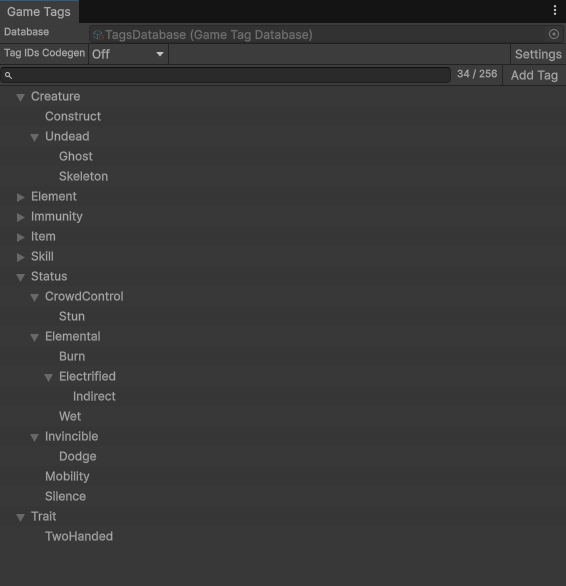
Game Tags lets you label entities with names like Status.CrowdControl.Stun, Creature.Undead.Skeleton or Trait.TwoHanded.
Tags form a tree, so a system can ask a broad question such as "is this character under any crowd control?" and get the right answer for every kind of crowd control, including ones a designer adds later. Designers pick tags in the inspector, systems ask about them.
A First Example
One rule: characters under crowd control can't move.
The movement config asset has a MovementBlockedByTags field, a collection of tags.
A designer adds Status.CrowdControl to it in the inspector and the movement system stops any character that has a tag from that list.
| The character has | Result |
|---|---|
Status.CrowdControl.Stun |
Can't move |
Status.CrowdControl.Root |
Can't move |
Status.Elemental.Wet |
Moves |
Stun and Root both sit under Status.CrowdControl, so the one rule stops both.
Wet doesn't, so that character moves.
Add Status.CrowdControl.Freeze next month and frozen characters stop too, with no code change.
Why Tags
Most games start tracking gameplay state with booleans and enums: IsStunned, IsRooted, a CreatureType field.
That works until the rules multiply.
Every new status has to be added to every check that should respect it, and every rule lives in code, so designers wait on programmers to change it.
Tags replace those fields with one set of names per entity. Because the names form a tree, a rule can ask about a whole family at once. Because the rules read lists of tags from assets, designers can change them in the inspector.
With tags:
C#
// config.MovementBlockedByTags = [Status.CrowdControl], set in the inspector
bool canMove = tags->HasAny(frame, config.MovementBlockedByTags) == false;
Add Status.CrowdControl.Sleep in the tag editor and every rule written against Status.CrowdControl already covers it.
Without tags:
C#
bool canMove = character->IsStunned == false
            && character->IsRooted == false
            && character->IsFrozen == false;
Add a Sleep status and you edit this check, the casting check, the stun icon, etc. If you forget it, a sleeping character can walk.
What People Tag
Game Tags isn't tied to one kind of system. Anything that needs to label entities or check them against rules can use it, from combat and AI to inventory, quests and level logic. The uses below are a few common ones; they are examples, not a complete list.
Statuses
Example tags: Status.CrowdControl.Stun, Status.Elemental.Wet
Effects add a tag and remove it when they expire, or a reaction is triggered when a character is both Wet and Electrified.
C#
tags->HasAll(frame, reaction.RequiredTags)
Categories
Example tags: Creature.Undead.Ghost, Creature.Construct
A holy sword deals bonus damage to anything Undead. Ghosts, skeletons and the undead you add later all qualify.
C#
target->Has(frame, sword.BonusDamageAgainstTag)
Equipment Rules
Example tags: Trait.TwoHanded, Item.Weapon.Staff
A staff grants Trait.TwoHanded to whoever holds it and the off-hand slot refuses items while its wearer has that trait.
C#
wearerTags->Set(frame, wearer, item.GrantedTags)
Immunities
Example tags: Immunity.Wet, Immunity.CrowdControl
A water wand grants Immunity.Wet.
The Wet effect lists it under blocked-by, so its holder never gets wet.
C#
tags->HasAny(frame, effect.BlockedByTags)
Features
- Rules that cover new content. Ask about a parent tag and every child counts, including children added after the rule was written.
- Rules designers can edit. Systems read tag lists from assets. Designers pick tags from a tree in the inspector and the system follows.
- References that survive renames. Fields store a tag's permanent ID, so renaming
Status.CrowdControltoStatus.Controlkeeps every asset reference working. - Reactive signals. Systems can react when an entity's tags change.
- Editor tooling. A tag tree editor with undo, inspector pickers, a usage check before deletes, optional generated C# constants and an in-game tag debugger display.
When a Tag Is the Right Tool
Reach for tags when:
- Rules cross categories and designers author them. An item grants a trait, the trait blocks a slot, an effect checks an immunity.
- The set is open and grows with content. New creatures, items and effects arrive as tags, without new enum values.
- Rules ask about a parent.
Status.CrowdControlorCreature.Undeadshould cover children added later.
Keep an enum or a field when:
- States exclude each other. A character is in one locomotion state at a time.
- The set is small, fixed and owned by programmers. A flags field is simpler and faster.
- The value is a number. Timers, stacks and counters, since an acive tag is just a single bit.
Release History
Last updated on
Back to top