Quantum Server API
Plugin Factory
The plugin factory is used by the Photon Server to instantiate the plugin code for individual rooms. The base Photon Server class IPluginFactory2 is derived by the Quantum plugin factory DeterministicPluginFactory. Override and implement the CreateDeterministicPlugin() method to instantiate different plugins and/or server objects.
C#
public override DeterministicPlugin CreateDeterministicPlugin(IPluginHost gameHost, String pluginName, Dictionary<String, String> config, ref String errorMsg)
Basic Structure
Apart from the factory the Quantum server plugin consist of two additional, extended-able parts.
The DeterministicPlugin is build upon the Photon Server PluginBase class. Override the base class virtual methods when needed. The plugin class is instantiated per Photon room when the first client enters.
The DeterministicServer is instantiated when the Quantum simulation is started and controls all online aspects related to the simulation of the Quantum server (e.g. input, server simulation, etc).
Logging
Caveat: server logging can easily result in floods of logs that are unusable and which can quickly result in destabilizing entire servers.
The Quantum.Log will be statically initialized using a Photon Plugin logger named Quantum before the first Plugin is instantiated. Quantum.Log debug methods use the Conditional("DEBUG") attribute which are only enabled when the using projects (Quantum Custom Server) have this define enabled.
New Photon plugin loggers can be created using IPluginHost.CreateLogger().
The logs for a local server are located in this folder: Photon.Server\deploy_win\log. The GSGame.log is where logs from the custom plugin show up. To retrieve logs from the Photon enterprise server contact us please.
Server Simulation
When running the server simulation, the Quantum dependencies, the simulation dll and the assets always have to be in sync with the client builds. Run the sync process in Unity (e.g. by selecting the QuantumDotnetBuildSettings asset).
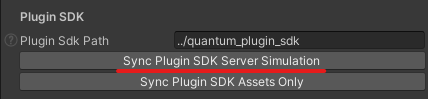
The dependencies from the Unity SDK that the simulation was build with take precedence over the files from the plugin SDK inside the Lib folder.
When the server simulation throws an exception it will log inside GSGame.log, the simulation is terminated but the online game will continue to run.
External dependencies to the Newtonsoft.Json package is required which works together with Quantum.Json to support the asset db and RuntimeConfig, RuntimePlayer deserialization.
Quantum Asset DB
The Quantum Asset DB must be available on the server to run the server simulation. By default an exported Json file is supported. Syncing the server simulation from Unity already exports and copies it to Photon.Server\deploy_win\Plugins\QuantumPlugin3.X\bin\assets\db.json. It can also be exported using the Unity menu: Tools > Quantum > Export > Asset Database.
It's possible to replace the Json asset serialization by using a custom implementation of IAssetSerializer.
Embedded Quantum Asset DB
Optionally the exported asset file can be embedded into the Quantum.Simulation.dll.
XML
  <ItemGroup>
    <EmbeddedResource Include="db.json" />
  </ItemGroup>
The EmbeddedDBFile configuration property points to the name of the embedded resource. Always add the additional Quantum. prefix to the property.
The plugin will always try to load the Asset DB from an external file first. If none was found it will try to load from the embedded resource.
Local Quantum Plugin Configuration
The Quantum plugin configuration values for a local Photon Server can be found in the Photon.Server\deploy_win\LoadBalancing\GameServer\bin\plugin.config file. Caveat: the file is overwritten by ./plugin.config when compiling one of the sample projects.
The default plugin.config contains a plugin XML configuration. Change or add new key-value variables accordingly.
These properties are replaced with the key-values settings from the Photon online dashboard for a particular AppId.
XML
<root>
  <PluginSettings Enabled="true">
    <Plugins>
      <Plugin
        Name="QuantumPlugin3.X"
        Version=""
        AssemblyName="Quantum.Plugin.Custom.dll"
        Type="Quantum.QuantumCustomPluginFactory"
        PathToLUTFolder="assets/LUT"
        PathToDBFile="assets/db.json"
        EmbeddedDBFile="Quantum.db.json"
      />
    </Plugins>
  </PluginSettings>
</root>
The asset paths have to be relative to Photon.Server\deploy\Plugins\QuantumPlugin3.X\bin.
When upgrading the Plugin SDK local changes should not be overwritten.
Add new properties by adding a line to the Plugin XML node, key and value are both strings and parsed as such.
XML
<Plugin
  NewStringProperty="foo"
  NewIntProperty="10"
/>
C#
if (config.TryGetString("NewStringProperty", out var newStringProperty, defaultValue: "default")) {
}

if (config.TryParseInt("NewIntProperty", out var newIntProperty, defaultValue: 0)) {
}
Server Classes
DeterministicPluginFactory
The default factory that instantiates the Quantum server plugins.
DeterministicPlugin
This class is the default implementation of the Quantum server plugin.
DeterministicServer
An instance of the DeterministicServer orchestrates a Quantum online game session within a Photon room.
It provides a variety of virtual callback methods to hook into the server flow.
Methods
The callbacks are called in this order during the lifetime of a room:
OnDeterministicServerSetup()when the room is createdOnDeterministicStartRequest()for each client that requests to start the simulationOnDeterministicGameConfigs()once when the RuntimeConfig and SessionConfig have been receivedOnDeterministicSessionCanStart()repeatedly until it returnstrueOnDeterministicStartSession()once after the simulation (and server simulation) started- While the session runs:
OnDeterministicPlayerAdd(),OnDeterministicPlayerRemove()andOnDeterministicCommand()for client requestsOnDeterministicLateStart()andOnDeterministicSnapshotRequested()for late-joining or reconnecting clientsOnDeterministicInputReceived(),OnDeterministicServerInput(),OnDeterministicInputConfirmed(),OnDeterministicServerReplacedInput()andOnDeltaCompressedInput()while processing inputOnDeterministicUpdate()at the end of each server update
OnDeterministicServerClose()when the room closes
All callbacks run on the room's fiber. Never block inside them (e.g. always use Async = true for HTTP requests), because this stalls the room for all clients.
Callbacks returning a Boolean deny or discard the request when false is returned, unless stated otherwise.
OnDeterministicServerSetup
C#
void OnDeterministicServerSetup(IHost host, IEventSender eventSender, IWebhookHost webhookHost, Dictionary<string, string> config, ref Boolean runServerSimulation)
This is called when the Realtime room is created.
The config dictionary includes the configurations set up in the Photon dashboard when testing online applications or inside the Photon.Server\deploy_win\LoadBalancing\GameServer\bin\plugin.config file when testing a local Photon Server.
For ease of use, you can use the ConfigParsingExtensions in order to parse additional values.
Example:
C#
config.TryParseBool("WebHookEnableReplay", out var isReplayStreamingEnabled, false);
Set runServerSimulation to enabled or disable the server simulation for this session. The bool has already been configured by the dashboard variables ServerSimulationEnabled and ServerSimulationPercent. The simulation will only start if a session runner is available (see the Server Simulation section of the respective Quantum version).
OnDeterministicServerClose
C#
void OnDeterministicServerClose()
Is called when the Realtime room closes.
OnDeterministicUpdate
C#
void OnDeterministicUpdate()
Is called for running sessions during each server update after the input has been processed and the server simulation (if any) has been processed.
OnDeterministicStartRequest
C#
Boolean OnDeterministicStartRequest(DeterministicPluginClient client, Protocol.StartRequest startRequestData)
This is called when a client requests to start the simulation. Return false to deny the request and disconnect the client.
OnDeterministicGameConfigs
C#
void OnDeterministicGameConfigs(ref byte[] runtimeConfig, ref DeterministicSessionConfig sessionConfig)
This is called once just before the server starts the simulation. It's the last chance to validate or replace the RuntimeConfig and SessionConfig sent by the client or the webhook.
OnDeterministicSessionCanStart
C#
Boolean OnDeterministicSessionCanStart()
Is polled repeatedly before the session starts. Return false to delay the start, e.g. to wait for an HTTP response.
OnDeterministicPlayerAdd
C#
void OnDeterministicPlayerAdd(DeterministicPluginClient client, int playerSlot, ref byte[] runtimePlayer)
This is called when a client adds a player, before the runtime player data is processed. The runtimePlayer data can be changed.
OnDeterministicPlayerRemove
C#
void OnDeterministicPlayerRemove(DeterministicPluginClient client, int playerSlot)
This is called when a player is removed from the Quantum simulation.
OnDeterministicSnapshotRequested
C#
Boolean OnDeterministicSnapshotRequested(ref Int32 tick, ref byte[] data)
This is called when a late-joining or reconnecting client requests a snapshot, before the request is forwarded to other clients.
Return true after setting tick and data to send the snapshot directly. When running the server simulation, the default implementation sends a snapshot of the server simulation.
OnDeterministicCommand
C#
Boolean OnDeterministicCommand(DeterministicPluginClient client, Protocol.Command cmd)
This is called when a player sends a command to the Quantum simulation. cmd.Data contains the serialized command wrapper, which can be altered or validated.
Return false to discard the command. To defer it, return false and call SendDeterministicCommand() later.
OnDeterministicLateStart
C#
int? OnDeterministicLateStart(DeterministicPluginClient client, Protocol.SimulationStart startData)
Is called when the late-joining or reconnecting client is about to receive the simulation start event. Return a tick to force the client to start from it.
OnDeterministicInputReceived
C#
void OnDeterministicInputReceived(DeterministicPluginClient client, DeterministicTickInput input)
Is called when a player input is received by the Quantum simulation. You can override this method to alter the input.
OnDeterministicInputConfirmed
C#
void OnDeterministicInputConfirmed(DeterministicPluginClient client, Int32 tick, Int32 playerIndex, DeterministicTickInput input)
Is called when input for a client and tick is confirmed. client is null for input generated by the server.
OnDeterministicServerInput
C#
Boolean OnDeterministicServerInput(DeterministicTickInput input)
Override to set the input data for a server controlled player. Tick and player index have already been set on the input object. Return true when the input was modified.
OnDeterministicStartSession
C#
void OnDeterministicStartSession()
Is called when the Quantum simulation is started. When running the server simulation, the session runner has already been started.
OnDeterministicServerReplacedInput
C#
void OnDeterministicServerReplacedInput(DeterministicTickInput input)
Is called when the server replaces the input for a player.
OnDeltaCompressedInput
C#
void OnDeltaCompressedInput(int tick, byte[] data)
This callback is invoked when the delta compressed input if finalized and can be used to stream the replay.
SendDeterministicCommand
C#
void SendDeterministicCommand(Protocol.Command cmd)
Sends a command to the Quantum simulation from the server.
Obsolete Callbacks
OnDeterministicPlayerDataSet(), OnDeterministicClientJoinRequestSession(), OnDeterministicClientJoinedSession(), OnDeterministicSessionConfig() and OnDeterministicRuntimeConfig() are obsolete and not called anymore. Use OnDeterministicStartRequest(), OnDeterministicPlayerAdd() and OnDeterministicGameConfigs() instead.
Quantum 3.1
Plugin Factory
The plugin factory will be derived from IPluginFactory3 eventually. Making use of HostReleased() to free memory from shared resources like the asset db.
Another important method to override is CreateSessionFactory(). This creates one class that can create/forward all further instances required to run server simulation. The asset serializer, session context, session runner and shared resources (asset db).
C#
public override IDeterministicSessionFactory CreateSessionFactory() {}
Logging
Logging from a custom server can be done by calling Quantum.Log.Info().
Server Simulation
Instead of creating a session runner directly, implement the CreateSessionFactory like this and set runServerSimulation to true.
C#
public override IDeterministicSessionFactory CreateSessionFactory() =>
  new ServerSessionFactory(
    assetSerializer: new QuantumJsonSerializer(),
    runServerSimulation: true);
The dependencies that take precedence over the Lib folder are for example Quantum.Engine.dll and Quantum.Log.dll.
Server Classes
DeterministicServer
Create the server with the parameterless constructor, the session context and session runner are created by the session factory. SessionContext and SessionRunner are null if not available.
C#
public override DeterministicPlugin CreateDeterministicPlugin(IPluginHost gameHost, String pluginName, Dictionary<String, String> config, ref String errorMsg) =>
  new DeterministicPlugin(new DeterministicServer());
When overriding Setup(), use the overload with the sessionFactory parameter and pass it to the base method.
OnDeterministicCommand (deserialized)
C#
OnDeterministicCommandResult OnDeterministicCommand(DeterministicPluginClient client, DeterministicCommand cmd)
Is called for each command inside the command wrapper, after the serialized OnDeterministicCommand() overload returned true. Return Accept, Discard to remove the command or Modified when the command was changed. Requires a session context.
SendDeterministicCommand (deserialized)
C#
void SendDeterministicCommand(DeterministicCommand command)
Serializes and sends a command to the Quantum simulation from the server. Requires a session context.
ServerSessionFactory (IDeterministicSessionFactory)
Default session factory, compiled into the Quantum.Simulation.dll. Created once and shared by all rooms. It creates the shared resources once per process, and the session context and session runner once per room. runServerSimulation: false only creates the session context, which is enough to use the command serializer in OnDeterministicCommand().
If loading the shared resources fails, the session context and server simulation are disabled for all rooms.
ServerSharedResources (IDeterministicSharedResources)
Loads the LUT files and the Quantum Asset DB once per process into a resource manager shared by all rooms. The paths are read from PathToLUTFolder, PathToDBFile and EmbeddedDBFile when the plugin factory starts, changing them requires a server restart.
ServerSessionContext
Created per room, access it via DeterministicServer.SessionContext. Provides the CommandSerializer (available after the session started) and the ResourceManager. An optional per room CustomResourceManager falls back to the shared resource manager.
ServerSessionRunner
Created per room when runServerSimulation is true, access it by casting DeterministicServer.SessionRunner. Add initial dynamic assets with AddInitialDynamicAsset() in OnDeterministicSessionCanStart(). Subscribe to simulation events and callbacks in OnDeterministicStartSession(), subscriptions are cleared when the runner shuts down.
C#
public override void OnDeterministicStartSession() {
  if (SessionRunner is ServerSessionRunner sessionRunner) {
    ((EventDispatcher)sessionRunner.EventDispatcher).Subscribe<EventFoo>(this, e => Log.Info("Foo"));
    ((CallbackDispatcher)sessionRunner.CallbackDispatcher).Subscribe<CallbackGameStarted>(this, c => Log.Info("Game Started"));
  }
}
Quantum 3.0
Logging
Logging from a custom server can be done by calling DeterministicPlugin.LogInfo(), DeterministicPlugin.LogWarning(), or using the DeterministicPlugin.Logger directly.
Server Simulation
For the Quantum server to run the simulation the DeterministicServer object needs to be created with an additional parameter of the type IDeterministicSessionRunner. Different to Quantum 2 starting and updating the simulation is now completely encapsulated. Check out the DotNetSessionRunner class in the Unity project.
C#
var sessionRunner = new DotNetSessionRunner {
  AssetSerializer = new QuantumJsonSerializer()
};
The dependencies that take precedence over the Lib folder are for example Quantum.Deterministic.dll and Quantum.Log.dll.
Last updated on
Back to top