Assets in Unity
Overview
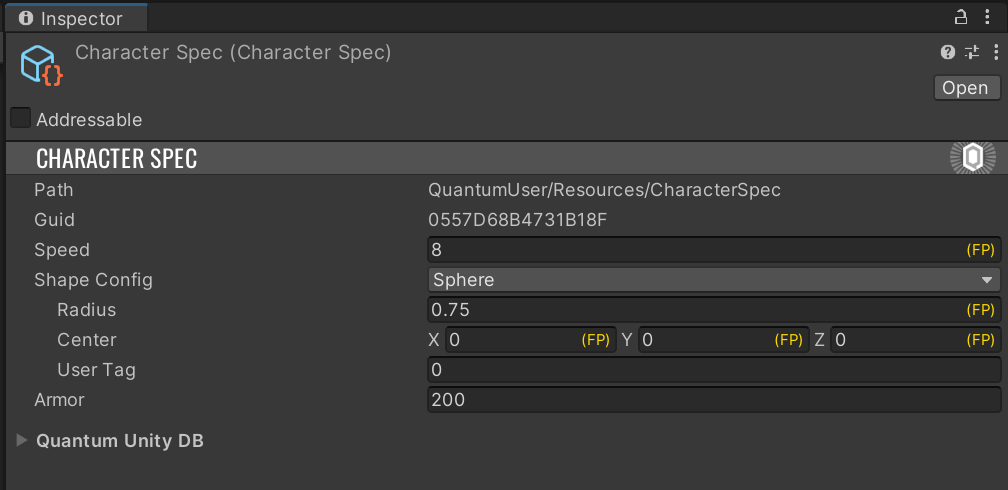
Since in Unity AssetObject derives from UnityEngine.ScriptableObject, Quantum assets are generally stored in .asset files, just like any other custom Unity assets. However, because AssetObjects need to be available to the simulation code and need to be accessible with AssetRef at any time, they need to be managed and kept track of.
Whenever an AssetObject asset is imported, Quantum checks if it is located in one of QuantumEditorSettings.AssetSearchPaths (by default, the Assets folder and all child folders, in Quantum 3.1 edited in Edit > Project Settings > Photon Quantum). If not, it is ignored and won't be available to the simulation. Otherwise:
- Asset label
QuantumAssetis applied. Identifier.Guidis set to a deterministic and uniqueAssetGuid. The value is based on asset's UnityGUIDandfileID, so moving/renaming the asset will not change theAssetGuid.Identifier.Pathis set to the path of the asset file, omittingAssets/prefix and the extension
In Quantum 3.1, an asset with the Unity asset label QuantumIgnore is ignored even if it is located in one of the search paths.
This is useful for prefabs that are only used as map prototypes and do not need to be part of the QuantumUnityDB.
Additionally, if this is a new asset or the asset has been moved, the QuantumUnityDB asset is refreshed:
- All
AssetObjectwithQuantumAssetlabel assets are discovered. - Each
AssetObjecthas a generated entry containing theAssetGuidand the information needed to load theAssetObjectat runtime (e.g. addressable path, resource path). - Entries are saved into the
QuantumUnityDBasset (by defaultAssets/QuantumUser/Resources/QuantumUnityDB.qunitydb).
To browse the list of AssetObjects currently part of the database, use the QuantumUnityDB Inspector window accessible via Tools > Quantum > Window > Quantum Unity DB or Window > Quantum > Quantum Unity DB.
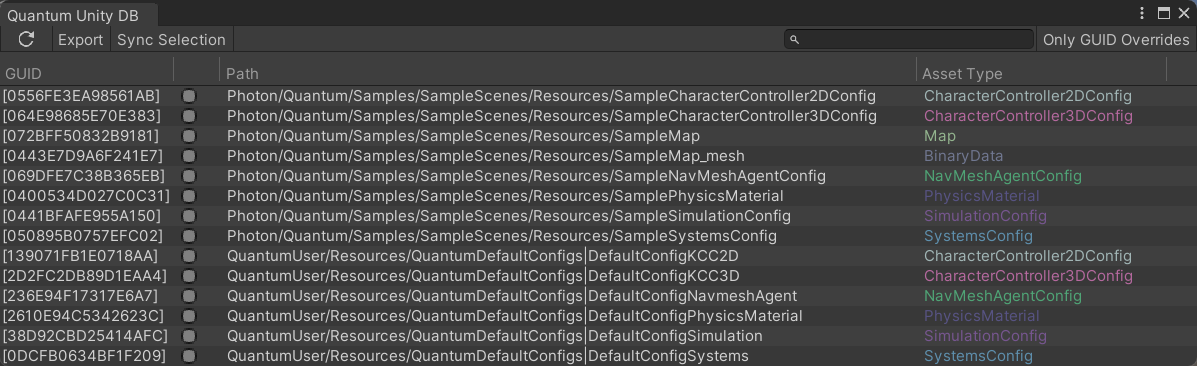
At runtime QuantumUnityDB is loaded and used as the simulation's IResourceManager and the entries are used to load the assets dynamically.
Finding Quantum Assets in Unity scripts
To access assets outside of the simulation, use QuantumUnityDB.GetGlobalAsset or QuantumUnityDB.TryGetGlobalAsset static methods. Calls to these methods make use of entries stored in QuantumUnityDB and are equivalent to calling Frame.FindAsset or Frame.TryFindAsset in the simulation.
C#
CharacterSpec characterData = QuantumUnityDB.GetGlobalAsset(myAssetRef);
FP maximumHealth = characterData.MaximumHealth;
C#
if (QuantumUnityDB.TryGetGlobalAsset(myAssetRef, out CharacterSpec characterData)) {
    FP maximumHealth = characterData.MaximumHealth;
}
Finding Assets In the Inspector
It's important to note that when attempting to load a Quantum asset from an editor script, GetGlobalAssetEditorInstance/TryGetGlobalAssetEditorInstance should be used instead. These methods use Unity Editor API to load assets.
Usage:
C#
public override void OnInspectorGUI() {
  base.OnInspectorGUI();

  CharacterSpec characterData = QuantumUnityDB.GetGlobalAssetEditorInstance(myAssetRef);
  FP maximumHealth = characterData.MaximumHealth;

  // do something

  EditorUtility.SetDirty(characterData);
}
Overwriting AssetGuids
In some cases, it might be necessary to overwrite the deterministic AssetGuid of an asset.
This can be done by navigating to your asset object, clicking the dropdown named Quantum Unity DB and then enabling Guid Override. You will be provided a field to enter your custom AssetGuid.
These overrides are saved in QuantumEditorSettings (in Quantum 3.1 a project setting, Edit > Project Settings > Photon Quantum).
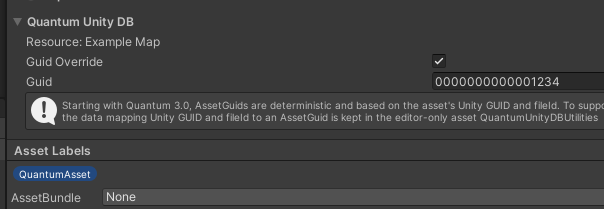
Assets that have been migrated from Quantum 2 will preserve their non-deterministic AssetGuids using Guid Overrides.
Resources, Addressables and Asset Bundles
Quantum avoids forming hard-references to AssetObject assets, if possible. This enables the use of any dynamic content delivery.
The following methods of loading assets are supported out of the box, in this order:
- Addressables: used if the asset has an address (explicit or implicit)
- AssetBundles: if the asset is assigned to an AssetBundle
- Resources: if the asset is in a
Resourcesfolder - Hard-reference: if none of the above are applicable
To load an asset from an AssetBundle, Quantum first looks for an already loaded bundle with the matching name.
If there is none, it calls the QuantumAssetSourceAssetBundle.AssetBundleRequested delegate, which can be set to load bundles from a custom location.
Without a delegate, the bundle is loaded from Application.streamingAssetsPath.
C#
QuantumAssetSourceAssetBundle.AssetBundleRequested = bundleName => {
  return AssetBundle.LoadFromFile(Path.Combine(myBundleFolder, bundleName));
};
A QuantumUnityDBScope asset can include all AssetObjects of specific AssetBundles by listing the bundle names in its AssetBundles field.
The details on how to load each asset are stored in QuantumUnityDB. This information is accessed when a simulation calls Frame.FindAsset or when QuantumUnityDB.GetGlobalAsset is called and leads to an appropriate method of loading being used. Note that loading QuantumUnityDB will also load all assets that are hard-referenced; this may be sub-optimal if QuantumUnityDB is addressable itself.
To make the list of the assets (QuantumUnityDB) dynamic itself some extra code is needed; please refer to the Updating Quantum Assets in Build section for more information.
User scripts can avoid hard references by using AssetRef<T>. (e.g. AssetRef<CharacterSpec>) instead of AssetObject references (e.g. CharacterSpec) to reference Quantum assets.
C#
public class TestScript : MonoBehaviour {
  // hard reference
  public CharacterSpec HardRef;
  // soft reference
  public AssetRef<CharacterSpec> SoftRef;

  void Start() {
    // depending on the target asset's settings, this call may result in
    // any of the supported loading methods being used
    CharacterSpec characterData = QuantumUnityDB.GetGlobalAsset(SoftRef);
  }
}
Drag-And-Dropping Assets In Unity
Adding asset instances and searching them through the Frame class from inside simulation Systems can only go so far. At convenient solution arises from the ability to have asset instances point to database references and being able to drag-and-drop these references inside Unity Editor.
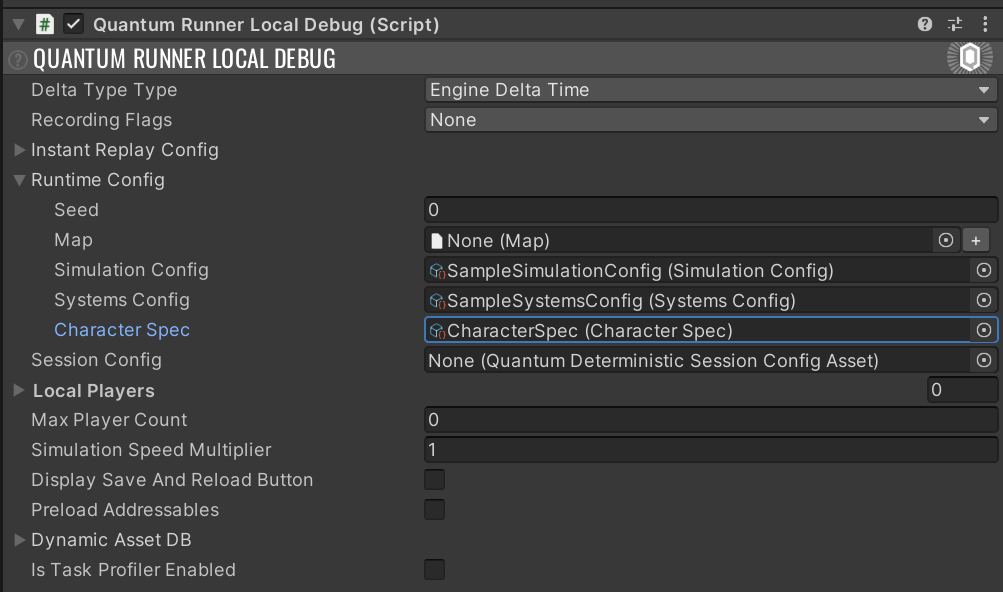
One common use is to extend the pre-build RuntimePlayer class to include an AssetRef to a particular CharacterSpec asset chosen by a player. The type-safe AssetRef<T> type is used for linking references between assets or other configuration objects.
C#
// this is added to the RuntimePlayer.User.cs file
namespace Quantum {
  partial class RuntimePlayer {
    public AssetRef<CharacterSpec> CharacterSpec;
  }
}
This field only accepts a link to an asset of type CharacterSpec. This field will show up in the Unity inspector and can be populated by drag-and-dropping an asset into the slot.
Map Asset Baking Pipeline
Another entry point for generating custom data in Quantum is the map baking pipeline.
The Map asset has a User Asset slot that can hold any custom data asset, for example spawn points collected from the scene by a custom MapDataBakerCallback.
See Map Baking for the baking callbacks and a spawn point example.
Preloading Addressable Assets
Quantum needs assets to be loadable synchronously.
WaitForCompletion was added in Addressables 1.17 which added the ability to load assets synchronously.
Although asynchronous loading is possible, there are situations in which preloading assets might still be preferable.
The QuantumRunnerLocalDebug script demonstrates how to achieve this: when Preload Addressables is enabled, it loads all addressable Quantum assets before the simulation starts.
Updating Quantum Assets in Build
It is possible for an external CMS to provide data assets; this is particularly useful for providing balancing updates to an already released game without making create a new build to which players would have to update.
This approach allows balancing sheets containing information about data-driven aspects such as character specs, maps, NPC specs, etc... to be updated independently from the game build itself. In this case, game clients would always try to connect to the CMS service, check for whether there is an update and (if necessary) upgrade their game data to the most recent version before starting or joining online matches.
Updating Existing Assets
The use of Addressables is recommended as these are supported out of the box. Any AssetObject that is an Addressable will get loaded at runtime using the appropriate methods.
To avoid unpredictable lag spikes resulting from downloading assets during the game simulation, consider downloading and preloading your assets as discussed here: Preloading Addressable Assets.
Adding New Assets At Runtime
The QuantumUnityDB generated in the editor will contain the list of all the assets present at its creation. If a project's dynamic content includes adding new Quantum assets during without creating a new build, a way to update the db needs to be implemented. New assets can be added to QuantumUnityDB at any time, before or during the simulation. User needs to make sure that AssetGuids of newly added assets are identical across all clients.
The most straightforward approach is to QuantumUnityDB.AddAsset method:
C#
public void AddStaticAsset(AssetGuid guid) {
  var asset = ScriptableObject.CreateInstance<CharacterSpec>();
  asset.Guid = guid;
  asset.Speed = 10;
  asset.MaxHealth = 100;
  QuantumUnityDB.Global.AddAsset(asset);
}
Alternatively, adding such an asset can be rewritten as:
C#
public void AddStaticAsset(AssetGuid guid) {
  var asset = ScriptableObject.CreateInstance<CharacterSpec>();
  asset.Guid = guid;
  asset.Speed = 10;
  asset.MaxHealth = 100;
  QuantumUnityDB.Global.AddSource(new QuantumAssetObjectSourceStatic(asset), guid);
}
Both approaches have the downside of AssetObject being loaded into memory - at the moment of its creation with ScriptableObject.CreateInstance, regardless of whether simulation is actually going to load it or not.
If the asset is addressable, this can be easily avoided:
C#
public void AddAddressableAsset(AssetGuid guid, Type assetType, string address) {
  var source = new QuantumAssetObjectSourceAddressable(address, assetType);
  QuantumUnityDB.Global.AddSource(source, guid);
}
There is also an option of fully custom asset loading by implementing IQuantumAssetObjectSource interface. The following snippet is a custom asset source that loads the asset asynchronously with Task<AssetObject> factory, with error checking omitted for clarity.
C#
public void AddCustomAsset(AssetGuid guid) {
  var source = new AsyncAssetObjectSource() {
    AssetType = typeof(CharacterSpec), Factory = () => LazyCreateCharacterSpec(guid)
  };
  QuantumUnityDB.Global.AddSource(source, guid);
}

private async Task<AssetObject> LazyCreateCharacterSpec(AssetGuid guid) {
  // create asset before the await, as this needs to be done in the main thread
  var asset = ScriptableObject.CreateInstance<CharacterSpec>();
  asset.MaxHealth = 100;

  // task will resume on a different thread; we don't want to enter the main thread as the main thread may be blocked with
  // the DB waiting
  await Task.Delay(1000).ConfigureAwait(false);
  return asset;
}

public class AsyncAssetObjectSource : IQuantumAssetObjectSource {
  private Task<AssetObject> _task;

  public Func<Task<AssetObject>> Factory { get; set; }
  public Type AssetType { get; set; }

  public void Acquire(bool synchronous) => _task = Factory();
  public void Release() => _task = null;
  public AssetObject WaitForResult() => _task.Result;

  public bool IsCompleted => _task?.IsCompleted == true;
  public string Description => $"AsyncAssetObjectSource: {AssetType}";
  public AssetObject EditorInstance => null; // no support for editor instance
}
Dynamic QuantumUnityDB
An alternative to adding new assets manually is to make QuantumUnityDB itself dynamic.
If QuantumUnityDB.qunitydb is made addressable, QuantumGlobalScriptableObjectAddress attribute can be used to instruct Quantum to load it with Addressables:
C#
[assembly:Quantum.QuantumGlobalScriptableObjectAddress(typeof(QuantumUnityDB), "QuantumUnityDBAddress")]
This will cause the QuantumUnityDB to be loaded from Addressables with "QuantumUnityDBAddress" address the moment QuantumUnityDB.Global property or any QuantumUnityDB.Global* method is accessed.
Alternatively, custom means of loading the db can be implemented with an attribute deriving from QuantumGlobalScriptableObjectSourceAttribute.
Adding New Assets With DynamicAssetDB
If new assets can be created in a deterministic way, the DynamicAssetDB can be used as discussed here: Dynamic Assets.
Last updated on
Back to top