Connection
App ID and Fusion Settings
Project-wide Fusion configuration can be found in Project Settings > Fusion Settings in the Unreal editor. The most important fields are AppId and AppVersion. The App ID identifies the project on the Photon Cloud and AppVersion segments players by client build so incompatible versions cannot share rooms.
Get an App ID for the project from the Photon Dashboard and paste it into the App ID field as shown in the Quick Start Guide.
Connecting to Photon
In Blueprints, the entry point is the latent node "Connect To Photon", which maps to ConnectToPhoton(FFusionConnectOptions, WorldContextObject) and returns a UFusionConnectToPhotonAsync with OnSuccess and OnFailure multicast pins. That node is a convenience wrapper built for Blueprint use; under the hood it drives RealtimeCore::Matchmaking::RealtimeClient::Connect.
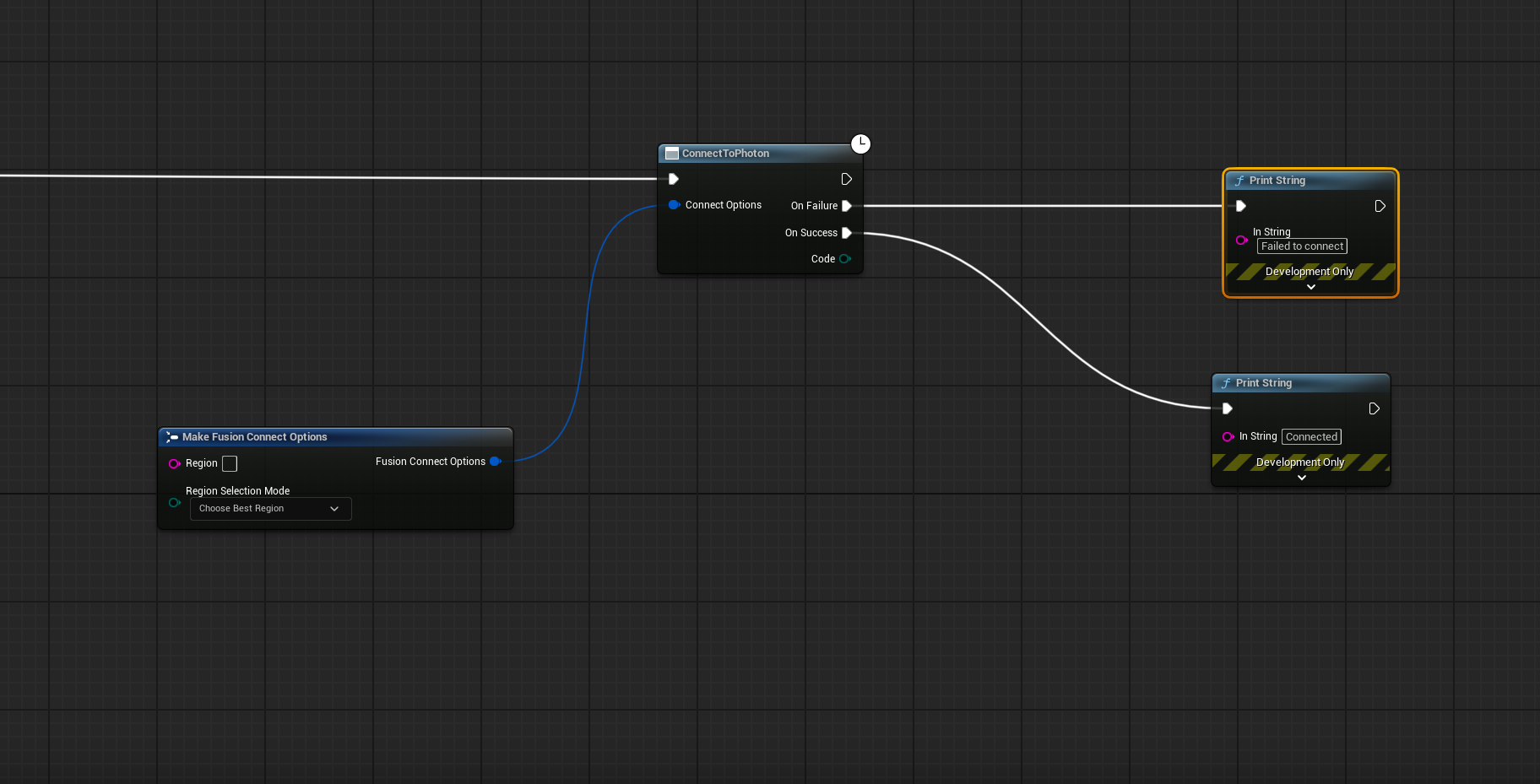
When connecting through Blueprints, the latent node automatically sets PhotonMatchmaking::RealtimeClient on the UFusionOnlineSubsystem. Subsequent calls to check the connection status and join/create rooms can then be made. The other latent nodes rely on having the PhotonMatchmaking::RealtimeClient set on the UFusionOnlineSubsystem.
From C++, you call that matchmaking API directly and skip the latent node entirely.
C++
// Create a standalone matchmaking client. AppId / AppVersion / region mode come
// from Fusion Settings. It is NOT on the subsystem yet.
FFusionConnectOptions ConnectOpts;
ConnectOpts.RegionSelectionMode = EFusionRegionSelectionMode::Best;
UFusionRealtimeClient* RealtimeClient = UFusionRealtimeClient::CreateRealtimeClient(ConnectOpts);

RealtimeCore::Matchmaking::RealtimeClient* Client = RealtimeClient->GetClient();

RealtimeCore::Matchmaking::ConnectOptions RtOpts;
RtOpts.Auth.UserId = reinterpret_cast<const RealtimeCore::Common::CharType*>(
    StringCast<UTF8CHAR>(*FGuid::NewGuid().ToString()).Get());
// Leave RtOpts.ServerAddress empty for the Photon Cloud NameServer.

RealtimeCore::Matchmaking::Task Task = Client->Connect(RtOpts);

// For illustration only: Poll from Tick or a timer instead of blocking the game thread.
while (!Task.IsReady())
{
      RealtimeClient->Service();
      FPlatformProcess::Sleep(0.01f);
}

RealtimeCore::Matchmaking::Result Result = Task.Get();
The one hard requirement is that something calls Service() on the client every tick; that is what advances the connection and dispatches incoming events. While the client is standalone, you pump it yourself; once you hand it to the subsystem via UFusionOnlineSubsystem::SetRealtimeClient, UFusionOnlineSubsystem::WorldTick does it for you.
Joining or Creating a Room
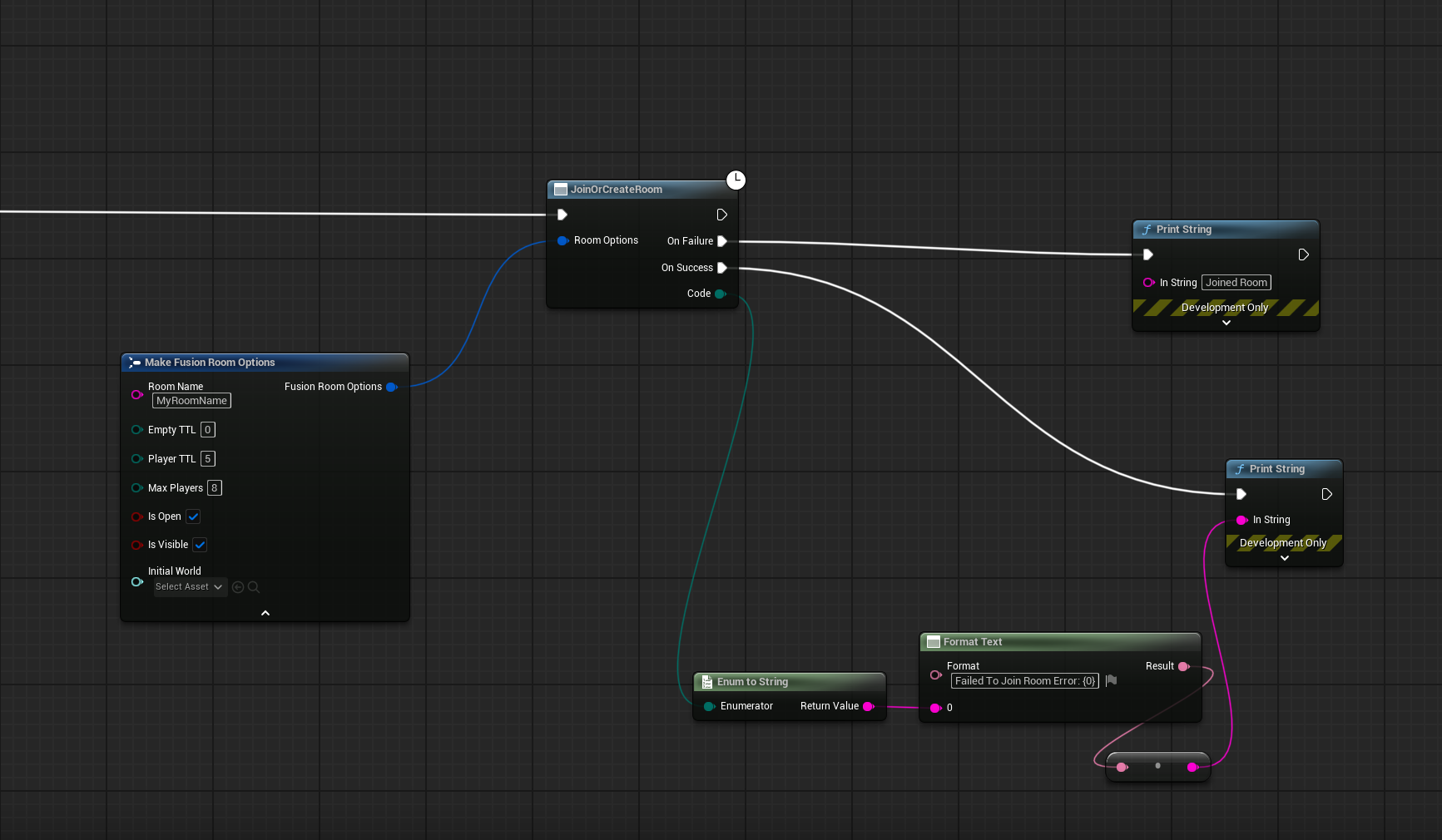
Once connected, the subsystem exposes five room entry points. CreateRoom, JoinOrCreateRoom and JoinOrCreateRandomRoom all take an FFusionRoomOptions struct describing the room to create. JoinRoom(RoomName) and JoinRandomRoom join an existing room without creating one: the by-name variant requires the exact room name, and the random variant picks any open and visible room.
For Blueprint projects, it is then possible to join a room using one of the available join room actions.
C++
RealtimeCore::Matchmaking::RealtimeClient* Client = RealtimeClient->GetClient();
const auto RoomName = StringCast<UTF8CHAR>(TEXT("MyRoomName"));

RealtimeCore::Matchmaking::CreateRoomOptions RoomOpts;
RoomOpts.MaxPlayers = 4;

RealtimeCore::Common::Task<RealtimeCore::Common::Result<RealtimeCore::Matchmaking::MutableRoomView, RealtimeCore::Matchmaking::ErrorCode>> Task =
      Client->JoinOrCreateRoom(reinterpret_cast<const RealtimeCore::Common::CharType*>(RoomName.Get()), RoomOpts);

// For illustration only: Poll from Tick or a timer instead of blocking the game thread.
while (!Task.IsReady())
{
      RealtimeClient->Service();
      FPlatformProcess::Sleep(0.01f);
}
If you would rather not call Service() yourself, the inverse also works: assign the client to UFusionOnlineSubsystem up front so WorldTick services it from the start.
C++
// Member of your class: the subscriptions stay alive as long as it does.
RealtimeCore::Common::SubscriptionBag Subscriptions;

UFusionOnlineSubsystem* Subsystem = GetGameInstance()->GetSubsystem<UFusionOnlineSubsystem>();

UFusionRealtimeClient* RealtimeClient = UFusionRealtimeClient::CreateRealtimeClient(FFusionConnectOptions{});
// The subsystem holds the client from here on and calls Service() on it every frame.
Subsystem->SetRealtimeClient(RealtimeClient);

RealtimeCore::Matchmaking::ConnectOptions RtOpts;
RtOpts.Auth.UserId = reinterpret_cast<const RealtimeCore::Common::CharType*>(
StringCast<UTF8CHAR>(*FGuid::NewGuid().ToString()).Get());

RealtimeClient->PendingVoidTasks.push_back(RealtimeClient->GetClient()->Connect(RtOpts));

// Once connected (Subsystem->IsConnected()):
UFusionRealtimeClient*                     RealtimeClient = Subsystem->GetRealtimeClient();
RealtimeCore::Matchmaking::RealtimeClient* Client = RealtimeClient->GetClient();

Subscriptions += Client->OnRoomJoined.Subscribe([this, Subsystem, RealtimeClient]() {
Subsystem->StartFusionSession(RealtimeClient, GetWorld());
});

// Must be called before joining. Fusion needs its core client to exist before the join request is sent.
RealtimeClient->CreateFusionCoreClient();

RealtimeCore::Matchmaking::CreateRoomOptions RoomOpts;
RoomOpts.MaxPlayers = 4;

const auto RoomName = StringCast<UTF8CHAR>(TEXT("MyRoomName"));

// The subsystem drops the task once it is ready, so react to failure in OrElse.
RealtimeClient->PendingRoomTasks.push_back(
Client->JoinOrCreateRoom(reinterpret_cast<const RealtimeCore::Common::CharType*>(RoomName.Get()), RoomOpts)
.OrElse([](RealtimeCore::Matchmaking::Error Error) {
UE_LOG(LogTemp, Error, TEXT("JoinOrCreateRoom failed: %s"),
UTF8_TO_TCHAR(reinterpret_cast<const char*>(Error.Message.c_str())));
return RealtimeCore::Matchmaking::Result<RealtimeCore::Matchmaking::MutableRoomView>::Err(std::move(Error));
}));
The room entry points map one-to-one onto RealtimeCore::Matchmaking::RealtimeClient methods: JoinOrCreateRoom, JoinRandomOrCreateRoom, CreateRoom, JoinRoom(name) and JoinRandomRoom. The FFusionRoomOptions struct used by the Blueprint nodes is just a wrapper; FusionMatchmakingHelpers::CreatePhotonRoomOption converts it to the RealtimeCore::Matchmaking::CreateRoomOptions these methods take, so C++ code can build either one.
For Blueprints, the convenience node "Connect And Join Room" (ConnectAndJoinRoom) chains connect, join and Fusion start in a single action. The C++ equivalent is the snippet above.
Async Actions
Every connect and room call returns a UFusionRoomActionBase subclass, a Blueprint latent action that exposes OnSuccess and OnFailure multicast delegates as exec pins in Blueprints and as FMulticastDynamicDelegate members in C++. OnFailure carries an EFusionActionFailureCodes value describing the reason. These actions exist for Blueprint use; C++ code that wants to avoid them uses the RealtimeCore::Matchmaking::RealtimeClient directly, as shown in Connecting to Photon above.
| Async class | Subsystem method | Wraps |
|---|---|---|
UFusionConnectToPhotonAsync |
ConnectToPhoton |
Initial cloud connection |
UFusionDisconnectFromPhotonAsync |
DisconnectFromPhoton |
Full disconnect from the cloud |
UFusionJoinOrCreateRoomAsync |
JoinOrCreateRoom, JoinOrCreateRandomRoom |
Join a matching room or create one |
UFusionCreateRoomAsync |
CreateRoom |
Create a new room unconditionally |
UFusionJoinRoomAsync |
JoinRoom, JoinRandomRoom |
Join an existing room |
UFusionLeaveRoomAsync |
LeaveRoom |
Leave the current room, stay connected |
UFusionConnectAndJoinRoomAsync |
ConnectAndJoinRoom |
Connect plus join in one action |
EFusionActionFailureCodes covers the practical failure cases: TimeOut, InvalidRegion, ClientAlreadyExists, Disconnected and the already-in-that-state codes Connecting, JoiningRoom and InRoom, which fire when the requested action is redundant because the client has already reached that state (for example, calling connect while already connected, or join/create while already in a room).
Connection Options and Regions
FFusionConnectOptions carries two fields. Region is a region code string such as "us" or "eu"; see Regions for the full list. RegionSelectionMode is an EFusionRegionSelectionMode enum that decides how the Region field is interpreted.
| Mode | Behavior |
|---|---|
Default |
Use the first available region. The Region string is ignored. |
Select |
Connect to the region named in the Region string. |
Best |
Ping every available region, pick the lowest-RTT one, and cache the result. |
C++
FFusionConnectOptions ConnectOpts;
ConnectOpts.Region = TEXT("us");
ConnectOpts.RegionSelectionMode = EFusionRegionSelectionMode::Select;
For production, ship with Best on first launch so the player lands on the lowest-RTT region without any UI. Persist the chosen region and switch to Select with that value on subsequent launches to skip the ping pass.
Room Options
FFusionRoomOptions describes the room being created or joined.
| Field | Type | Effect |
|---|---|---|
RoomName |
FString |
Unique name within the App ID. Required for invite-style flows; auto-generated when joining randomly. |
MaxPlayers |
uint8 |
Maximum concurrent players in the room. |
bIsOpen |
bool |
If false, the room rejects new joins. Set false to seal a match in progress. |
bIsVisible |
bool |
If false, the room does not appear in random-join results. Invite-only rooms set this false. |
EmptyTTL |
uint8 (seconds) |
How long the room survives after the last player leaves. Converted to ms internally. |
PlayerTTL |
uint8 (seconds) |
How long a disconnected player stays in the room as inactive, keeping their slot so they can rejoin. 0 removes the player immediately. Converted to ms internally. |
InitialWorld |
TSoftObjectPtr<UWorld> |
World to load when the local player joins. Skips a separate ChangeWorld call on the Master Client. |
C++
FFusionRoomOptions RoomOpts;
RoomOpts.RoomName = TEXT("Match-42");
RoomOpts.MaxPlayers = 8;
RoomOpts.EmptyTTL = 0;
RoomOpts.PlayerTTL = 2;
RoomOpts.InitialWorld = LobbyWorldPtr;
Set InitialWorld whenever the room creator already knows the starting map. The local client loads that world automatically as it joins, and the Master Client does not need to issue a separate ChangeWorld call after OnSuccess.
Leaving the Room and Reconnecting
LeaveRoom(WorldContextObject) returns a UFusionLeaveRoomAsync, and after OnSuccess, the client is back in EFusionStatus::Connected. It can call JoinOrCreateRoom again without re-running ConnectToPhoton. For a full teardown of the Photon connection, use DisconnectFromPhoton, which returns the client to EFusionStatus::None.
Connection Status and Events
Status() returns the current EFusionStatus. The normal lifecycle traces None → Connecting → Connected → JoiningRoom → InRoom → LeavingRoom, with Disconnected and Error reachable from any non-terminal state. The transitions are introduced in Concepts.
| Query | Returns |
|---|---|
IsConnected() |
True when the client has reached at least Connected. |
IsInRoom() |
True when the client is fully in a room (InRoom). |
IsJoiningOrInRoom() |
True for both JoiningRoom and InRoom — useful for "session is forming or formed" gates. |
IsMasterClient() |
True when this client is the elected Master Client of the current room. |
PlayerCount() |
Current number of players in the room. |
GetLocalPlayerId() |
Stable int32 id of the local player for this session. |
GetRtt() |
Round-trip time to the Photon relay, in milliseconds. |
CurrentRoomInfo(Name, Players) |
Room name and current player count as out params. |
Last updated on
Back to top