Custom Shaders
In the Video SDK, the texture that is streamed is flipped vertically by default, for compatibility with some encoders/decoders.
So, when rendering a received texture, or when trying to modify a texture before encoding it, this orientation has to be taken into account. By default, the Video SDK components (texture recorders and video screen) will handle this.
However, if a custom shader is required, this flip logic has to be managed by the shader.
Unity 6.3 and above
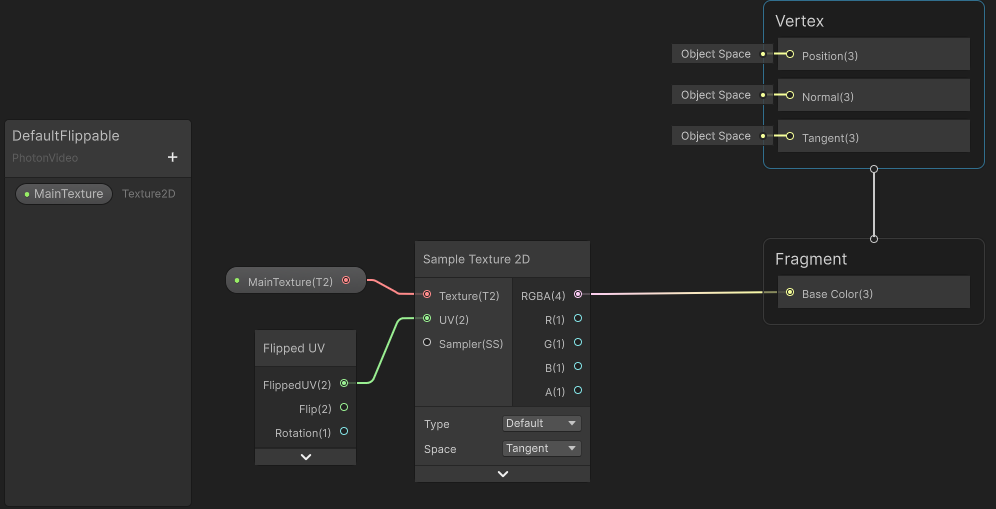
When creating a shader with Unity 6.3+ Shader Graph, instead of using the UV node, you can use the FlippedUV node, which will automatically manage the potential flip and rotation effect desired on the resulting texture.
You can look at the DefaultFlippable shader to see a basic usage of the FlippedUV node:
Older versions of Unity
The FlippedUV node requires Unity version 6.3 and above. For earlier versions, the shader params have to be used manually.
The Unity video SDK components will automatically fill the _PhotonVideoFlip and _PhotonVideoRotation parameters of your shader, providing the flip and rotation (for local preview only - see Preview rotation support) values.
An example of such a shader, exposing those parameters, is included in the Video SDK: the DefaultFlippable_Unity60 shader.