Systems
The systems in the Quantum Golf Sample are split into two categories:
- systems driving gameplay; and,
- systems dedicated to managing player turns.
Gameplay
Gameplay systems handle all game logic specific to the Quantum Golf Sample.
Maximum Amount of Players
The maximum amount of players is 2 and fixed in the DSL using the following snippet: #pragma max_players 2. The value is also defined as a constant #define MAX_PLAYERS 2 in order to reused it for array initialization.
SetupSystem
The SetupSystems handles the initial game setup - this covers:
- receive the
RuntimePlayervia theISignalOnPlayerDataSetsignal; - initialize the players based on their respective
RuntimePlayer - resetting player’s
TurnDatainstances; and, - triggering the ball spawning via the
SpawnSystem(see related system).
SpawnSystem
The SpawnSystem's sole responsibility is to spawn the golf ball upon request from the SetupSystem. To achieve this it first looks up the GameConfig asset and uses a filter to find all active SpawnPoint. The SpawnSystem will spawn the ball according to the SpawnPointType provided in the GameConfig, after which the SpawnPoint will be disabled.
SpawnPoint
A SpawnPoint is a component used on scene prototype to define spawn point locations.
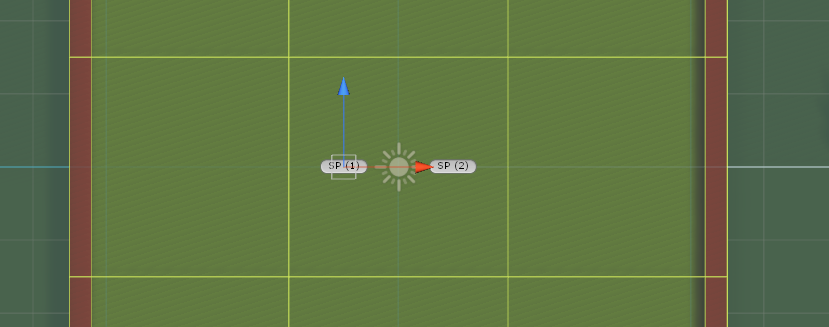

It holds data on its SpawnPointType and whether an entity has been spawn on it.
NearHole: definesSpawnPoints to be used when theNearHoleoption is selected for spawning balls in theGameConfigasset;Regular: for spawning balls on regular games.
C#
asset ConfigAssets;
asset GameConfig;
asset UserMap;

enum SpawnPointType { Regular, NearHole }

component SpawnPoint
{
  SpawnPointType Type;
  Boolean IsAvailable;
  entity_ref Entity;
}

synced event GameplayEnded { }
PlaySystem
The PlaySystem handles the ball's physics and determine the turn state based on its velocity. The information on a player's strike is received via the ISignalOnSkipCommandReceived signal.
Ball
The ball model uses two components, Actor and BallFields; both of which are defined in the Ball.qtn file.
Actor
The Actor component holds a player_ref to the player controlling / owning the entity it is placed on. The Active boolean is used to check if a player is currently active in this game and it is used when loading a game from a saved file.
C#
component Actor
{
    Boolean Active;
    player_ref Player;
}
BallFields
The BallFields component is used to hold the state of a player's ball.
C#
component BallFields
{
    asset_ref<BallSpec> Spec;
    TurnData TurnStats;
    FPVector3 LastPosition;
    Boolean HasCompletedCourse;
    FrameTimer EndOfMovementTimer;
    Int32 Score;
}
TurnStats: An instance ofTurnDatato accumulate stats from the globalCurrentTurnwhen it is that particular player's turn. This particular field is maintained by theTurnSystem.LastPosition: last position before being shot. It is used to reset the ball’s position when it lands on a Rough Field.HasCompletedCourse: keeps track of whether the player has completed the current course. It is checked and updated by thePlaySystem.EndOfMovementTimer: AFrameTimerthat is checked by thePlaySystemonce the ball has come to a stop.Score: Updated by theScoreSystemwhen a player’s turn has ended.
OnBallShot
The ISignalOnBallShot signal triggered by the PlaySystem when a ball is shot.
Input
In addition to the PlayCommand sent by a player when striking a ball, the regular input struct is used to share the current aiming direction and force bar mark position with other players. This allows to replicate the active player’s aiming on the waiting player's side.
input
{
    FPVector3 Direction;
    FP ForceBarMarkPos;
}
These values are meant exclusively for visual feedback purposes and are not used for any gameplay related logic despite holding the same information as PlayCommands.
Forces
The forces applied to the ball are defined by the player strike sent as input via the PlayCommand. The PlaySystem implements the ISignalOnPlayCommandReceived which allows it to receive PlayCommand. The systems processes the command to ensure it is valid; this takes place in 3 steps:
- clamping the strike data (direction and force) according to the values defined on the
GameConfigasset; - striking the ball by applying a force to its
PhysicsBody3D; and finally, - triggering the
ISignalOnBallShotsignal.
Collisions
In addition to applying the forces on the ball, the PlaySystem also evaluates the collisions triggered by the course's hole and the outer Rough Field.
If a ball stops on a Rough Field static collider, the outer dark green field, its position will be reset to position it had before the strike.
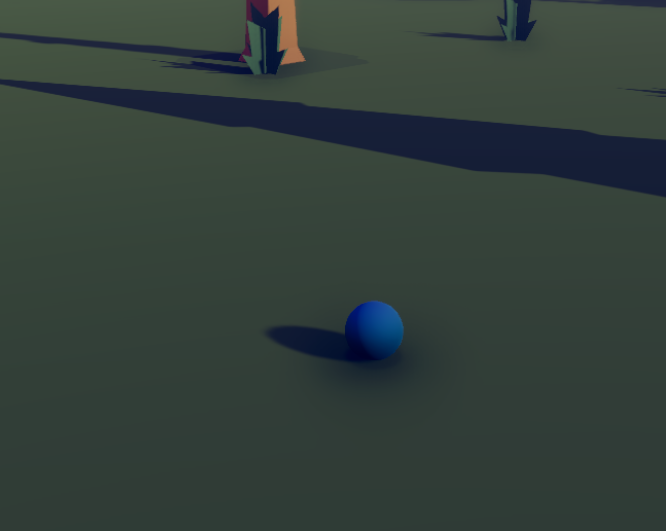
When a ball triggers a static collider on the Hole layer AND its velocity is below the HitHoleVelocityThreshold defined in the GameConfig asset, the OnHitHole() method is called and the course is considered completed.
PlayerTurn
If the global variable CurrentTurn.Status is set to TurnStatus.Resolving, it means the ball is still moving. During that time, the PlaySystem will check if the ball has stopped moving at each Update(). The resting threshold is determined by the value set in the BallSpec asset.
If the ball's velocity is below the threshold value, it is considering at rest. At this point, the EndOfMovementTimer field in the BallFields component will start increasing. Once it has reached the EndOfMovementWaitingInTicks value, the EndOfPlay() method will be called and the ISignalOnTurnEnded signal will be triggered thus ending the current player's turn.
When a play ends, the ball's PhysicsBody3D component is disabled to prevent unwanted interactions while that player's TurnStatus is Inactive.
TurnSystem
The TurnSystem handles the turn related logic used by the turn based features.
Each player has their own TurnData instance to aggregate the of their turn from the global CurrentTurn data instance. The active player’s TurnStatus is also kept updated by the system.
When the ball is struck in the PlaySystem, the TurnSystem set the global CurrentTurn.Status to TurnStatus.Resolving and calls SetStatus() on the active player's BallFields component TurnStats field.
If a valid SkipCommand is received from the active player, the TurnSystem simply triggers a the ISignalOnTurnEnded signal.
When a ISignalOnTurnEnded signal is received, the TurnSystem checks the TurnType.
- If it is of type
Countdownand there is a eligible ball for the next turn, it activates next ball's turn. - If it is of type
Play, it callsAccumulateStats()andSetStatus()on the current player's ball to render it inactive. Afterwards it callsReset()on the globalCurrentTurn.
TurnData
The Turn-Based SDK is an addon for the default Quantum SDK. It aims to help you store and operate logic over your turn-related data.
Most of this happens on your Turn Data struct instances, which have configurable parameters through a data asset and can be used on each of your players/entities and/or globally to manage your game flow.
Variables
The TurnData struct holds references to a Player and an Entity for convenience; e.g. to easily access the player or entity the data refers. It also keeps a reference to a TurnConfig asset that carries the information about a turn's configurable parameters.
Every turn has a current TurnType that suggests but does not mandate what kind of interactions are allowed/forbidden during the current turn. The Quantum Golf Sample includes two pre-defined types:
Play: interactions are allowed.Countdown: interactions are forbidden and the gameplay is on hold.
Every turn also has a keeps track of its TurnStatus; it is used to define which logic path will be used to manipulate data while that status is active. The Quantum Golf Sample uses three pre-defined status:
Active: the turn timer can be increased and player commands are accepted.Inactive: the timer is paused and player commands are not accepted.Resolving: signalizes a temporary status after aPlayCommandhas been received by the current player and game-specific logic is being executed - e.g. simulating ball physics.
The Number keeps track of the number of turns played by a player and is increased by 1 when calling AccumulateStats(). This way the active player's TurnData can be updated when the global CurrentTurn ends. In contrast, the Ticks variables is increased every frame while the global CurrentTurn is marked as Active. This allows to know exactly how many ticks each player was active during all turns they has played thus far.
C#
enum TurnType { Play, Countdown }
enum TurnStatus { Inactive, Active, Resolving }

struct TurnData
{
  player_ref Player;
  entity_ref Entity;
  asset_ref<TurnConfig> ConfigRef;
  TurnType Type;
  TurnStatus Status;
  Int32 Number;
  FrameTimer Timer;
}
The CurrentTurn is a global TurnData instance which is reset at the beginning of every new turn to track of the current player's turn. When a turn ends, the data is aggregated / accumulated to the existing player's turn data instance.
A turn may end for many different reasons; the Quantum Golf Sample enumerates some of them via the TurnEndReasons enum. These can be changed and added to signalizing a turn has ended and trigger different game-specific logic routines.
C#
enum TurnEndReason { Time, Skip, Play, Resolved }

global
{
  TurnData CurrentTurn;
}
Methods
If the current turn uses a timer when a TurnData instance is updated and the status is Active, the Ticks are incremented by 1.
If the Ticks value reach the maximum allowed amount for this turn's as defined in the TurnConfig asset, the ISignalOnTurnEnded signal is triggered with the TurnEndReason.Time enum passed in as the turn end reason.