Overview
The Quantum Essentials technical sample showcases many of the entry-level capabilities of Photon Quantum.
It is split into multiple folders, each containing a self-contained example of a specific feature or set of features that are core to Quantum. The projects can be explored individually and have no dependencies on one another.
The main purposes of this sample are to:
- Help developers understand the fundamentals described in the Manual.
- Serve as a reference project for video tutorials that use this sample as their foundation.
This is an ongoing sample in which more objects will be added alongside with new video tutorials for Photon Quantum. For now, this project only contains one project for Quantum's View Framework a video tutorial showcasing it can be found on its page.
Download
| Version | Release Date | Download |
|---|---|---|
| 3.1.0 | 5月 11, 2026 | Quantum Essentials 3.1.0 |
| 3.0.9 | 2月 05, 2026 | Quantum Essentials 3.0.9 |
Requirements
- Unity 6000.3 or higher.
- Quantum 3 AppId created in the Photon Engine Dashboard.
Supported Platforms
The Quantum Essentials Sample is built for PC.
Project Setup
Creating a Photon Quantum AppId
Go to the Photon Engine Dashboard and log in or create an account.
On the dashboard open
Applications > Public Cloudand select a Quantum 3 app or create a new app selecting Quantum 3 as Photon SDK.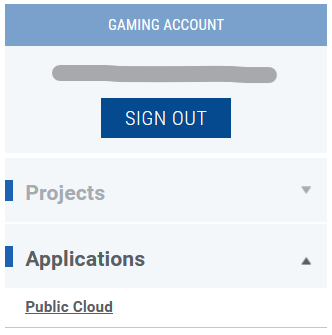
Copy and paste the Quantum 3 AppId into the
App Id Quantumfield of thePhotonServerSettingsasset in the Unity project:- A) Use the Quantum Hub
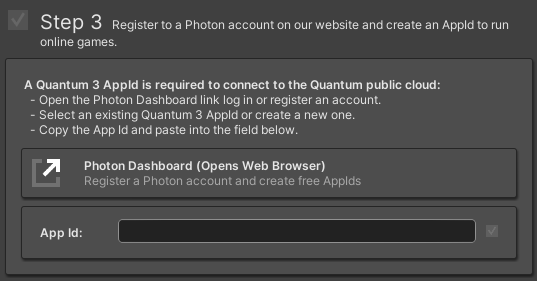
- B) Or find the asset directly using
Tools > Quantum > Find Config > Photon Server Settings
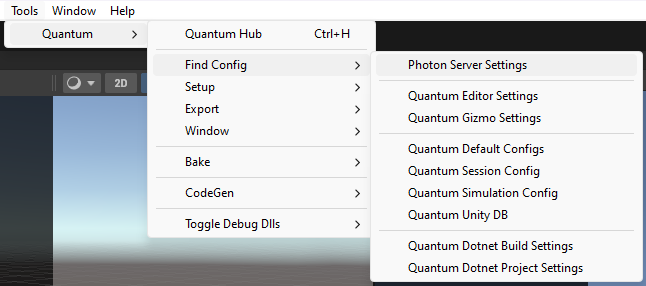
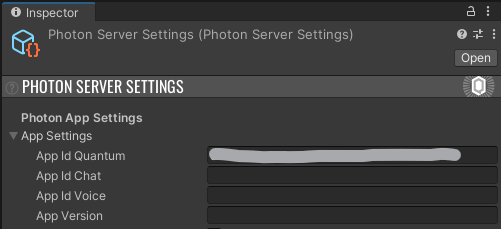
Video Tutorials