Migration Guide
Migrating Quantum From 3.0 to 3.1
Projects in Quantum SDK 2.1 should be upgraded to the latest 3.0 SDK before being upgraded to 3.1.
Migration Steps
- Download the latest Quantum SDK 3.1 unitypackage
- Check for modifications to any Quantum Unity scripts and backup the changes.
- Import the
.unitypackageinto the Unity project. - Delete remnants of the Quantum.Deterministic library:
Quantum.Deterministic.dll,Quantum.Deterministic.pdbandQuantum.Deterministic.xml.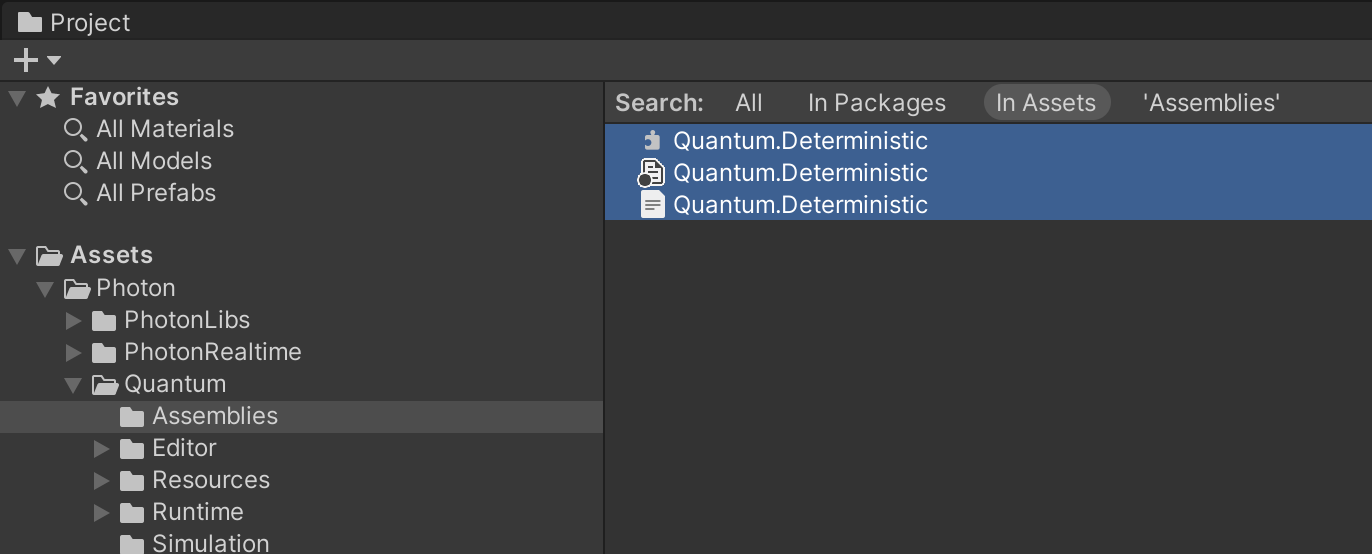
- Restart the Unity Editor.
- Fix any remaining compilation errors.
- (Optional) If the project uses Bot SDK, close its AI documents and editor window, download Bot SDK 3.1.0 Preview package and import it into the project.
- Reimport the asset
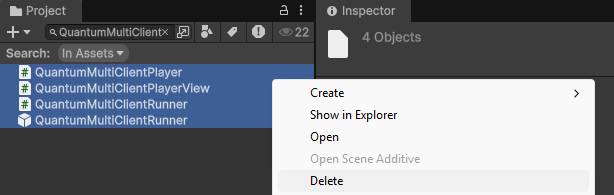
Assets/QuantumUser/Resources/QuantumDefaultConfigs.assetto make sure theInputActionAssetis set. - The multi client scripts and prefabs have been moved into a additional
.unitypackage, delete the these files from the SDK.Assets/Photon/Quantum/Runtime/RuntimeAssets/QuantumMultiClientRunner.prefabAssets/Photon/Quantum/Runtime/QuantumMultiClientPlayer.csAssets/Photon/Quantum/Runtime/QuantumMultiClientPlayerView.csAssets/Photon/Quantum/Runtime/QuantumMultiClientRunner.cs
- Import optional used Quantum packages from
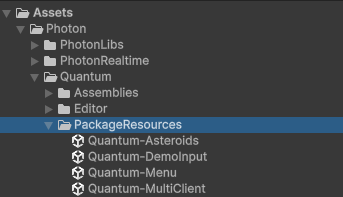
Assets/Photon/Quantum/PackageResources: Quantum-DemoInput, Quantum-Menu or Quantum-MultiClient by importing the.unitypackagemanually or by reinstalling it using the Quantum Hub Sample section.