Project Architecture
Introduction
This page provides an overview of the project's overall structure. The game is designed around the idea that animation-driven motion is the central element that defines gameplay behavior. Rather than using abstract Animator Mecanim state transitions or manually scripted KCC movement, the system derives the character's actions and movement primarily from animation-driven data.
The core gameplay systems implementing this approach are:
Animated Bone Sampler: responsible for sampling colliders motion and extracting frame-accurate position and rotation data.
Root Motion: drives character displacement and rotation directly from animation data.
FadeTo Animations: a controlled transition system that blends animations with precise timing.
This project makes extensive use of the Animator Addon, it is important to read the Animator documentation prior to exploring this sample source.
Animated Bone Sampler
Some games require extracting specific information from animations so it can be used in the Quantum simulation, for example, determining the hitbox of a sword that moves quickly during an attack animation.
The technique referred to here as Animated Bone Sampler demonstrates how the Quantum Animator can be extended to extract custom data from an animation clip. It is important to note that this is not a one-size-fits-all solution; depending on the project, additional adjustments or modifications may be required to support different scenarios or more complex animation setups.
Usage and DSL Layout
In the DSL (game state), the sampled data is stored in the dictionary contained within the AnimationBoneSamplerComponent.
The BoneSamplerType Defines the types of bones that can be sampled and tracked during animations. Each value corresponds to a specific body part or equipment slot on the character.
The integer value of each entry is used as a direct index into frame data arrays, so the order of this enum must remain stable across bakes. The BoneHolder component is attached to a bone entity that is owned by a character entity.
Acts as a lightweight tag + metadata component so the system can identify which character owns the bone and what role the bone plays. AnimationBoneSamplerComponent eer-character component that holds the full mapping of bone slots to their runtime entities.
Allocated and managed by AnimationBoneSamplerSystem. The dictionary is keyed by BoneSamplerType and maps to BoneSamplerData, allowing lookup of any bone entity given its semantic type during each simulation tick.
C#
enum BoneSamplerType {
    Sword,
    Shield,
    Head
}

component BoneHolder {
    EntityRef Owner;
    BoneSamplerType Type;
}

[Serializable]
struct BoneSamplerData {
    EntityRef Entity;
}

component AnimationBoneSamplerComponent {
    dictionary<BoneSamplerType, BoneSamplerData> Data;
}
For more details on how the solution works internally, refer to AnimationBoneSamplerSystem, which is responsible for advancing the bone data according to the current animation state, creating or updating the corresponding bone child entities each tick, and making the data ready to be polled by custom systems.
The image below illustrates how the stored data can be retrieved from the dictionary and used to perform Shape Queries, as demonstrated in this sample's AttackCollisionSystem.
C#
private void PerformSwordCollision(Frame f, EntityRef entity, int damage)
{
    var attackData = f.Unsafe.GetPointer<AttackData>(entity);
    var targetList = f.ResolveList(attackData->CollisionHistory);

    var boneSampler = f.Unsafe.GetPointer<AnimationBoneSamplerComponent>(entity);
    var samplerData = f.ResolveDictionary(boneSampler->Data);

    if (samplerData.TryGetValue(BoneSamplerType.Sword, out var boneSamplerData))
    {
        var boneTransform = f.Unsafe.GetPointer<Transform3D>(boneSamplerData.Entity);
        var boneCollider = f.Unsafe.GetPointer<PhysicsCollider3D>(boneSamplerData.Entity);

        var characterTransform = f.Unsafe.GetPointer<Transform3D>(entity);

        var hits = f.Physics3D.OverlapShape(boneTransform->Position, boneTransform->Rotation,
            boneCollider->Shape);
        hits.Sort(characterTransform->Position);


        for (int i = 0; i < hits.Count; i++)
        {
            {...}
        }
    }
}
Bone Entity Lifecycle
Each BoneSamplerType slot is backed by a dedicated child entity that carries a Transform3D and a trigger PhysicsCollider3D. These entities are created lazily on the first tick a given bone slot is encountered and are registered in the AnimationBoneSamplerComponent dictionary keyed by their BoneSamplerType. On subsequent ticks the system updates the existing entity's transform in-place rather than recreating it. The BoneHolder component on each bone entity references its owning character entity and its type, allowing other systems to identify the source of a physics overlap.
Custom Graph Baker
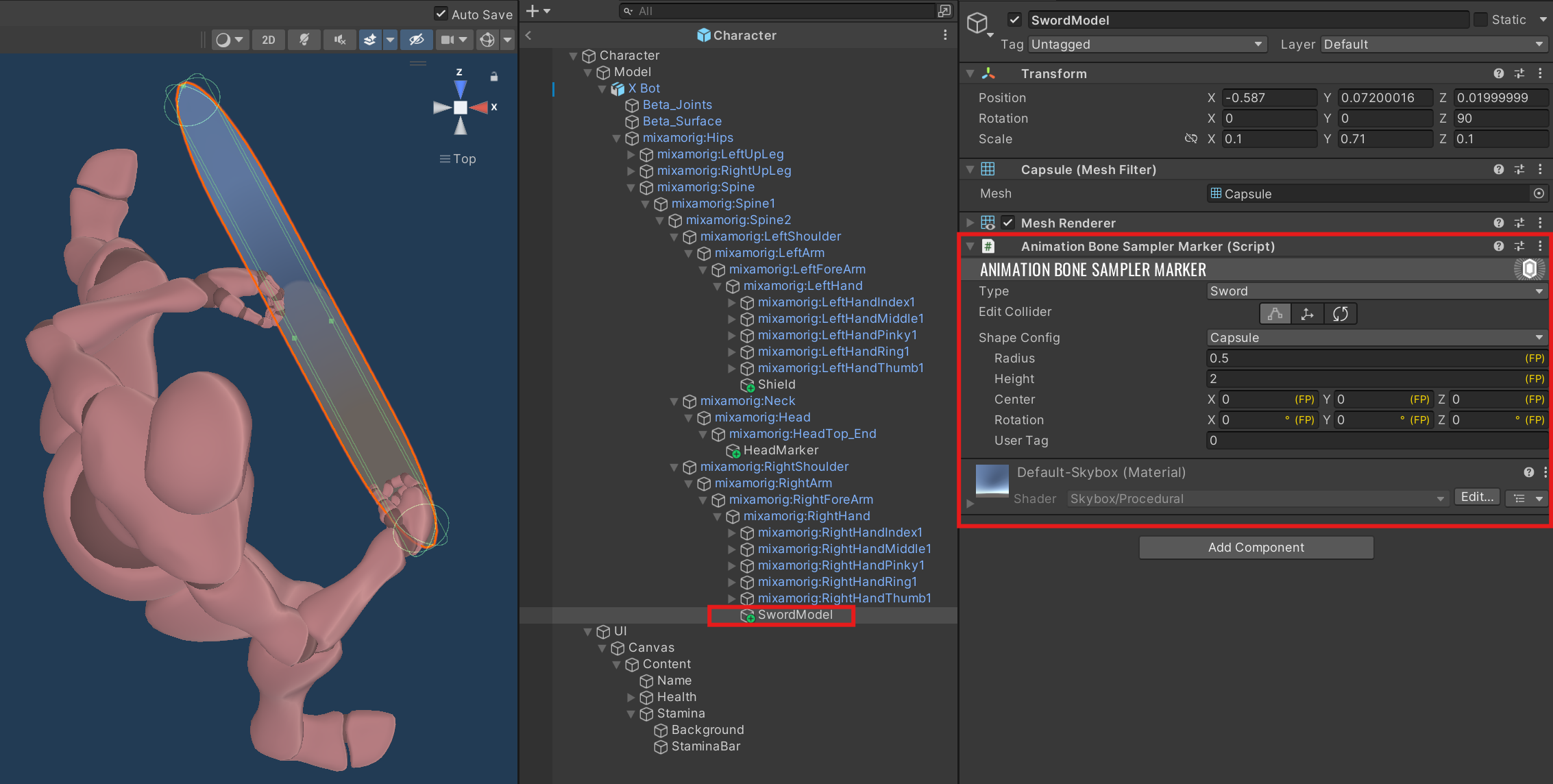
The AnimatorGraph's ReferenceModel is the GameObject used to extract animation data during the bake process. To enable bone tracking, add the AnimationBoneSamplerMarker component anywhere in the hierarchy of the ReferenceModel, positioned and oriented to match the bone or attachment point you want to track.
The figure below shows how this configuration was applied for the sword's collider. The Shape Config used for sampling can be of type Box, Sphere, or Capsule. The shape is automatically scaled by the bone's world-space lossy scale during baking, so the authored shape should be defined in the marker's local space.
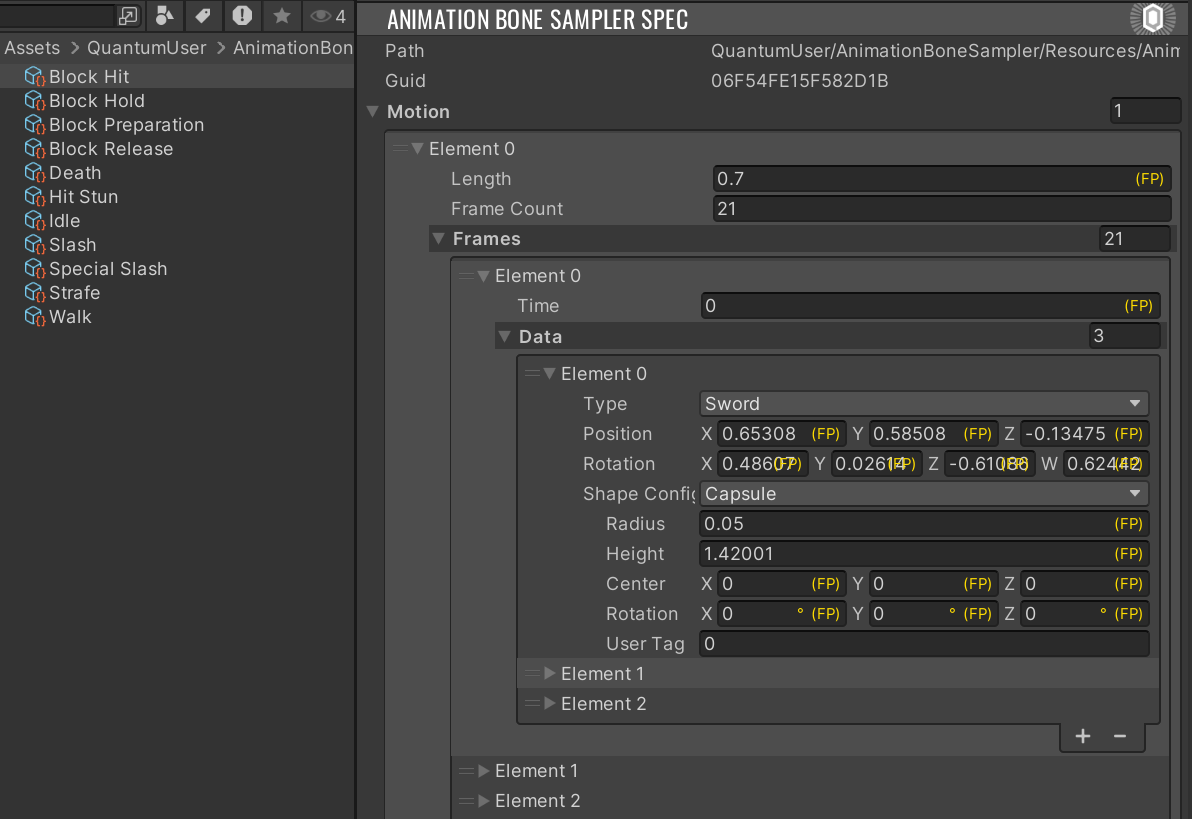
For each state defined in the Unity AnimatorController, the baking process generates an AnimationBoneSamplerSpec asset located at: Assets/QuantumUser/AnimationBoneSampler/Resources/<AnimatorGraphAsset-Name>. For blend-tree states the spec contains one motion entry per child clip, in the same order as the blend tree's child list. Re-baking always replaces existing assets to prevent stale data from persisting between bakes.
Root Motion
This sample project includes a fully functional 3D Root Motion implementation within the MovementSystem. It also provides a motion-cancellation mechanism that interrupts the current state whenever the character collides with or stumbles over an obstacle.
How motion is applied is entirely a design choice. In this case, the decision was made to disable the KCC and move the transform directly. The code below demonstrates how the animator's root motion is processed.
C#
    public void OnAnimatorRootMotion3D(Frame f, EntityRef entity, AnimatorFrame deltaFrame,
        AnimatorFrame currentFrame)
    {
        if (deltaFrame.Position == FPVector3.Zero && deltaFrame.RotationY == FP._0)
            return;
        if (f.Unsafe.TryGetPointer<Transform3D>(entity, out var transform))
        {
            transform->Rotate(FPVector3.Up, deltaFrame.RotationY * FP.Rad2Deg);
            transform->Teleport(f, transform->Rotation);

            if (f.Unsafe.TryGetPointer<KCC>(entity, out var kcc))
            {
                kcc->Data.SetLookRotation(transform->Rotation);
            }

            var currentFrameRotation = FPQuaternion.CreateFromYawPitchRoll(currentFrame.RotationY, 0, 0);
            currentFrameRotation = FPQuaternion.Inverse(currentFrameRotation);
            var newPosition = currentFrameRotation * deltaFrame.Position;
            var displacement = transform->Rotation * newPosition;

            var targetHitPosition = (displacement.XOZ.Normalized * FP._0_33 * 2) + displacement;
            var hitOrigin = transform->Position + FPVector3.Up;
            var hits = f.Physics3D.RaycastAll(hitOrigin, targetHitPosition.XOZ, targetHitPosition.Magnitude, -1,
                QueryOptions.HitStatics);

            if (hits.Count <= 0)
            {
                if (kcc != null)
                {
                    kcc->Teleport(f, transform->Position + displacement);
                }
            }
            else
            {
                f.Signals.OnChangeState(entity, StateType.HitStun);
            }
        }
    }
Note that AnimationBoneSamplerSystem also implements ISignalOnAnimatorRootMotion3D and updates all bone child entity transforms on the same signal, ensuring bone colliders remain in sync with the character's post-root-motion position within the same tick.
FadeTo Animations
This project primarily uses FadeTo transitions. This means the AnimatorController is not the main driver for deciding which animation state should play.
Instead, state selection and transition logic are handled programmatically. For more information on how this system works, refer to the AnimationSystem.
Third Party Assets
This sample includes third-party free and CC0 assets. The full packages can be acquired for your own projects at their respective site:
- Medieval Village MegaKit[Standard] by Quaternius
- Medieval Weapons Sound Effects by Happy Soul Music Library
- Modular Character Outfits - Fantasy[Standard] by Quaternius
- Round Shield by Lucian Pavel
- Short Sword by Lucian Pavel
- Stylized Nature MegaKit by Quaternius
- Universal Base Characters Kit by Quaternius
More Quantum Samples
Visit our Samples page to discover more example projects.
Back to top