ダウンロード
ダウンロード
| Version | Release Date | Download |
|---|---|---|
| 3.0.5 | 7月 24, 2025 | Quantum Simple FPS 3.0.5 |
| 3.0.0 | 8月 16, 2024 | Quantum Simple FPS 3.0.0 |
要件
- Unity 2022.3.38f1以降
- Photon Engine ダッシュボードから作成したQuantum 3 AppId
対応プラットフォーム
Quantum Simple FPSは、キーボードとマウス入力を備えたPCとWebGL向けです。
プロジェクトのセットアップ
Creating a Photon Quantum AppId
- Go to the Photon Engine Dashboard and log in or create an account.
- On the dashboard open
Applications > Public Cloudand select a Quantum 3 app or create a new app selecting Quantum 3 as Photon SDK.
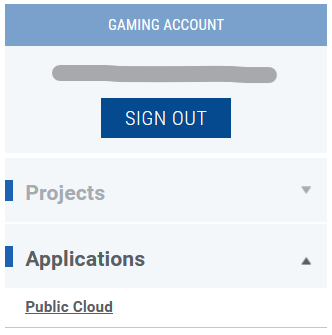
- Copy and paste the Quantum 3 AppId into the
App Id Quantumfield of thePhotonServerSettingsasset in the Unity project:- A) Use the Quantum Hub
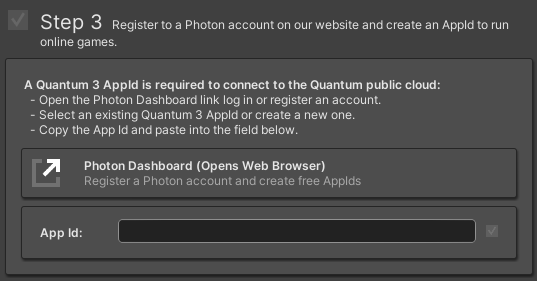
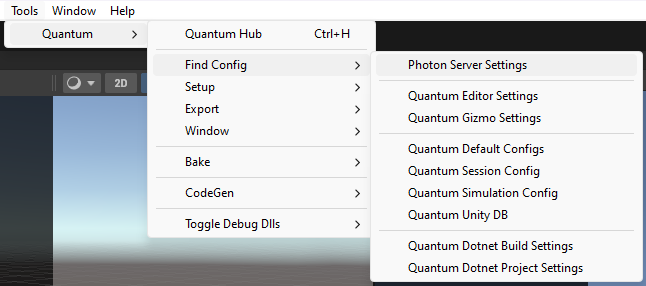
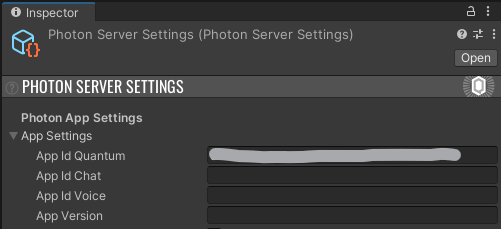
ゲームを実行するには、ゲームの開始セクションの手順に従ってください。
Back to top