Quantum Addressables Sample
Overview
This sample demonstrates how to ship a Quantum project's content through Unity Addressables instead of the default Resources/ folder. Quantum prototypes and entire gameplay scenes are loaded on demand, while the simulation code remains unchanged, AssetRef<T> lookups continue to work exactly as they did before.
This sample assumes familiarity with Quantum 3 and Unity Addressables. For an introduction to Addressables, refer to the official Unity Addressables documentation. The Quantum-side integration points are documented in Extending Assets and Assets in Unity.
Download Table
| Version | Release Date | Download |
|---|---|---|
| 3.0.11 | 5월 15, 2026 | Quantum Addressables 3.0.11 |
Requirements
- Unity Editor 6000.3.13f1+
- Quantum 3.0.11+
- Unity Addressables
- Photon Quantum 3 AppId created in the Photon Engine Dashboard (for instructions, see How to create a Quantum 3 AppId)
Highlights
Technical
- Addressables for prototypes, maps, and scenes;
QuantumSceneslabel routing throughAddressables.LoadSceneAsync;QuantumMenuConnectionBehaviourSDK.ConnectAsyncInternaloverride that asynchronously preloads every Addressable the simulation will request;
Gameplay
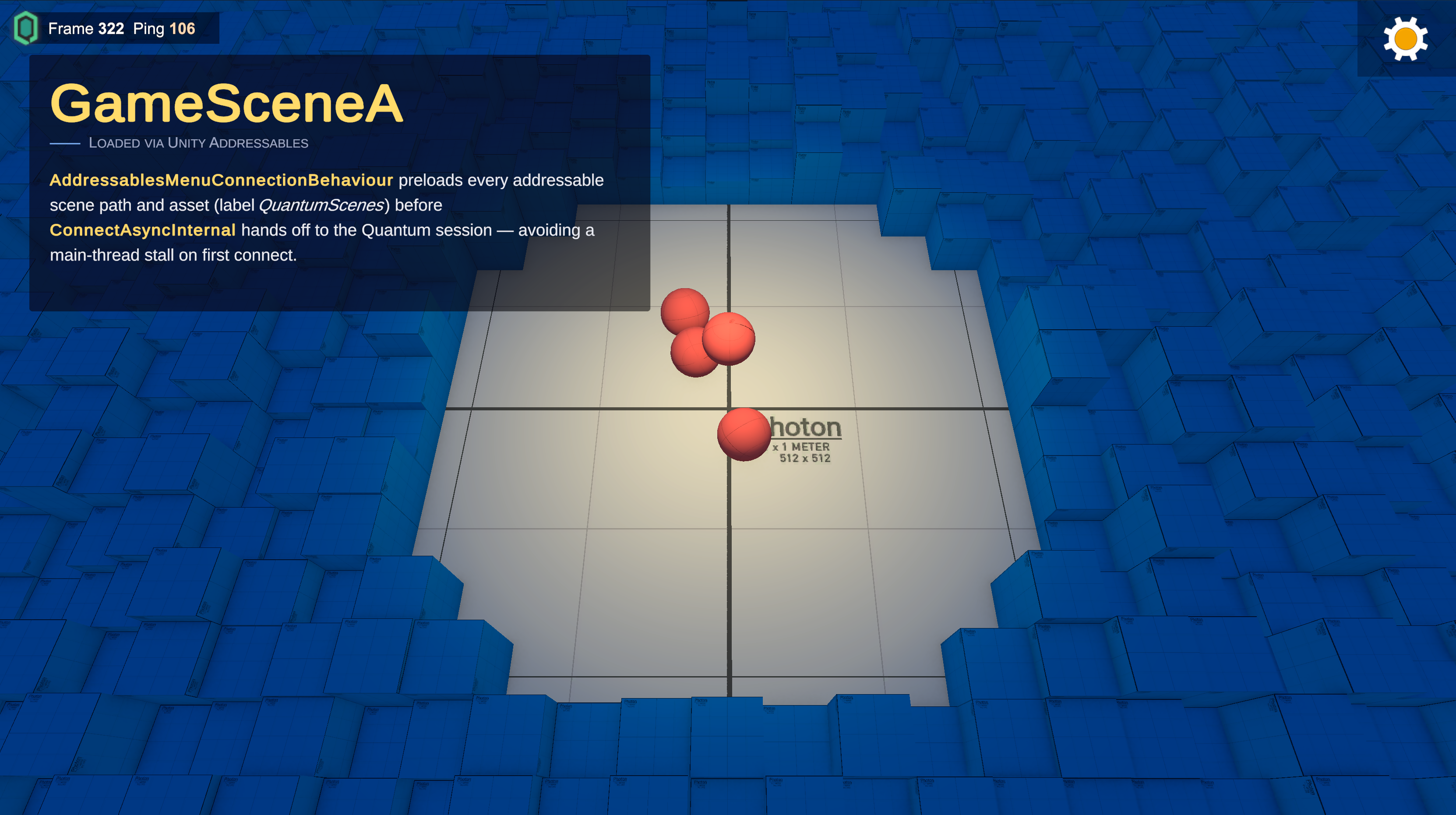
- Two gameplay scenes with distinct maps and visuals;
- Two prototype sets (red and blue spheres) demonstrating prototype swap per scene;
- Single
SpawnerSystemthat emits a prototypes around the origin every second;
Project Architecture
The sample is organised around four ideas, that comes from how they compose to deliver Addressables assets to the deterministic simulation.
Asset routing through QuantumUnityDB
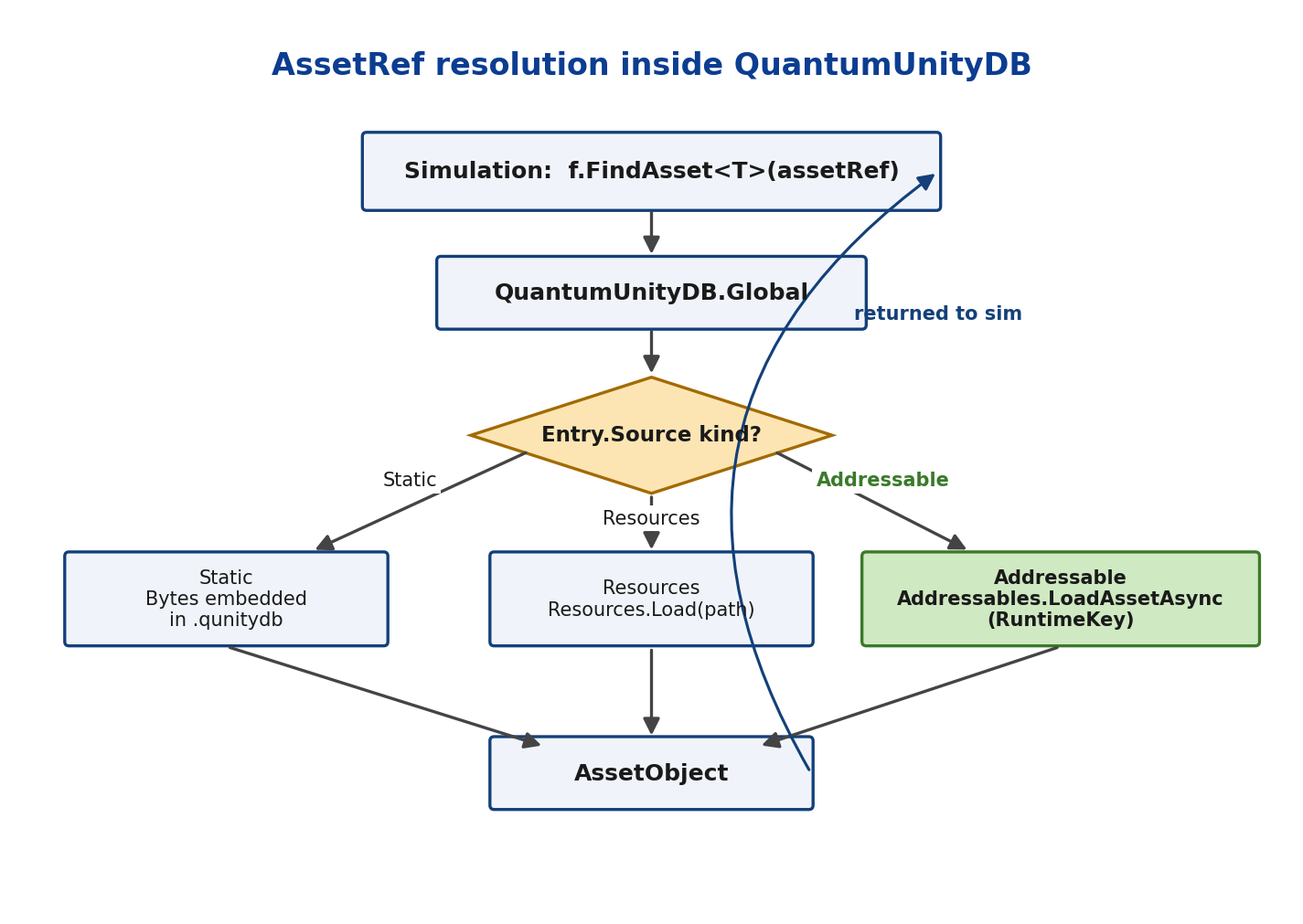
Quantum doesn't reference Unity assets directly. The simulation asks for an AssetRef<T> (a deterministic GUID) and QuantumUnityDB resolves it. Each entry in the DB carries a source that determines how the data is loaded:
- Static, bytes embedded in the
.qunitydbblob; - Resources,
Resources.Load(path)at first access; - Addressable,
Addressables.LoadAssetAsync(RuntimeKey).
When the Addressables package is installed, the editor importer at QuantumAssetSourceFactoryAddressable automatically tags every Addressables-marked asset as a QuantumAssetObjectSourceAddressable. The simulation never sees the difference, f.FindAsset<T>(assetRef) returns the same AssetObject regardless of which source produced the bytes.
For the API surface, see Extending Assets.
Quantum Menu as bootstrap
The bootstrap scene of this sample is MainMenu.unity, a clone of QuantumSampleMenu.unity placed under user-owned content so SDK upgrades don't overwrite it. The only customisation is a single subclass of the menu's connection behaviour.
Per-scene RuntimeConfig
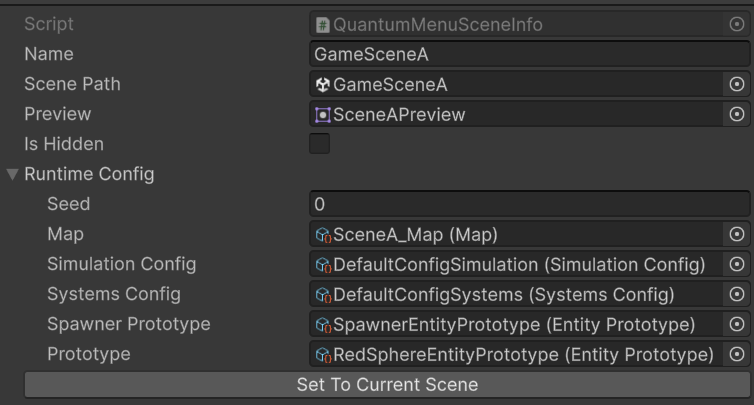
Each gameplay scene is described by a QuantumMenuSceneInfo asset under Assets/QuantumUser/Resources/. When the host picks a scene from the menu, its RuntimeConfig is JSON-cloned and propagated through the deterministic session start. Every client preloads the same set of Addressables and runs the same simulation. Adding a third scene is a data-only change: drop another QuantumMenuSceneInfo asset under Resources/, point it at a new gameplay scene, and the menu picker shows it on the next Play.
Custom connection behaviour
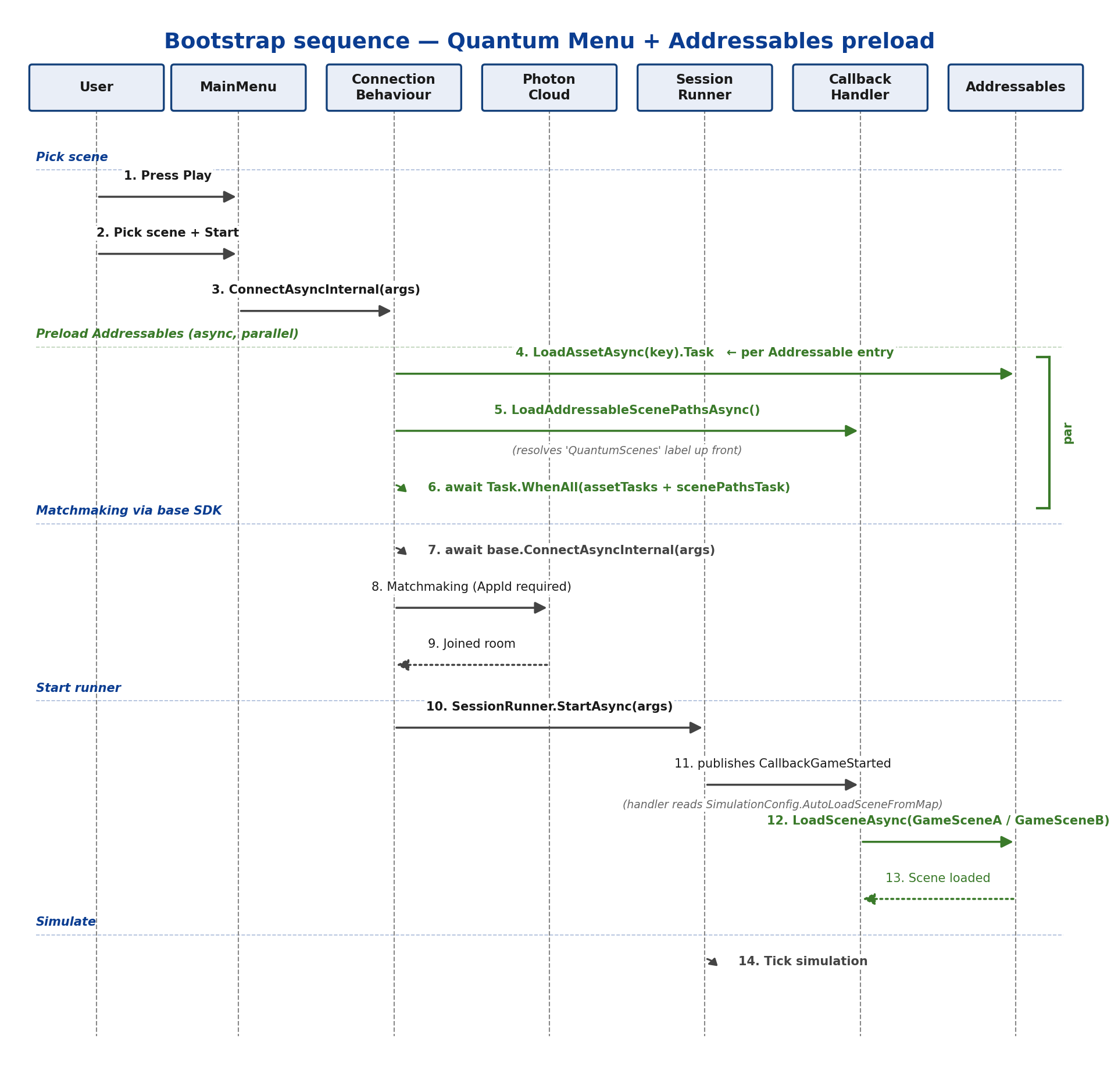
The integration is done via AddressablesMenuConnectionBehaviour. The class overrides ConnectAsyncInternal, runs the Addressables preload in parallel with the scene-path resolution, then delegates the rest of the connection flow to the SDK:
C#
public class AddressablesMenuConnectionBehaviour
    : QuantumMenuConnectionBehaviourSDK
{
  protected override async Task<ConnectResult> ConnectAsyncInternal(
      QuantumMenuConnectArgs connectArgs)
  {
    Task scenePathsTask =
        QuantumCallbackHandler_UnityCallbacks.LoadAddressableScenePathsAsync();

    Task[] assetTasks = QuantumUnityDB.Global.Entries
      .Where(e => e.Source is QuantumAssetObjectSourceAddressable)
      .Select(e =>
      {
        var src = (QuantumAssetObjectSourceAddressable)e.Source;
        return Addressables.LoadAssetAsync<UnityEngine.Object>(src.RuntimeKey).Task;
      })
      .ToArray();

    await Task.WhenAll(assetTasks.Append(scenePathsTask));
    return await base.ConnectAsyncInternal(connectArgs);
  }
}
Task.WhenAll fans out every Addressable load concurrently and joins them before the SDK's connection flow begins. Pre-resolving the QuantumScenes label up front means the scene paths are cached when AutoLoadSceneFromMap eventually fires, so the gameplay scene load doesn't stall on a synchronous lookup.
Sample Layout
| Path | Purpose |
|---|---|
Assets/QuantumUser/Simulation/Game.qtn |
DSL definitions; declares the Spawner component |
Assets/QuantumUser/Simulation/Systems/SpawnerSystem.cs |
Creates the spawner entity on init; emits prototypes on a timer |
Assets/QuantumUser/Simulation/RuntimeConfig.User.cs |
Adds SpawnerPrototype and Prototype fields to RuntimeConfig |
Assets/QuantumUser/Scripts/AddressablesMenuConnectionBehaviour.cs |
Subclass of QuantumMenuConnectionBehaviourSDK; preloads Addressables in OnStart |
Assets/QuantumUser/Resources/SceneA_MenuInfo.asset |
QuantumMenuSceneInfo for the red-prototypes scene |
Assets/QuantumUser/Resources/SceneB_MenuInfo.asset |
QuantumMenuSceneInfo for the blue- scene |
Assets/QuantumUser/Scenes/MainMenu.unity |
Cloned menu scene wired with the custom connection behaviour |
Assets/QuantumUser/Scenes/GameSceneA.unity, GameSceneB.unity |
Gameplay scenes; loaded via Addressables, removed from Build Settings |
More Quantum Samples
For a step-by-step walkthrough on building this sample from scratch, see the Quantum Addressables Tutorial.
Visit our Samples page to discover more example projects, including:
Back to top