State Replication
To replicate a value means to reproduce the value over a network/connection on the other machine. Bolt makes it easy for you to define what is important to be transferred over the network by defining a State.
The State of a BoltEntity can only be modified by the Owner. Trying to change the State from somewhere else than the Owner will mean the value will not get replicated over the network.
Mecanim/State interaction/Modifying state properties
Remember to link your Animator/Transform when your state is attached, eg. (in a script that inherits from Bolt.EntityBehaviour<YourStateNameHere>):
C#
    public override void Attached ()
    {
      state.transform.SetTransforms(transform);
      state.SetAnimator(GetComponentInChildren<Animator>()); //Or wherever your animator is
    }
After that, if your state properties are all set up properly in-editor, then all you have to do is change the linked properties, and your Animator should replicate as intended.
In-editor example of Mecanim properties in state:
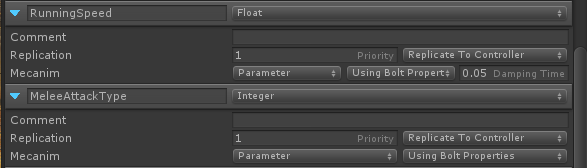
Then, to change the properties (this is not mecanim-specific, this method can be used to change any property): In a script that inherits from: Bolt.EntityBehaviour<YourStateNamehere>
C#
state.RunningSpeed = currentSpeed;
Then, as long as the controller is the only one running that bit of code (eg: wrap that in a if(BoltNetwork.isOwner) loop), Bolt will replicate that variable across the network, and push it into that animator automatically, if your state properties are set up as shown above.
Replicate to Controller
By default Bolt will replicate the values to all Clients that are not the Controller. To enable Replicate to Controller one needs to enable the Joystick icon in the State's property in the Bolt Editor (Bolt 0.4+).
When to use Replicate to Controller?
It makes sense to keep this turned off when:
- It's a property that you want to allow the Controller to have full control over.
- It's a property that will be updated by the resulting state you receive from the Server/Owner in
ExecuteCommand()whereresetState==true.
On the other hand you would turn this on if:
- It's a property that the Owner/Server will set and the Controller won't then you'll need to turn this on to receive the value of the property on the Controller's end.