Features
This Addon is for Fusion 2.1.x. It does not support Fusion 2.0.x.
This page is the Fusion Plugin SDK feature reference.
See Setup for installation and a first-run walkthrough.
Code and Data Sharing
Your Unity project and the plugin execute in different environments — the plugin has no direct access to your code, prefabs, or scenes, and no concept of UnityEngine.
The tools below bridge that gap: code is exported into the plugin's compilation unit, and asset data is captured into a snapshot the plugin loads at startup.
The FusionPluginProjectSettings asset is where you configure the export pipeline — export buttons, auto-export toggles, code-include paths, and per-asset postprocess callbacks all live in its inspector.
Each subsection below covers either a control on this asset or a code-side annotation that influences what it exports.
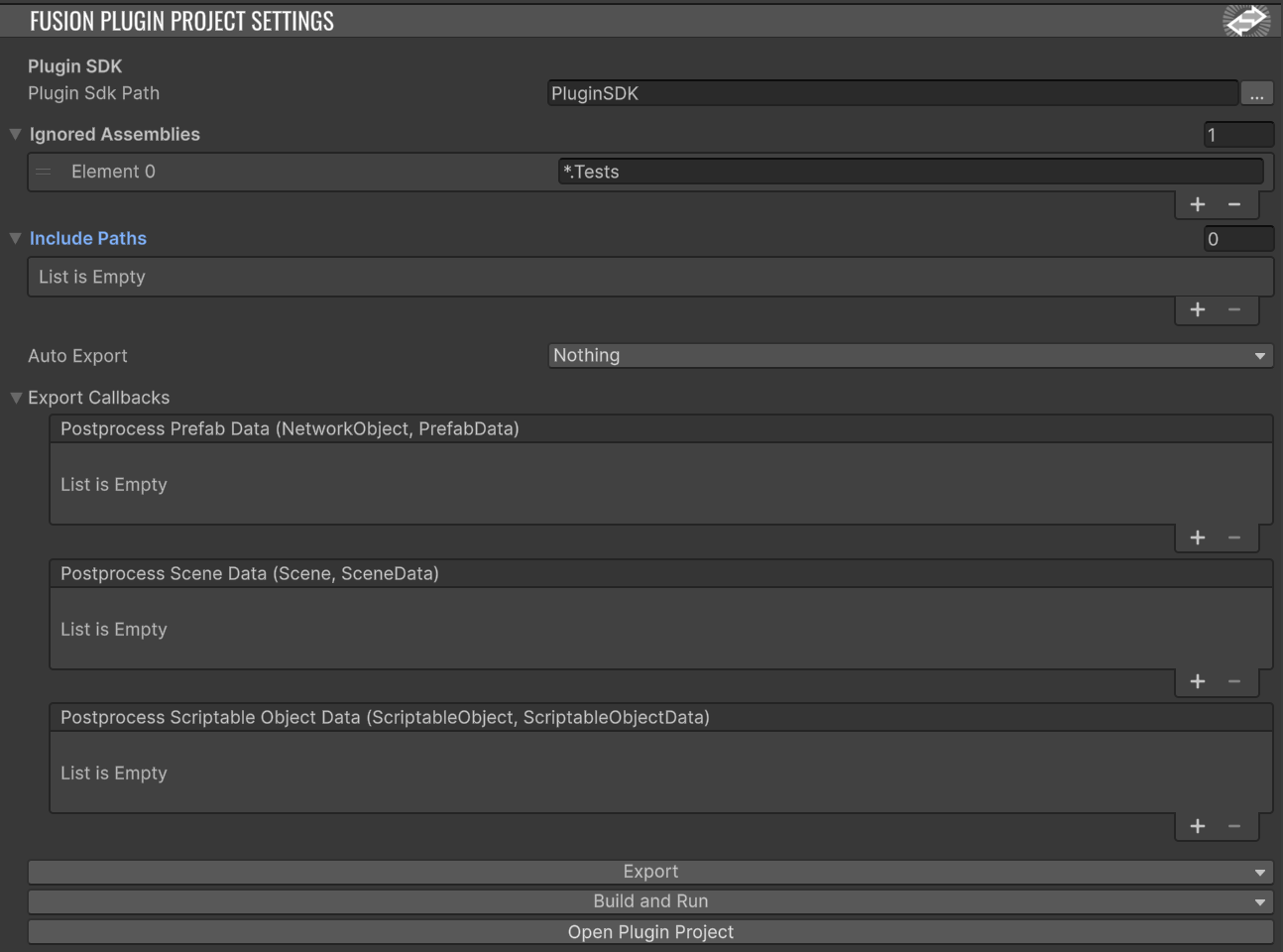
Note: Create the asset in your Unity project via the right-click menu Create > Fusion > Plugin Project Settings.
Exporting
When you press Export in the FusionPluginProjectSettings inspector, two outputs are produced:
- Types are generated. All your
NetworkBehaviours,[Networked]properties, networked structs,[NetworkInput]types, and types derived fromNetworkObjectare mirrored into the plugin project underFusion.Plugin.Types/Generated/UserTypes.<AssemblyName>.cs. The mirrors are declaredpartial, so plugin code can extend them. - Asset data is captured. Prefab hierarchies, scene NetworkObject layouts, and networked ScriptableObject state are written to embedded JSON databases (
DB.Prefab.*.json,DB.Scene.*.json,DB.ScriptableObject.*.json) inside the sameGenerated/folder. These are loaded server-side at runtime so the plugin can spawn and resolve the same objects clients use.
The export is a snapshot. After any Unity-side change that the plugin should see, re-export.
Auto-Exporting
The FusionPluginProjectSettings asset has an AutoExport field that controls when the plugin export runs automatically in response to project changes. Each asset type can be enabled independently.

Note: Auto-export aims to cover every workflow but may miss something. If it does, run Export manually and please file a bug report.
Code Annotations
The PluginCodeExportSettings(PluginExportOptions opts) attribute can be used to include a type or field that would be otherwise skipped or to skip something that would otherwise be included from the export. This can be achieved via the PluginExportOptions.Skip and PluginExportOptions.Export flags.
C#
    // Fields are skipped by default, but can be exported via the attribute
    [PluginCodeExportSettings(PluginExportOptions.Export)]
    int MaxHealth = 100;
Intercepting Exports
If you need to inject custom logic into the export pipeline (e.g. strip a field, transform a value, attach extra metadata) the FusionPluginExportCallbacks UnityEvents on the settings asset fire once per captured asset:
PostprocessPrefabData(...)PostprocessSceneData(...)PostprocessScriptableObjectData(...)
Code Sharing
FusionPluginProjectSettings.IncludePaths is a list of folder/file patterns inside the Unity project. Anything matching is included in the plugin project (csproj) at export time, becoming part of the plugin's compilation unit.
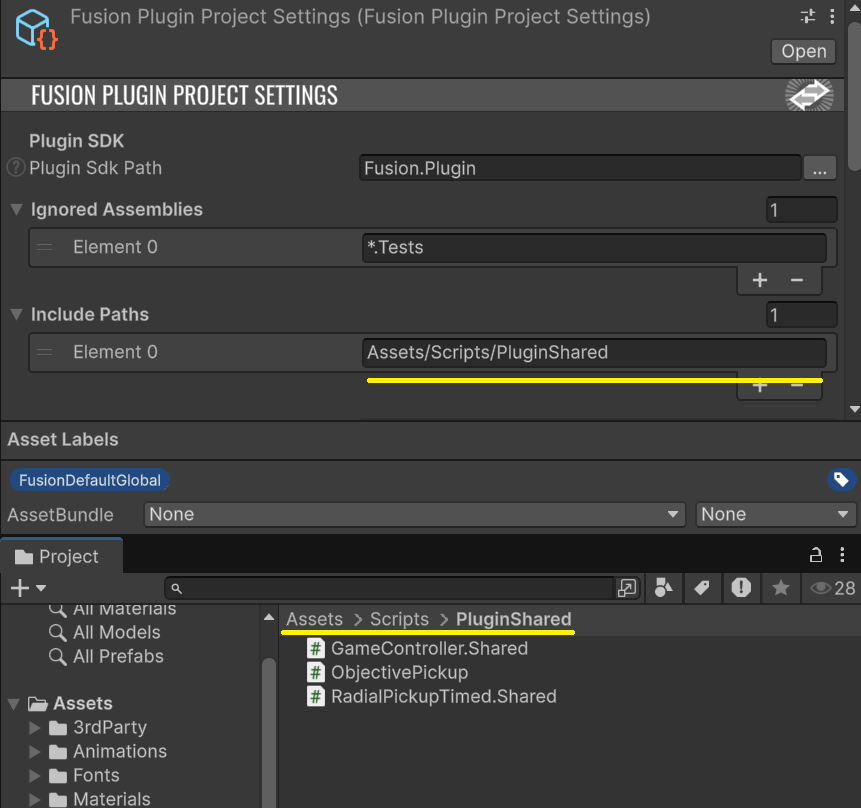
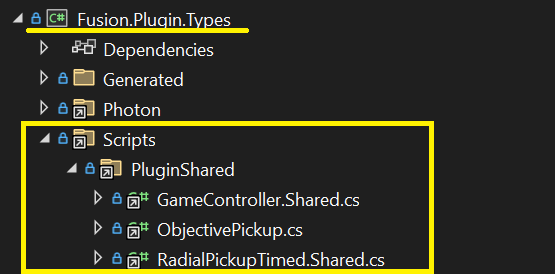
There's also a Unity asset label, FusionPluginInclude, that achieves the same per-file — apply the label to a script and it'll be picked up even if it lives outside an IncludePaths folder.
This is the right tool for:
- Shared types (enums, plain data classes) that both Unity and the plugin need to agree on.
- Helper / utility code you want to reuse server-side.
Press Export after changing IncludePaths for the changes to land in the plugin project.
Note: The plugin does not depend on UnityEngine. We provide our own stand-ins for the most common UnityEngine types, but coverage isn't exhaustive — keep UnityEngine dependencies in shared files to a minimum to avoid plugin-side compile errors.
Network Behaviours
By default all Networked properties and their owning NetworkBehaviours are exported for extension.
Networked Properties - Basics
For example a simple Health NetworkBehaviour declared unity side
C#
// Unity Side
using Fusion;

namespace Foo {
  public class Health : NetworkBehaviour {
    [PluginCodeExportSettings(PluginExportOptions.Export)]
    int MaxHealth = 100;

    [Networked]
    public int CurrentHealth { get; set; }
  }
}
Would generate a partial class in Fusion.Plugin.Types, that you can extend as follows
C#
// Plugin Side - Extend by placing a partial in Fusion.Plugin.Types
using Fusion;
namespace Foo;

public partial class Health {
  public override void FixedUpdateNetwork() {
    if (CurrentHealth > MaxHealth) {
      Log.Info($"{CurrentHealth} exceeds {MaxHealth}");
    }
  }
}
This is an example of the plugin identifying users setting their health to values outside the expected range — log it, flag the user, or kick them.
The above example also demonstrates
- Usage of the [PluginCodeExportSettings(PluginExportOptions.Export)] attribute to mark a field to be included in the export, fields are skipped by default.
- Overriding
FixedUpdateNetworkin the plugin, you are also able to override theSpawnedandDespawnedlifetime methods
C#
public partial class Health {
  public override void Spawned() {
    base.Spawned();
  }

  public override void Despawned(NetworkRunner runner, bool hasState) {
    base.Despawned(runner, hasState);
  }

  public override void FixedUpdateNetwork() {
  }
}
Networked Properties - Plugin Authority
The [Networked] attribute has two parameters that work together to make a property server-authoritative:
C#
public class Player : NetworkBehaviour {
  [Networked(PluginAuthority = true, AllowPrediction = false)]
  public int Level { get; set; }

  [Networked(PluginAuthority = true, AllowPrediction = false)]
  public int Xp { get; set; }
}
| Parameter | Effect |
|---|---|
PluginAuthority = true |
When a custom plugin is running, the plugin owns the property. Even the client that holds the object's state authority sees the property as a proxy — it can read but its writes don't stick. Without a plugin, this parameter has no effect. |
AllowPrediction = false |
(default is true.) Disables local prediction. Only state authority can write. input authority and proxy writes are silently ignored. |
Combined, [Networked(PluginAuthority = true, AllowPrediction = false)] gives you a property that only the plugin can change — clients see plugin authoritative values. This is the recommended pattern for anti-cheat-sensitive state (XP, currency, match score).
RPCs
Intercepting RPCs
To force RPCs through the plugin first, add InvokeLocalMode = RpcInvokeLocalMode.ForwardToPlugin:
C#
// Unity side
public class Chest : NetworkBehaviour {
  [Rpc(RpcSources.All, RpcTargets.StateAuthority, InvokeLocalMode = RpcInvokeLocalMode.ForwardToPlugin)]
  public void RPC_Open() {
    // Default client behaviour: spawn loot. Only runs if the plugin
    // doesn't cancel the RPC.
    SpawnLoot();
  }
}
C#
// Plugin side - Fusion.Plugin.Types
partial class Chest {
  partial void RPC_Open(ref RpcInfo info) {
    if (NotAllowedToOpen()) {
      info.Cancel();  // Suppresses delivery - clients never run RPC_Open.
      return;
    }

    // Or do server-authoritative work directly and prevent the client
    // version from running:
    SpawnLootServerSide();
    info.Cancel();
  }
}
Mechanism:
- The exporter emits a matching
partial voidon the plugin side for every RPC method. Fill it in. - The first parameter is
ref RpcInfo info. Callinginfo.Cancel()marks the RPC for suppression so it isn't forwarded to its declared targets. - To modify an RPC's payload rather than just block it, cancel the original and call a fresh RPC with the corrected arguments.
Writing plugin-aware client code
Runner.HasCustomPlugin lets the same Unity code branch on whether a custom plugin is running this session:
C#
// Unity Side
[Rpc(RpcSources.All, RpcTargets.StateAuthority, InvokeLocalMode = RpcInvokeLocalMode.ForwardToPlugin)]
public void RPC_TakeHit(int damage) {
  if (Runner.HasCustomPlugin == false) {
    // No plugin: client state auth applies the damage itself.
    CurrentHealth = Mathf.Max(0, CurrentHealth - damage);
  }

  // Either way, fire the cosmetic event.
  HitReceived.Invoke();
}
C#
// Plugin Side - Fusion.Plugin.Types
partial void RPC_TakeHit(int damage, ref RpcInfo info) {
    // Note we do not want to cancel the RPC as we want remaining
    // clients to receive it to trigger the HitReceived effect
    CurrentHealth = Mathf.Max(0, CurrentHealth - damage);
}
This is what lets you ship one codebase that runs both against the plugin and without it (e.g. for local testing or sessions that don't need server-authoritative logic).
Baked per-object data
IPluginBakedDataProvider<T> lets a NetworkBehaviour ship arbitrary custom data into the plugin export, captured from Unity at export time. The exporter calls Bake(...) on each instance and writes the returned object alongside the rest of the prefab/scene data; on the plugin side it's surfaced as a BakedPluginData field.
C#
// Unity side
public class Chest : NetworkBehaviour, IPluginBakedDataProvider<Chest.PluginData> {

  PluginData IPluginBakedDataProvider<PluginData>.Bake(in PluginBakedDataContext ctx) {
    transform.GetPositionAndRotation(out var pos, out var rot);
    return new PluginData { Position = pos, Rotation = rot };
  }

    // The data type needs to be visible to the plugin too. Either define
    // it in a shared file (see "Code Sharing" above) or annotate it
    // with [PluginCodeExportSettings(...)] so the exporter emits a mirror.
    [PluginCodeExportSettings(PluginExportOptions.Export)]
    public sealed class PluginData
    {
        [PluginCodeExportSettings(PluginExportOptions.Export)]
        public Vector3 Position;
        [PluginCodeExportSettings(PluginExportOptions.Export)]
        public Quaternion Rotation;
    }
}
C#
// Plugin side
partial class Chest {
  public void SpawnItem() {
    var spawnPos = BakedPluginData.Position
                 + BakedPluginData.Rotation * Vector3.forward;
    // ... spawn an item at spawnPos
  }
}
Key points:
Bake(in PluginBakedDataContext context)is called once per object at export time. Return your data instance.- A
public T BakedPluginData;field is exported on the plugin-side class — you access it directly - The data type must be visible to the plugin. Easiest approaches: put the type in a shared file (
FusionPluginProjectSettings.IncludePaths, see Code Sharing) or annotate it with[PluginCodeExportSettings(...)]so the exporter emits a mirror.
Plugin entry points
Fusion.Plugin.Custom/Core/ contains three partial classes that own the plugin lifecycle. The SDK ships baseline implementations; you can substitute custom behaviour via partial methods:
| Class | Partial method | Use to |
|---|---|---|
CustomPlugin |
CreateServerUser(ref FusionServer result) |
Provide a custom FusionServer subclass instance. |
CustomPlugin |
HasCustomLogicUser(ref bool value) |
Override the Runner.HasCustomPlugin flag broadcast to clients. |
CustomPluginFactory |
CreatePluginUser(IPluginHost, string, Dictionary<string,string>, ref IGamePlugin) |
Provide a fully custom plugin instance, or read dashboard config before plugin creation. |
CustomServer |
CreateRunnerUser(NetworkProjectConfig, NetAddress, INetSocket, ref NetworkRunner) |
Provide a custom NetworkRunner instance (e.g. with non-default initialization). |
Most customers won't need to touch these — the defaults are fine. Use them only when the default FusionServer / NetworkRunner plumbing doesn't fit your scenario.
Server-side hooks
The runner inside the plugin is the same NetworkRunner the Unity client uses, running in SimulationModes.Server. The plugin gets all the standard INetworkRunnerCallbacks — FusionServer provides empty virtual implementations of each, and CustomServer (the project's subclass) is where you override the callbacks you need.
The recommended pattern is to add a CustomServer.User.cs (or similar) file alongside CustomServer.cs:
C#
namespace Fusion.Plugin;

partial class CustomServer {
  public override void OnPlayerJoined(NetworkRunner runner, PlayerRef player) {
    base.OnPlayerJoined(runner, player);   // keep the actor mapping intact
    Log.Info($"player joined: {player}");
  }

  public override void OnPlayerLeft(NetworkRunner runner, PlayerRef player) {
    Log.Info($"player left: {player}");
    base.OnPlayerLeft(runner, player);
  }
}
Authority & validation
Three callbacks on FusionServer gate client actions. All return bool — return false to deny.
| Callback | Used for |
|---|---|
CanPlayerCreateObject(runner, player, ref readonly NetworkObjectHeader header) |
Whether player may spawn the object described by header. Default: allow. |
CanPlayerDestroyObject(runner, player, NetworkObjectMeta meta) |
Whether player may destroy an object. Default: allow. |
CanPlayerRequestStateAuthorityChange(runner, player, NetworkObjectMeta meta, bool acquire) |
Whether player may acquire/release state authority on an object. Default: allow. |
These run for every spawn / destroy / authority request — keep them cheap.
Plugin Side Spawning
It's possible for the plugin to spawn NetworkObjects using the familiar Runner.Spawn methods.
C#
partial class CustomServer {
  public override void OnPlayerJoined(NetworkRunner runner, PlayerRef player) {
    base.OnPlayerJoined(runner, player);

    Runner.Spawn("SomeObject");
  }
}
Where "SomeObject" is the name of a Unity prefab that has a NetworkObject behaviour associated with it
Plugin Logging
Use the Log API for all plugin logging — it's wired into log4net via the SDK's log4net.config. Levels: Log.Debug, Log.Info, Log.Warn, Log.Error.
CustomPluginFactory.GetLoggerName() returns "Custom", so entries from your plugin appear under [Plugin.Custom] in the log — convenient for searching.
Plugin Threading
The plugin runs in Photon Server's multi-threaded hosting environment. Multiple game sessions can be updated on different threads concurrently.
Practical implications:
- Avoid mutable
staticstate. If two sessions in the same plugin process both touch the same static, you'll run into concurrency issues. Use instance fields onCustomServer/CustomPlugininstead. - Within a single session's tick, callbacks are serialized — you don't need to lock state owned by a single
CustomServerinstance against itself.
Common patterns
- Cheat detection. Check Networked state values against plausible bounds, flag users whose values exceed them.
- Right-size your cheat-proofing. 100% cheat-proof gameplay is the wrong goal — chasing it leads to false positives that punish honest players. Detect cheaters silently. Flag users based on repeated patterns, not a single event. Segregate them into a separate matchmaking pool, and let them play against each other.
- Plugin-authoritative critical state. Use
[Networked(PluginAuthority = true, AllowPrediction = false)]for anything anti-cheat-sensitive (XP, currency, score). No client can write it. - Different logic per session type. Branch on dashboard config or session properties to run different gameplay rules (casual vs ranked, region-specific).